
Lecture
Development approaches differ in complexity, areas of application, and goals.
I think it's time to figure out why they're needed, why there are so many of them, and how they can be useful to us.
We'll start getting acquainted with them from the simplest to the fairly complex ones, look at usage examples, and weigh the pros and cons of each.
TDD — is a software development methodology based on repeating short development cycles: first a test covering the desired change is written, then code is written that implements the desired behavior of the system and lets the written test pass. After that, the code is refactored, with the tests being checked continuously throughout.
Sounds simple and clear. Many are familiar with this approach to development, and even "Uncle Bob" himself actively promotes it.
TDD is considered one of the correct forms of building an application. The philosophy of test-driven development is that your tests are the specification of how your program should behave. If you treat your test suite as a mandatory part of the build process, then when your tests fail, the program doesn't build, because it is incorrect. Of course, the limitation is that the correctness of your program is defined only by the completeness of your tests. Nevertheless, studies have shown that test-driven development can lead to a 40-80% reduction in production bugs.
When you start using TDD, you may feel like you're working slower than usual. That's because you'll be working outside your “comfort zone”, and that's perfectly normal.
Once you feel that writing tests has become a simple and natural part of the workflow, that you no longer need to think about using TDD while working on a project, you'll realize that TDD has become woven into your work.
This methodology makes it possible to build an application suitable for automated testing and to achieve very good test coverage, since the requirements are translated into the language of automated tests — that is, everything the program is supposed to do gets checked. TDD also often simplifies the implementation: implementation redundancy is eliminated — once a component passes its test, it is considered done.
The architecture of software products developed this way is usually better (in applications suitable for automated testing, responsibility is usually distributed very well among components, and complex procedures that are executed are decomposed into many simple ones). The stability of an application developed through testing is higher, because all the main functionality of the program is covered by tests and its operability is continuously checked. The maintainability of projects where everything, or almost everything, is tested is very high — developers don't need to be afraid to make changes to the code, because if something goes wrong, the results of automated testing will report it.
You can learn more about the principles of TDD by reading Kent Beck's book "Extreme Programming: Test-Driven Development".
Type Driven Development is abbreviated the same way as Test Driven Development, so the full name is usually used instead.
In type-driven development, your data types and type signatures are the specification of the program. Types also serve as a form of documentation that is guaranteed to stay up to date.
Types act as small checkpoints, which give us a multitude of mini-tests throughout our application. Moreover, the cost of creating types is minimal, and they don't need to be kept up to date separately, since they are part of the codebase itself.
Type-driven development is another correct way of building an application. As with test-driven development, type-driven development can increase your confidence in the code and save you time when making changes to a large codebase.
The only downside is the increasing complexity for dynamically typed languages. For example, this approach is harder to apply to JavaScript than to TypeScript.
Because of a certain methodological similarity, TDD (Test Driven Development) and BDD (Behaviour Driven Development) are often confused even by professionals. So what's the difference? The concepts of both approaches are similar — tests come first, and only then does development begin — but their purpose is completely different. TDD is more about programming and testing at the level of the product's technical implementation, where the tests are created by the developers themselves. BDD involves a tester or analyst describing user scenarios in natural language — in the language of the business, so to speak.
BDD — behaviour-driven development — is development based on describing behavior. A certain person (or people) writes descriptions of the form "as a user, I want the menu shown in the picture to appear when the start button is pressed" (with specially highlighted keywords). Programmers have long since written special tools that translate such descriptions into tests (sometimes completely transparently for the programmer). After that, it's classic test-driven development.
If test names are written as sentences, and business-domain vocabulary is used when naming methods, the resulting documentation becomes understandable to clients, analysts, and testers.
Scenario texts are written in a specific form.
Given (i.e., a certain given) context,
When (i.e., an event) occurs,
Then check the result.
Something like this might come out of it:

Or another example, in Russian:
+Scenario 1: There is money on the account+
Given an account with money
And a valid card
And an ATM with cash
When the customer requests cash
Then make sure the account was debited
And make sure the cash was dispensed
And make sure the card was returned
The BDD approach, together with engineering practices, allowed us to abandon legacy documentation containing outdated information and to get new documentation on the fly, storing it together with the project, which brought analysts and testers closer to the code.
BDD is more of a process aimed at reducing the cost of implementing new features. Even at the start of development, we get important artifacts — for example, documentation that is easy to maintain. This documentation lets all stakeholders form their own understanding of the product and of the user-behavior scenarios that need to be implemented over the course of the development iterations. With the BDD approach, we also lower the barrier to entry for new participants joining the project.
What are the advantages of BDD?
Downsides:
But this approach also has drawbacks — it's slow and expensive. BDD is inconvenient if only because it requires involving testing specialists as early as the requirements-elaboration stage, which lengthens the development cycle.
A way out of this situation can be to choose a suitable BDD framework and properly organized development processes.
Many people have long since decided that testing is a kind of cure-all for every ill, but is that really so? Certainly, thoroughly tested code runs more stably and predictably, but tests don't rid us of problems and mistakes at the design and requirements-setting stage. The following development approaches can help you with that.
Domain-driven design is not any specific technology or methodology. DDD is a set of rules that let you make the right design decisions. This approach can significantly speed up the process of designing software in an unfamiliar domain.
Domain-driven design (less often, problem-driven design, DDD) is a set of principles and patterns aimed at building optimal systems of objects. The development process comes down to creating software abstractions called domain models. These models contain the business logic that establishes the connection between the real-world conditions of the product's domain and the code.
The DDD approach is especially useful in situations where the developer is not an expert in the domain of the product being built. For example, a programmer can't know every domain that software needs to be built for, but with a proper representation of the structure, through the domain-driven approach, they can design an application without much trouble, relying on the key points and knowledge of the working domain.
DDD is an approach aimed at studying the domain of an enterprise as a whole, or of certain individual business processes. It's a great approach for projects where the complexity (convolutedness) of the business logic is quite high. Applying it is meant to reduce that complexity as much as possible.
Outside the DDD approach, when a programmer writes code, they pay more attention to technologies and infrastructure — for example, how to send a message, how to receive it, encode it, save it to a database, and which database exactly.
The DDD approach says that all of this is, of course, important, but secondary. The business comes first and must take top priority. And for all of this to work together, DDD teaches us (developers) to speak the same language as the business. Not the language of programming, but the language of the business. In DDD, this is called the Ubiquitous Language.
The Bounded Context is a key DDD tool — it's an explicit boundary within which a domain model exists. It maps the ubiquitous language onto a software model. It's precisely on the basis of contexts that code can be split into modules/packages/components in such a way that changes in each of them have minimal (or zero) effect on the others.
For developers, this approach makes it possible to change the code without worrying that something will break somewhere else (for example, changing something in the checkout without worrying that something will fall apart for the couriers as a result).
For team leads, this approach makes it possible to parallelize the team's (or teams') work to a large extent, which can significantly speed up work on the project.
Besides bounded context, there are also all sorts of other things like context maps, the ubiquitous language, relationships between contexts, translation maps… phew! You can't cover that in 10 minutes, but you can read the “green” book.
In this article I try to convey the essence of each approach to software development, but you could write more than one article about DDD, and I won't manage to cover every nuance in a few paragraphs. So when explaining it, I'll give clarifying links to the most worthwhile sources.
The main goal of Domain-Driven Design is to fight the complexity of business processes, their automation, and their implementation in code. «Domain» translates as «subject area», and it's precisely from the domain that development and design proceed within this approach.
A key concept in DDD is the «ubiquitous language». The ubiquitous language promotes transparent communication between project participants. It's called "ubiquitous" not in the sense that there's one for every occasion. Quite the opposite. All participants communicate using it, all discussion happens in terms of the ubiquitous language, and all artifacts must be expressed in terms of the ubiquitous language as much as possible — starting from the requirements and ending with the code.
The next concept is the "domain model". This model is essentially a dictionary of terms from the ubiquitous language. Both the domain model and the ubiquitous language are limited by a context, which in Domain-Driven Design is called the bounded context. It bounds the domain model in such a way that every concept inside it is unambiguous, and everyone understands what is being talked about.
Example: take the entity "person" and place it in the context of "public speaking". In this context, according to DDD, they become a speaker or a presenter. And in the context of "family" — a husband or a brother.

Now about the code. It's important that your code reads like a book, and is simple and clear to everyone who knows the project's ubiquitous language. What do I mean by that?
If, in the project's language, you use expressions like "the product was added", then the following isn't DDD-compliant:
var product = new Product('apple')
product.save()
Why? The code says that we created a product in a strange way and saved it. So how do you actually add a product? You need to add it. Here's the DDD code:
Product::add('apple');
Architecture:
From the point of view of Domain-Driven Design, it makes absolutely no difference which architecture you choose. Domain-Driven Design isn't about that; Domain-Driven Design is about language and about communication.
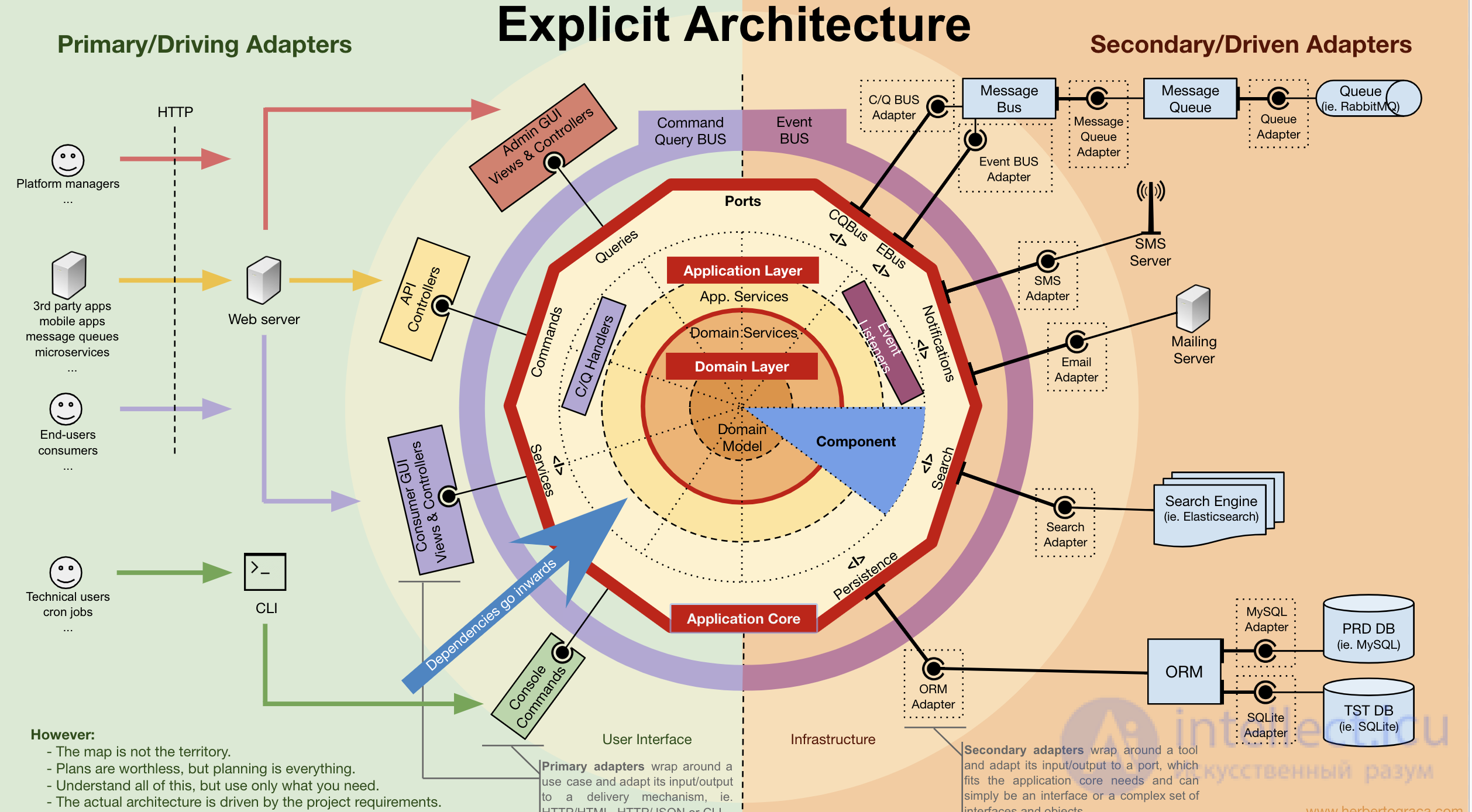
But DDD is almost impossible without a clean project architecture, since when adding new functionality or changing existing functionality, you need to try to preserve the flexibility and transparency of the codebase. You can read about ports, adapters, and onion architecture in [[b8714]].
The picture above is from that very article.
DDD is a fairly old approach. Using it looks reasonable and quite justified, but for some reason it's still not very widespread, and people don't talk about it much at conferences. So what's wrong with this DDD?
There's a suspicion that the main problem is a shortage of learning materials. The whole theory is described in a few books: the red one, the blue one and the green one. They say there's “yet another red book”, but hardly anyone has seen it yet :)
The red and blue books are so hard to digest that somewhere around the middle you want to throw the book out the window shouting: «I've had enough of this crap, forget this incomprehensible DDD! I'll just do it my own way instead». And that's just the theory — the materials on practice are even harder.
So if you do decide to start studying DDD literature, it's best to start with the «green» book. In it, Vaughn Vernon runs through the highlights of the approach and shows its advantages using simple examples. They say the translation turned out questionable, so it's better to read it in the original.
Count the number of use cases in your system. If there are around 10-15 of them, that means the business logic isn't all that complex, and you don't need to worry — no DDD required.
If you have 30-50 or more UX cases, and they overlap a great deal, it's worth thinking about applying DDD to at least some part of the system.
Let's imagine you're a developer who likes DDD, and you think that this approach could be applied at your company to bring people happiness.
Starting a guerrilla rollout of DDD alone is hard. First, you might not have enough knowledge to get the process going. Second, the folks on your team might think you're up to something silly and wreck everything by throwing a wrench in the works.
It's better to start the rollout by forming an initiative group: try the approach together, understand the nuances, work it out in practice. Only after that can you go to the architect or the tech director to explain its value to them. But remember that DDD isn't needed everywhere. DDD solves specific problems, so it's very important not to overdo it.
The approach has a side effect: once people at least start striving toward DDD, they'll already begin acting under the paradigm of «Split things up, divide them, lower coupling, and keep an eye on the business logic». And that's where positive changes begin: somewhere the code will be written better, somewhere the speed will increase. This knowledge doesn't necessarily have to turn into contexts and other DDD-ish artifacts in the code itself. The code can remain just code, but it will become better, and the speed and quality will go up.
Through practice, of course. Just don't tell the person up front that you're teaching them DDD, and don't scare them ahead of time.
Let the person come in and get tasks. Don't tell them it's DDD, just let them do it. They'll do it based on how they understand SOLID and all that. Later, when they turn in the work, you need to tell them: «Dear fellow, it sort of works, but it needs to be redone» — and explain why.
Don't force them to read or learn everything deliberately. Be interactive about it instead. That way, in 3-5 months the person will start understanding the basic principles of DDD: from the implementation standpoint, and from the theoretical standpoint. They'll start understanding the patterns even earlier, through the approach's artifacts – the context maps. At first people won't understand anything, but gradually they'll get it, and some will even start reading the books.
If you're in Russia and you know DDD, that's cool. But it's far from certain that DDD knowledge itself will come in handy on the job. It's more likely to serve as an indicator for the employer of your high level of development as a developer. After all, the skills you gain by studying the DDD approach develop you as a programmer and as a designer (architect).
But if you're thinking about moving abroad, then a line like that on your resume can have a positive effect. Abroad, the DDD community is much bigger, and the approach itself is much more popular than it is here. Especially in Europe.
Downsides:
FDD — this methodology (abbreviated as FDD) was developed by Jeff De Luca and Peter Coad, a recognized guru in the field of object-oriented technologies. FDD represents an attempt to combine the industry's most widely recognized software development techniques, taking as their foundation the functionality (features) of the software being built that matters to the customer. The main goal of this methodology is to develop real, working software systematically, within the set deadlines.
Like other adaptive methodologies, it places its main emphasis on short iterations, each of which serves to work out a specific part of the system's functionality. According to FDD, one iteration lasts two weeks. FDD comprises five processes. The first three of them relate to the start of the project:
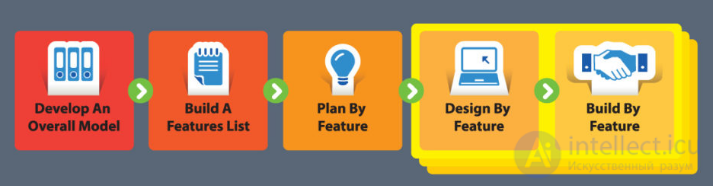
The last two steps need to be done during each iteration. In doing so, each process is broken down into tasks and has verification criteria.
Let's take a closer look at each point.
Developing an overall model.
Development begins with an analysis of the breadth of the existing range of tasks and the context of the system. Then, for each area being modeled, a more detailed breakdown is done. Preliminary descriptions are put together by small groups and brought forward for further discussion and expert review. Afterward, one of the proposed models, or a combination of them, becomes the model for the specific area. The models for each task area are combined into an overall final model, which can change over the course of the work.
Compiling the feature list
The information gathered while building the overall model is used to compile the feature list. Features are grouped into so-called "domains", which are in turn divided into subject areas by functional characteristic.
Each subject area corresponds to a specific business process, and its steps become the list of features. Features are represented in the form of «action — result — object», for example, «validate the user's password». Developing each feature shouldn't take more than 2 weeks; otherwise, the task needs to be decomposed into smaller iterations. The feature list in FDD is the same thing as the product backlog in SCRUM.
Plan by feature
Next comes the stage of distributing the features among the lead programmers or across teams.
Design by feature
A design package is created for each feature. The lead programmer picks out a small group of features to develop over the course of two weeks. Detailed sequence diagrams are then produced for each feature, refining the overall model. Next, «stubs» of classes and methods are written. At this point we need to focus on the design of the software product.
Build by feature
We write the code, remove the stubs, and test.
Once a feature has been tested and shipped to production, we take the next feature by priority and repeat the design/build cycle.
In the end, we get the following:
Downsides:
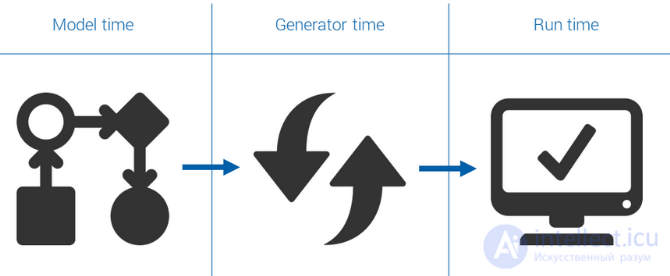
Lately, a lot of attention in publications has been devoted to the topic of model-driven architecture and development — MDA (Model Driven Architecture) and MDD (Model Driven Development). Without going into detail, let's highlight only the key points.
Model-driven development is a style of software development in which models become the primary development artifacts, from which code and other artifacts are generated.
To put it more simply, the whole essence of development comes down to building the necessary diagrams, from which we subsequently generate the project's working code.
The main goal of MDD is to minimize the costs associated with being tied to specific system platforms and software infrastructures. After all, the core business logic is contained in the diagrams and doesn't constrain us within the bounds of a particular programming language or development tools.
Let's take a small detour and recall the compiler. It converts a high-level programming language into an equivalent implementation in machine language. In this case, the model is the program written in the high-level language, which hides insignificant details of its implementation. In MDD, our diagrams are another level of abstraction that keeps us from getting bogged down in implementation details, letting us instead see the big picture.
Diagrams act as a kind of «blueprint», from which various automated and semi-automated processes extract programs and their corresponding models. Moreover, automatic code generation ranges from extracting a simple application skeleton all the way to producing the final codebase (which is comparable to traditional compilation).
The idea of MDD isn't new – it has been used with varying success before as well. The reason for the increased attention to it nowadays is that significantly more processes can now be automated than before. This development is reflected in the emergence of MDD standards, which leads to the unification of the corresponding tools. One such standard is the revised version of the Unified Modeling Language – UML 2.0.
According to the standards of the Object Management Group (OMG), building an application consists of the following steps:
A classic example of applying MDD, one that has been used for a long time, is database modeling. Based on a single conceptual data model, you can maintain several related physical models for different DBMSs.
What advantages do we get:
Downsides:
If you've tried agile development methodologies, you've almost certainly tried PDD too. Let's take a closer look at what the principles of this methodology are.
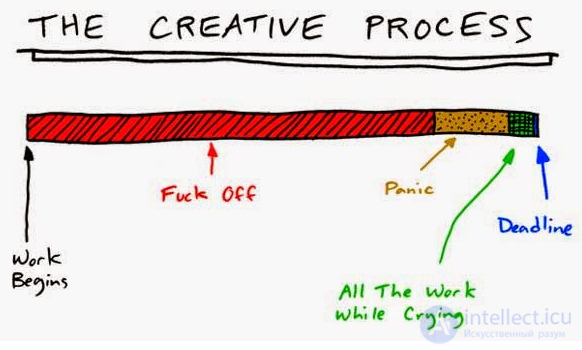
Whenever a new problem shows up in the middle of a sprint, it takes priority over any planned work. New is always better and has higher priority. Strange that this hasn't become one of the principles of agile development, isn't it? A focus on delivering value to the customer requires that the team take care of new features and set aside previously defined work.
Write as much code as you need to solve the problem.
Developers write code for a living. Bugs can only be fixed with code. Discussing design and UX can only slow development down. But we don't want to waste precious time, do we? First write the fix, then verify your assumption about it. If the fix works, the problem is solved.
Tests should be written last.
Once the fix has been deployed, tests can be scheduled as a task to be done in the future. Tests are useful, but they aren't a priority. You can take care of them later. Manual testing should be enough to prove that the implemented solution works.
Trust your instinct.
Programming is an art. Art has an inherent instinctive component. Trust your intuition. Write the code. Deploy it. Fortune favors the bold.
The process is flexible.
Any process created for developing, testing, and releasing software is just a set of conventions and rules, not carved in stone. Critical fixes require different approaches. You're expected to bend the process in order to get the task done on time, if the business requires it.
It's a process driven by the manager.
As part of a single team, managers have the right to voice their opinion on development matters. Refactoring or best practices can, and should, be overridden by business needs. Engineers can voice their opinion, but ultimately they have to accept whatever needs come from above.
Pros of the approach:
Downsides:
PDD is a peculiar development anti-pattern that, unfortunately, all of us practice from time to time.
COP - Crutch-Oriented Programming rests on three pillars:
1. Crutcheritance.
2. Crutchapsulation.
3. Polycrutchism.
1) Crutcheritance — is the creation of crutches that lets you describe a new crutch based on an already existing one, with partially or fully inherited bugs. The crutch that is being inherited from is called the base, parent, or super-crutch. The new crutch is called the descendant, heir, or derivative.
2) Crutchapsulation — is a property of crutches that lets you bundle together the fixes and patches that work with them inside a class, and hide the implementation details from being understood.
3) Polycrutchism — is a property of developers that lets them use crutches with the same interface without information about the type and internal structure of the crutch.
The world of agile development is multifaceted. We've only gotten acquainted with a small part of it, looked at a fair number of software development practices, and learned about their advantages and disadvantages.
I hope many of you learned something new about Driven Development practices, and now, coming face to face with the abbreviations DDD, BDD, MDD, you won't feel confused — and might even want to try them out in practice.

Comments