
Lecture
As you already know, any information stored in a file is a sequence of bytes. Each byte can take a value from 0 to 255 (28-1). The way information is written as a sequence of bytes is called the file format. That is, a graphic format is a way of recording graphic information.
The way an image is represented affects the possibilities for editing and printing it, as well as the amount of memory it occupies.
There are two main ways of encoding graphic information: vector and raster. With the vector approach, on which we won't dwell in detail right now, an image is represented as a combination of simple geometric shapes -- points, line and curve segments, circles, rectangles, and so on. To fully describe an image in this way, you need to know the type and base coordinates of each shape, for example, the coordinates of the two endpoints of a segment, or the coordinates of the center and the diameter of a circle, and so on. This encoding method is ideal for images that can easily be represented as a combination of simple shapes, for example, technical drawings.
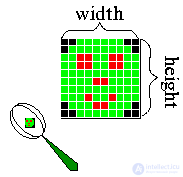
The raster format, which we'll get to know in more detail, is characterized by the fact that the entire image is divided vertically and horizontally into fairly small rectangles -- the so-called picture elements, or pixels (from the English pixel -- picture element).
A file containing raster graphics stores information about the color of every pixel in the given image. The smaller the rectangles into which the image is divided, the higher the (resolution), that is, the finer the details that can be encoded in such a graphic file.
The size of an image stored in a file is given as the number of pixels horizontally (width) and vertically (height). For example, the optimal resolution of a 15-inch monitor is typically 1024x768.
Besides the size of the image, the information about the number of colors encoded in the file is also important. The color of each pixel is encoded with a certain number of bits (bit), that is, the elementary units of information a computer can work with. Each bit can take one of two values -- 1 or 0. Depending on how many bits are allocated for the color of each pixel, different numbers of colors can be encoded. It's easy to see that if only one bit is allocated for encoding, each pixel can be either white (value 1) or black (value 0). Such an image is called monochrome (monochrome).
Next, if four bits are allocated for encoding, then 24=16 different colors can be encoded, corresponding to bit combinations from 0000 to 1111. If 8 bits are allocated, such an image can contain 28=256 different colors (from 00000000 to 11111111); 16 bits -- 216=65,536 different colors (the so-called High Color). And finally, if 24 bits are allocated, the image can potentially contain 224=16,777,216 different colors and shades -- quite enough even for the most discerning artist! In the last case the encoding is called 24-bit True Color. Note the word "potentially": even if 24 bits are allocated per pixel in the file, that doesn't mean you'll actually get to enjoy such a rich palette -- after all, the technical capabilities of monitors are limited.
The way color is split into its component parts is called a Color Model. Computer graphics uses three color models: RGB, CMYK and HSB.
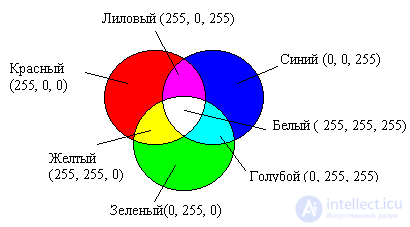
The most widespread way of encoding color is the RGB model. With this encoding method, any color is represented as a combination of three colors: red (Red), green (Green) and blue (Blue), taken at different intensities. The intensity of each of the three colors is one byte (i.e. a number in the range from 0 to 255), which is conveniently represented by two hexadecimal digits (a number from 00 to FF). Thus, a color is conveniently written as three pairs of hexadecimal digits, as is customary, for example, in HTML documents.
Example.
In the HTML hypertext markup language, colors can be specified like this: black -- 000000, white -- FFFFFF, yellow -- FFFF00, and so on; to get a darker shade of yellow, you need to equally reduce the intensity of red and green -- A7A700.
The greater the value of the byte for a color component, the brighter that color. When one component is overlaid on another, the brightness of the combined color also increases.
The CMYK color model corresponds to painting with pigments on a sheet of paper and is used when working with reflected color, i.e. for preparing printed documents.
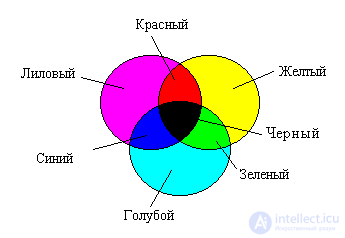
The color components of this model are: cyan (Cyan), magenta (Magenta), yellow (Yellow) and black (Black). These colors are obtained by subtracting the primary colors of the RGB model from white. Black is specified separately. Increasing the amount of ink reduces the brightness of the color.
The RGB and CMYK color systems are tied to limitations imposed by hardware (a computer monitor in the case of RGB, and printing inks in the case of CMYK).
The HSB color model is the most convenient for humans, since it fits well with how people perceive color. The components of the HSB model are:
Hue is the specific shade of a color. Saturation characterizes its intensity, or purity. Brightness, in turn, depends on the amount of black mixed into the given color.
The color value is chosen as a vector originating from the center of a circle. The point at the center corresponds to white, and the points on the boundary of the circle correspond to pure colors. The direction of the vector determines the color's hue and is given in angular degrees. The length of the vector determines the saturation of the color. The brightness of the color is set on a separate axis.
A graphic format — is a way of recording graphic information. Graphic file formats are intended for storing images, such as photographs and drawings.
The main raster formats: GIF, BMP, WBMP, PCX, PCD, PSD, FLM, IFF, PXR, PNG, SCT/PICT, PCT, RAW, TIF/TIFF, BMP, JPEG , TGA, FPX, GIF , PhotoCD, MNG, ICO, FLA/SWF
(from the English Bitmap Picture) — a format for storing raster images. Originally the format could only store hardware-dependent bitmaps (English Device Dependent Bitmap, DDB), but as image display technology evolved, the BMP format came to primarily store hardware-independent bitmaps (English Device Independent Bitmap, DIB).
The BMP format is supported by a huge number of programs, since support for it is built into the Windows and OS/2 operating systems. Files in the BMP format can have the extensions .bmp, .dib and .rle. In addition, data in this format is included in binary RES resource files and in PE files.
The color depth in this format can range from 1 to 24 bits per pixel, with a maximum image size of 65535?65535 pixels.
The BMP format supports RLE compression, but nowadays there are formats with stronger compression, and because of its large size BMP is rarely used on the Internet, where PNG and the older GIF are used for lossless compression.
It was developed by Microsoft to be compatible with all Windows applications. BMP can store black-and-white, grayscale, indexed-color and RGB color images (but not two-color or CMYK color images). The drawback of these graphic formats is their large size. As a result, they are poorly suited for Internet publishing.
Photoshop 7's Save for Web module can save images in the Wireless Bitmap (WBMP) format, specially optimized for cell phones, smartphones, handheld computers and other mobile devices. The description of this format, together with the WML (Wireless Markup Language) markup language, is included in the WAP (Wireless Application Protocol) specification. Besides Photoshop, WBMP images can also be created by Macromedia Fireworks 4 and later. The format supports only two colors, but more can be simulated using pixel dithering. In theory WBMP files can contain animation. Compression is not supported, which is quite surprising, since in practice a graphic file for WAP cannot be larger than 1461 bytes (this restriction is related to the small amount of memory in cell phones). Because of the modest display resolution of mobile devices, the safe file size is limited to 90x24 pixels. In addition to the drawbacks listed above, WBMP is still rather immature: only a few devices are capable of displaying graphics in this format.
(Graphics Interchange Format — a format for exchanging images). GIF is a format for storing graphic images. The GIF format can store compressed data without loss of quality in a format of no more than 256 colors. The hardware-independent GIF format was developed in 1987 (GIF87a) by CompuServe for transmitting raster images over networks. In 1989 the format was modified (GIF89a), and support for transparency and animation was added. GIF uses LZW compression, which allows fairly good compression of files containing many uniform fills (logos, text, diagrams).
GIF is widely used on World Wide Web pages.
Pronunciation of the name
The creators of the format pronounced its name as "jif". Nevertheless, in the English-speaking world the pronunciation "gif" is also widely used, based on the fact that GIF is an abbreviation of Graphics Interchange Format. Both pronunciations are listed as correct by the Oxford English Dictionary and the American Heritage Dictionary.
Compression
GIF uses the LZW compression format. Thus, images whose rows have repeating sections compress well. For example, images in which many pixels of the same color occur in a horizontal row.
The LZW compression algorithm belongs to the lossless compression formats. This means that data restored from GIF will exactly match the original data before packing. It should be noted that this is true only for 8-bit images with a palette; for a color photograph there will be losses caused by reducing it to 256 colors.
The LZW compression method was developed in 1978 by the Israelis Lempel and Ziv and refined later in the USA. It compresses data by searching for identical sequences (called phrases) throughout the whole file. The sequences found are stored in a table and assigned shorter markers (keys). So, if an image contains sets of pink, orange and green pixels repeating 50 times, LZW detects this, assigns this set a separate number (for example, 7) and then stores this data 50 times as the number 7. Like RLE, the LZW method works better on uniform areas free of color noise; it works much better than RLE when compressing arbitrary graphic data, but the encoding and decompression process is slower.
Interlaced GIF
The GIF format allows interlaced data storage. In this case the rows are split into groups, and the order in which rows are stored in the file is changed. While loading, the image appears gradually, in several passes. Thanks to this, having only part of the file, you can see the whole image, but at a lower resolution.
In an interlaced GIF, rows 1, 5, 9 and so on are written first. Thus, after loading 1/4 of the data, the user will already have an idea of the whole image. In the second pass, rows 3, 7, 11 follow, and the resolution of the image in the browser doubles again. Finally, the third pass transmits all the remaining rows (2, 4, 6…). In this way, long before the file finishes loading the user can understand what is in it and decide whether it is worth waiting for the image to load completely. Interlacing increases the file size slightly, but this is generally justified by the property gained.
Animated images
The GIF format supports animated images. The fragments are sequences of several static frames, along with information about how long each frame will be shown on the screen. The animation can be looped, in which case after the last frame the first one is shown again, and so on.
Patent protection
GIF was originally a proprietary format, but its patent protection has expired. In the USA, the patent for the LZW compression algorithm used in GIF (patent No. 4,558,302) expired on June 20, 2003. The Canadian patent's term ended on July 7, 2004. Patent protection in the United Kingdom, France, Germany and Italy ended on June 18, 2004, and in Japan on June 20, 2004.
The term of the last GIF patent expired on August 11, 2006.
JPEG (pronounced "jay-peg", from the English Joint Photographic Experts Group, named after the organization that developed it) is one of the popular graphic formats used for storing photographic and similar images. Files containing JPEG data usually have the extensions .jpeg, .jfif, .jpg, .JPG, or .JPE. Of these, however, .jpg is the most popular extension on all platforms. The MIME type is image/jpeg.
The JPEG algorithm is a lossy data compression algorithm.
Area of application
The JPEG algorithm is best suited for compressing photographs and pictures containing realistic scenes with smooth transitions of brightness and color. JPEG is most widely used in digital photography and for storing and transmitting images over the Internet.
On the other hand, JPEG is poorly suited for compressing drawings, text and symbolic graphics, where sharp contrast between neighboring pixels leads to noticeable artifacts. Such images are better saved in lossless formats such as TIFF, GIF, PNG or RAW.
JPEG (like other lossy compression methods) is not suitable for compressing images undergoing multi-stage processing, since distortions will be introduced into the images each time intermediate processing results are saved.
JPEG also should not be used in cases where even minimal losses are unacceptable, for example when compressing astronomical or medical images. In such cases, the Lossless JPEG compression mode provided for by the JPEG standard (which, unfortunately, is not supported by most popular codecs) or the JPEG-LS compression standard may be recommended.
Advantages and disadvantages
The drawbacks of JPEG-standard compression include the appearance, at high compression ratios, of characteristic artifacts on reconstructed images: the image breaks up into 8x8-pixel blocks (this effect is especially noticeable in areas of the image with smooth brightness changes), and in areas with high spatial frequency (for example, at contrasty contours and image edges) artifacts appear in the form of noise halos. It should be noted that the JPEG standard (ISO/IEC 10918-1, Annex K, item K.8) provides for the use of special filters to suppress block artifacts, but in practice such filters, despite their high effectiveness, are practically never used. However, despite its drawbacks, JPEG has become very widespread because of its fairly high compression ratio (relative to the alternatives that existed at the time of its appearance), its support for compressing full-color images, and its relatively low computational complexity.
The JPEG format is a TrueColor format, that is, it can store images with a color depth of 24 bits/pixel. This color depth is sufficient for practically exact reproduction of images of any complexity.
It is designed for representing complex photographic images. The progressive JPEG variant allows saving images that are displayed over a specified number of steps (from 3 to 5 in Photoshop) - first at a small resolution (poor quality), and at subsequent stages the initial image is redrawn with an increasingly better-quality picture. Animation or a transparent color are not supported by the format.
The reduction in file size is achieved by a complex mathematical algorithm for discarding information - the lower the requested quality, the greater the compression ratio and the smaller the file. The main thing is to choose the maximum compression with the minimum loss of quality. The latter identifies and discards data that the human eye is not able to see (minor changes in color are not distinguished by a person, whereas even the slightest difference in intensity is perceived, so JPEG is less suitable for processing black-and-white grayscale images), which leads to a substantial reduction in file size. Thus, unlike the LZW or RLE compression methods, as a result of applying JPEG technology the data is lost forever. So a file once saved in JPEG format and then converted, say, to TIFF, will no longer be the same as the original.
It is the most suitable format for placing full-color images on the Internet. It will probably remain the leading format for representing photographs on the Web until powerful lossless image compression algorithms appear.
JPEG 2000 (or jp2) is a graphic format that, instead of the discrete cosine transform characteristic of JPEG, uses wavelet transform technology, based on representing the signal as a superposition of certain basic functions - wave packets.
As a result of this compression the image comes out smoother and sharper, and the file size, compared to JPEG at the same quality, is reduced by a further 30%. JPEG 2000 is completely free of its predecessor's main drawback: thanks to the use of wavelets, images in this format do not contain the notorious "grid" of 8-pixel blocks. The new format, like JPEG, also supports so-called "progressive compression", which allows you to see a blurry image at first while loading, becoming ever sharper afterward.
So far this format is not very widespread and is not supported by all modern browsers. Among those supporting jp2 are Safari and Mozilla Firefox (via Quicktime)
Main advantages of JPEG 2000 compared to JPEG:
The main areas of application of this standard:
Artifacts arising during compression
The artifacts that arise when compressing with the JPEG 2000 algorithm at a high compression (loss) ratio are, qualitatively, not much different from the artifacts that arise when compressing with a JPEG compressor — in places where the original image had smooth color transitions, they become even smoother (blurred); while in places where there were sharp changes in brightness or color (areas of the image with high contrast), a characteristic artifact appears in the form of a bright outline framing the edge of the transition, offset slightly (by a couple of pixels) from the darker part of the transition. The differences in the artifacts are: there is no 8-by-8-pixel grid; the colors of small details that differ strongly in color from the background are not distorted; the artifacts characteristic of JPEG 2000 become noticeable at higher compression ratios than in the case of JPEG.
Often a photographic image can be compressed to a ratio of 1/20 of the original size without significant distortion appearing. The image on the right demonstrates various JPEG 2000 distortions at different compression ratios (the top image is the original, uncompressed one). The numbers indicate the ratio of the size of the original BitMap file to the size of the Jpeg2000 file.
Comparison with PNG
Although the JPEG 2000 format supports lossless compression, it is not intended to improve on the best lossless compression format.
The PNG (Portable Network Graphics) format is more effective for images containing solid-color areas (with a small number of colors — for example, < 1000), and supports special functional capabilities that JPEG 2000 does not have.
It is considered that, in the current implementation of the standards, using PNG is more effective for compressing diagrams, while JPEG 2000 is better for compressing photographic images.
PNG (portable network graphics) is a raster format for storing graphic information that uses lossless compression based on the Deflate algorithm.
PNG was created as a free format to replace GIF, which is why the backronym "PNG's Not GIF" appeared on the Internet.
Files in the PNG format usually have the extension .PNG (.png) and use the MIME type designation image/png.
It was created specifically for the Internet as a replacement for the first two formats, and thanks to Compuserve's patent policy it is gradually pushing GIF out (see above). It allows you to choose the saving palette - grayscale, 256 colors, true color. Depending on the properties of the image, it is indeed sometimes preferable to GIF or JPG. It allows the use of a "transparent" color, but, unlike GIF, there can be up to 256 such colors. Unlike GIF, lossless compression is performed both horizontally and vertically (the algorithm is proprietary, and its parameters are not configurable either).
Today the most advanced graphics format for the Web is png (Portable Network Graphics, pronounced "ping"). This ray of light and unique solution to a heap of headaches lets you create "zones of transparency" like .gif, but on top of that it can also be semi-transparent (the background can show through it); it was, in essence, a move by independent groups and consortiums against the immeasurably brazen company Ulead, which in 1995 "privatized" the popular lossless LZW compression algorithm. Instead of the latter, the png format uses the Deflate algorithm, which, incidentally, gives somewhat better results than LZW. Originally intended to replace the obsolete gif in the artificial landscapes of the Web, png offers a whole range of new capabilities, the lack of which in gif more than once made it the object of futile complaints.
This is a fairly "young" format for Web graphics, competing with GIF. All recent browser versions support it without any special plug-ins. The format supports grayscale and full-color RGB images with a single alpha channel, as well as indexed and monochrome images without alpha channels. The alpha channel serves as a transparency mask. Thus, PNG is the only widely used Internet format that allows full-color images with a transparent background. PNG uses a powerful lossless compression algorithm based on the popular LZW compression. Being Web-oriented, PNG does not support multichannel images, color profiles, or clipping paths.
There are two sub-formats: PNG8 and PNG24, the numbers indicating the maximum color depth possible in the sub-format. PNG24 finally implemented support for 256 levels of transparency through an additional alpha channel with 256 grayscale levels. Using this feature, for example, a semi-transparent logo can look the same on absolutely any background. In addition, PNG is packed with useful features such as two-dimensional interlacing (i.e. the image appears gradually not only by rows but also by columns) and built-in gamma correction, which allows saving images whose brightness is the same on both PC and Mac, Sun, and Silicon Graphics computers. Excited? Me too. Let's cool down together. None of these useful features is supported by any existing browser. PNG8 is not widely used due to poor promotion; it was created specifically for the Internet as a replacement for the first two formats and, thanks to Compuserve's patent policy, is gradually displacing GIF. It allows choosing a save palette - grayscale, 256 colors, true color. Depending on image properties, it is sometimes actually preferable to GIF. It allows using a "transparent" color, but, unlike GIF, there can be up to 256 such colors. Unlike GIF, lossless compression is performed both horizontally and vertically (a proprietary algorithm, with non-adjustable parameters). Does not support animation.
Why has such a wonderful and convenient format not become widespread? The fact is that our "most beloved" company Microsoft considered this format unpromising on the grounds that it was not developed by them.
History of the format
The birthday of PNG can be considered January 4, 1995, when T. Boutell proposed on a number of Usenet newsgroups to create a free format that would be no worse than GIF. And just three weeks after the idea was published, four versions of the new format had been developed. At first it was named PBF (Portable Bitmap Format), and it received its current name on January 23, 1995. Already in December of that same year, the PNG 0.92 specification was reviewed by the W3C consortium, and with the release of version 1.0 on October 1, 1996, PNG was recommended as a full-fledged network format.
Scope of application
The PNG format is designed to replace the outdated and simpler GIF format, and, to some extent, to replace the significantly more complex TIFF format. The PNG format is positioned primarily for use on the Internet and for graphics editing.
PNG supports three main types of raster images:
The PNG format stores graphic information in compressed form. Moreover, this compression is performed without loss, unlike, for example, JPEG, which is lossy.
It has the following main advantages over GIF:
The GIF format was developed by CompuServe in 1987 and was not initially available for free use. For some time, until the LZW compression algorithm patents held by Unisys and used in GIF expired in 2004, its use in free software was hindered. At present, these obstacles have been removed. PNG, on the other hand, has from the very beginning used the open, non-patented Deflate compression algorithm, free implementations of which are available on the Internet. The same algorithm is used by many data compression programs, including PKZIP and gzip (GNU zip).
The PNG format has a higher compression ratio for files with a large number of colors than GIF, but the difference is only about 5-25%, which is not enough for the format to have an absolute advantage, since GIF compresses small 2-16 color files with no less efficiency.
PNG is a good format for editing images, even for storing intermediate editing stages, since restoring and re-saving the image is lossless. Also, unlike, for example, TIFF, the PNG specification does not allow implementation authors to choose which features they are going to implement. Therefore, any saved PNG image can be read in any other application that supports PNG.
Different implementations of the Deflate algorithm produce different compression ratios, so programs were created for recompressing images with several setting options in order to achieve the best compression - for example, the pngcrush fork OptiPNG and advpng from the AdvanceCOMP package (which uses 7-Zip).
Animation
There is one feature of GIF that is not implemented in PNG - support for multiple images, especially animation; PNG was initially intended only for storing a single image in a single file.
To transmit animated images, an extended format called MNG was developed, published in mid-1999 and already supported in various applications, though it has still not become universally accepted.
Some - in particular, developers at the Mozilla Foundation - criticized MNG for its complexity and the large size of its implementation, and for its lack of backward compatibility with PNG. In 2004, they developed the APNG format, which was not adopted as an official standard by the PNG and MNG developers, but by 2008 its support had been implemented in test builds of some web browsers and some image viewing programs.
Browser compatibility
Not all web browsers display the contents of a PNG file in the same way. The bottlenecks are:
The problem of support for 32-bit (full) transparency of PNG format images in Microsoft Internet Explorer was solved in the seventh version of the browser. For other versions of IE, there are several methods that can help a web developer achieve transparency by including special functions and scripts in the web page.
The PSD (PhotoShop Document) format is Adobe Photoshop's proprietary format. It is the only format that supports all of the program's features. It is preferred for storing intermediate results of image editing, since it preserves their layered structure. All recent versions of Adobe Systems products support this format and allow importing Photoshop files directly. Disadvantages of the PSD format include insufficient compatibility with other common applications and the lack of compression capability.
All color models and any color depth from black-and-white to true color are supported, with lossless compression. Starting with version 3.0, Adobe added support for layers and paths, so the format of version 2.5 and earlier is distinguished as a separate sub-format. For compatibility with it, later versions of Photoshop have the option to enable a mode that adds to the file a single base layer, in which all layers are merged. Such files can be freely read by most popular viewers and imported into other graphics editors and 3D modeling programs.
The TIFF format (Tagged Image File Format) was created through the joint efforts of such giants as Aldus, Microsoft, and Next specifically for storing scanned images. The exceptional flexibility of the format has made it truly universal. TIFF is one of the oldest formats in the world of microcomputers; today it is the most flexible, universal, and actively developing format. It can store graphics in any mode: from bitmap and indexed colors to Lab, CMYK, and RGB (except for duotones and multichannel documents).
Although a lot of time has passed since its creation, TIFF is still the main format used for storing scanned images and placing them in publishing systems and illustration programs. Versions of the format exist on all computer platforms, which makes it exceptionally convenient for transferring raster images between them. TIFF supports monochrome, indexed, grayscale, and full-color images in RGB and CMYK models with 8- and 16-bit channels. It allows storing clipping paths, calibration information, and print settings. Any number of additional alpha channels can be used. Additional color channels are not supported. A major advantage of the format remains its support for almost any compression algorithm. The most common is lossless compression using the LZW (Lempel Ziv Welch) algorithm, which provides a very high compression ratio. Incidentally, this same algorithm is used by numerous general-purpose compression programs that support the ZIP format.
Compression
It is possible to save an image in a TIFF file with or without compression. The degree of compression depends on the characteristics of the image being saved, as well as on the algorithm used. The TIFF format allows the use of the following compression algorithms:
In this case, JPEG is simply an encapsulation of the JPEG format within the TIFF format. The TIFF format allows storing images compressed according to the JPEG standard without data loss (JPEG-LS).
The CCITT Group 3 and 4 algorithms are designed for encoding binary raster images. They were originally developed for fax networks (which is why they are sometimes called Fax 3, Fax 4). They are currently also used in printing, digital cartography systems, and geographic information systems. The Group 3 algorithm resembles RLE, since it encodes linear sequences of pixels, while Group 4 encodes two-dimensional fields of pixels.
ICO is a format for small pictures (icons) on the WWW. The pictures are used by browsers to mark Web projects in the URL bar and in bookmarks. It is supported and used by programs for creating icons, such as IconXP.
(RAW Image Data)
The format was developed for digital cameras. It is an exact copy of the image captured on the sensor at the moment of shooting, representing, in essence, three photographs taken in red, blue, and green colors.
The extensions of RAW files can differ between manufacturers, and it is not always possible to open them using image processing programs.
However, if a camera supports saving RAW, it usually comes bundled with some program for processing files of this format.
Currently, Adobe has proposed the DNG format (Digital Negative Specification), which was created to make life easier for manufacturers of graphics tools. Some companies (Leica and Pentax) have already included DNG in their cameras, but most camera vendors still continue to use their own formats.
It supports nothing. That is, absolutely nothing. It does not even store data on the number of channels, color depth, and resolution, so when opening it you will have to enter these parameters manually, from memory. The image is stored simply as a stream of pixels with a fixed header, into which any text information can subsequently be placed. Incidentally, you will also have to specify the size of this header in bytes when opening a picture in this format. Is this archaic? No! It is simply a claim to full cross-platform compatibility with all programs. This claim, it must be said, is unsuccessful: not every graphics editor or viewer supports raw. Simplicity taken, in pursuit of compatibility, to the point of complete absurdity.
RAW format extensions
.dng - Adobe (universal)
.crw .cr2 - Canon
.raf - Fuji
.kdc - Kodak
.mrw - Minolta
.nef - Nikon
.orf - Olympus
.ptx .pef - Pentax
.x3f - Sigma
.arw - Sony
The PCX (PC eXchange) format is one of the first raster formats, created by ZSoft for the PC Paintbrush program. It supports monochrome, indexed, and full-color RGB images. Additional color and alpha channels, clipping paths, and color management are not supported. The format uses the simplest lossless compression algorithm (Run Length Encoding, RLE). It now has mainly historical significance. The pcx format also once claimed the palm of primitiveness: internally it is almost as simple as bmp. Its capabilities are the same as those of bmp, except that OS/2 support is absent. On the other hand, pcx can be viewed by most DOS programs, including the built-in viewer of Norton Commander.
The PCD (Photo CD) format was developed by Kodak for storing scanned photographic images. Scanning is performed on special equipment (Kodak workstations, PIW), and the result is recorded on a special-format compact disc, the Kodak Photo CD. It can be viewed using industrial video players and game consoles on an ordinary television. In practice, Photo CD is more often used in publishing technologies as a source of images. Most producers of photo libraries use precisely this format on their compact discs. The PCD format has a number of useful features that make this area of application predominant. A PCD file contains the image at once in several fixed resolutions. The Base resolution, 512x768 pixels, is used for viewing on NTSC and PAL televisions. In addition to it, there are lower resolutions Base4, Base16, and higher ones 4Base, 16Base, and 64Base. The last resolution, 64Base, equal to 4096x6144 pixels, exists only on Pro Master standard discs. Curiously, the presence of six variants of the same image in one file does not increase its size. This is because the copies of higher resolution are represented as differences from the base one. This way, duplication of graphic information is avoided. Images on Photo CD are represented in a special color model, YCC, developed by Kodak specialists and in many ways similar to the Lab model. YCC also has three basic components, one luminance and two chromatic. Since the eye is more sensitive to brightness than to color, half of the color information is discarded during scanning: for every two pixels there is only one value of the chromatic components. This makes it possible to reduce the volume of graphic data and the size of the PCD file. To further reduce the file size, the usual lossless LZW compression scheme is used. There are several formats of Photo CD. The Master Photo CD format contains images scanned from ordinary 35 mm photographic film. The maximum resolution for this type is 16 Base. The Master Pro Photo CD format is intended for professional photographers, for which larger-format film (120 mm and 4x5 inches) is used. The Print Photo CD format is intended for printing applications. The original is scanned by professional scanners (Crosfield, Linotype, Scitex) and saved at an uncompressed resolution of 64 Base. The Catalog Photo CD format allows placing up to 4500 images with a base resolution on a single disc. And finally, the Portfolio PhotoCD format is oriented toward multimedia applications. A compact disc of this format can hold up to 800 images, as well as sound, interactive scripts, and so on.
The rather old TGA (Targa) format was created specifically for working with the TrueVision graphics accelerator. This accelerator is widely used by applications on the DOS platform. The format supports 24-bit and 32-bit RGB images with a single alpha channel, as well as grayscale, indexed, and 16-bit RGB images without alpha channels. Clipping paths and color profiles are not supported. The targa format (Truevision Targa Image File) is also respected among DOS programs. It supports color depths from 8 to 32 bits per pixel and uses the lossless RLE compression algorithm. Targa format files were often used by the DOS version of 3D Studio Max for storing textures.
Vector formats: WMF, EMF, CGM, EPS, WPG, AutoCAD, DXF, DWG, CDR, AI, PCT, FLA/SWF
(from Scalable Vector Graphics) — a markup language for scalable vector graphics, created by the World Wide Web Consortium (W3C) and forming a subset of the extensible markup language XML, designed to describe two-dimensional vector and mixed vector/raster graphics in XML format. It supports both static and animated, interactive graphics — or, in other terms, declarative and scripted graphics. It is an open standard and a recommendation of the W3C, the organization that also developed such standards as HTML and XHTML. Development began in 1999; version 1.1 was released in 2001 and remains current to this day, while version 1.2 is under active development. SVG is based on the VML and PGML markup languages.
A standard recommended by the World Wide Web Consortium for describing two-dimensional vector and combined vector-raster graphics using XML markup.
In the browser, SVG graphics are rendered using raster mechanisms. It supports transparency on each layer, linear gradients, radial gradients, and visual effects (shadows, washes, glossy surfaces, textures, patterns of any design, symbols of any complexity).
SVG is a format for two-dimensional vector graphics — as defined in the specification — but by adding a script (namely JavaScript) inside an SVG file, it is possible to create three-dimensional animated images.
A raster image can be embedded in SVG, and like any other object in SVG it can have transformations, transparency, etc. applied to it.
Capabilities of the language
Advantages of the format
Disadvantages of the format
Encapsulated PostScript (EPS) is an extension of the PostScript format, whose data is written in accordance with the DSC standard (Document Structuring Conventions), but with a number of extensions that allow this format to be used as a graphics format.
The EPS format was created by Adobe based on the PostScript language and served as the basis for creating early versions of the Adobe Illustrator format.
In its minimal configuration, an EPS file has a so-called BoundingBox DSC comment — information describing the size of the image. Thus, even if an application cannot rasterize the data contained in the file, it still has access to the image's dimensions and its preview.
QuarkXPress versions 4, 5, and 6 cannot rasterize the data from an EPS file, so it uses only the preview — a reduced copy of the entire image, which is stored in the EPS file separately from the main data — in the layout. Adobe InDesign versions CS-CS4 do not have this limitation. Using a reduced-quality copy of the image is meant to simplify displaying the image on screen and, as a result, significantly speed up work with the layout. The preview can be saved in TIFF or WMF format (PC only), or omitted altogether.
The format is used in professional printing and can contain raster images, vector images, or a combination of both.
An image saved in EPS format can be stored in various color spaces: Grayscale, RGB, CMYK, Lab, Multi-channel.
The data structure of a raster EPS file can be written using different methods: ASCII data (text data), Binary (binary data), and JPEG with varying degrees of compression.
The preview of an EPS file can also be created using various methods for reducing the amount of data: JPEG, TIFF (1/8 bit).
It uses a simplified version of PostScript, cannot contain more than one page in a single file, and does not preserve a number of printer settings. As with PostScript print files, EPS records the final version of a piece of work, although programs such as Adobe Illustrator and Adobe Photoshop can use it as a working file. EPS is intended for transferring vector and raster data to publishing systems, and it is created by almost every program that works with graphics.
CDR — a vector image or drawing created with the CorelDRAW program. This file format was developed by Corel for use in its own software products. CDR files are not supported by many programs designed for editing images. However, a file can be exported using CorelDRAW to other, more widespread and popular image formats.
A CDR file can also be opened with Corel Paint Shop Pro. For better compatibility, Corel recommends saving files in CorelDRAW format as CDR version 9.0 or earlier.
To open a CDR file of version 10 or earlier, Adobe Illustrator can also be used.
WMF (Windows MetaFile) — a universal vector graphics file format for Windows applications. It is used to store the collection of graphic images in Microsoft Clip Gallery. The format was developed by Microsoft and is an integral part of Windows, since it stores a sequence of hardware-independent GDI (Graphical Device Interface) functions that output an image directly to a given graphics device context (screen, printer, etc.). WMF is very often used implicitly to save the image of a program's output window and later restore it, as well as when transferring information through the clipboard. On MS Windows, writing and reading files in this format is extremely simple and fast; on other operating systems, support for this format is essentially useless. Some programs for Macintosh can understand it. On the Macintosh platform, the PICT format plays a similar role.
(Adobe Illustrator)
Being part of the Adobe family, it is supported by practically all programs related in one way or another to vector graphics. It is the best intermediary for transferring images from one program to another, from PC to Macintosh and back. It stands out for its high stability and compatibility with the PostScript language, which practically all publishing and printing applications are oriented toward.
Adobe Illustrator Artwork (AI) is a proprietary file format developed by Adobe Systems for representing single-page vector-based drawings in either the EPS or PDFformats. The .ai filename extension is used by Adobe Illustrator.
Early versions of the AI file format are true EPS files with a restricted, compact syntax, with additional semantics represented by Illustrator-specific DSC comments that conform to DSC's Open Structuring Conventions. These files are identical to their corresponding Illustrator EPS counterparts, but with the EPS procsets (procedure sets) omitted from the file and instead externally referenced using %%Include directives.
Recent versions of the AI file format, including the PDF-based formats and recent EPS formats, are based on a native format called PGF that is unrelated to both EPS and PDF. PDF compatibility is achieved not by extending the PDF format, but by embedding a complete copy of the native PGF data within the PDF file. The same kind of “dual path” approach is also used when recent versions of Illustrator are saving EPS-compatible files.
SWF (ShockWave Flash)
The Flash format, a product of the "Macromedia" company, allows the development of interactive multimedia applications. Flash is used in a variety of areas — these can be games, websites, CD presentations, banners, and simple cartoons. When creating a product, media, audio, and graphic files can be used, and interactive interfaces and full-fledged web applications using PHP and XML can be built.
FLA - the internal file format of the Flash program for creating interactive animation
Portable Document Format (PDF) is a cross-platform format for electronic documents, created by Adobe Systems using a number of features of the PostScript language. It is primarily intended for representing printed material in electronic form — a significant amount of modern professional printing equipment can process PDF directly. For viewing, you can use the official free Adobe Reader program, as well as third-party programs. The traditional way of creating PDF documents is a virtual printer, meaning the document itself is prepared in its own specialized program — a graphics program or text editor, CAD software, etc. — and then exported to PDF format for distribution in electronic form, transfer to a print shop, and so on.
Since July 1, 2008, PDF has been the open standard ISO 32000. Of all the countries that took part in the vote, France was against it, while Russia abstained. Bulgaria, China, Poland, Ukraine, and Japan supported the PDF format.
The PDF format allows embedding the necessary fonts (running text), vector and raster images, forms, and multimedia inserts. It supports RGB, CMYK, Grayscale, Lab, Duotone, Bitmap, and several types of raster data compression. It has its own technical formats for printing: PDF/X-1, PDF/X-3. It includes a mechanism for electronic signatures to protect and verify the authenticity of documents. A large amount of accompanying documentation is distributed in this format.
General information
Most often a PDF file is a combination of text with raster and vector graphics, less often — text with forms, JavaScript, 3D graphics, and other types of elements.
The data volume of two PDF documents that look identical on screen can differ significantly. This depends on:
To create a document of minimal size, you need to use vector graphics and "safe" fonts. There are 14 such fonts in total:
These fonts can be used without embedding them in the document — all programs should display them correctly. Any other fonts that were not embedded in the document and are not present in the system will be displayed using one of the available fonts, which can cause an increase or decrease in the number of pages, the number of characters per line, line spacing, and other issues related to font metrics.
The advantage of the PDF format is that it allows information to be "compressed." This makes it possible to store a large amount of information. All documents can be viewed with ease. This is of great importance for archiving and for prepress preparation.
DjVu (from the French déjà vu — "already seen") is a lossy image compression technology developed specifically for storing scanned documents — books, magazines, manuscripts, and so on — where an abundance of formulas, diagrams, drawings, and handwritten characters makes full recognition extremely labor-intensive. It is also an effective solution when it is necessary to convey all the nuances of appearance — for example, of historical documents, where not only the content matters but also the color and texture of the paper; parchment defects such as cracks and fold marks; corrections, ink blots, fingerprints; traces left by other objects, and so on.
DjVu has become the foundation for several digital libraries of scientific books. A huge number of books in this format are available on file-sharing networks.
The format is optimized for network transfer in such a way that a page can be viewed even before the download is complete. A DjVu file can contain a text (OCR) layer, which enables full-text search within the file. In addition, a DjVu file can contain a built-in interactive table of contents and active areas — links — which allows for convenient navigation within DjVu books.
Technologies used
To compress color images, DjVu uses a special technology that splits the original image into three layers: the foreground, the background, and a black-and-white (one-bit) mask. The mask is stored at the resolution of the original file; it is what contains the text image and other sharp details. The resolution of the background, which retains the illustrations and page texture, is reduced to save space. The foreground contains color information about details that did not make it into the background; its resolution is reduced even further. The background and foreground layers are then compressed using a wavelet transform, while the mask is compressed with the JB2 algorithm.
A distinctive feature of the JB2 algorithm is that it looks for repeating characters on the page and stores their image only once. In multi-page documents, every several consecutive pages share a common image "dictionary".
For compressing most books, just two colors are enough. In this case only a single layer is used, which allows a record compression ratio to be achieved. In a typical book with black-and-white illustrations scanned at 600 dpi, the average page size is about 15 KB, i.e., roughly 100 times smaller than the original file. However, it should not be forgotten that DjVu uses lossy data compression. For especially important documents, it may be wiser to use more "reliable" formats: PNG, JPEG 2000, TIFF, and so on. Overall, the size reduction in this case is 4—10 times.
The DjVu format is based on several technologies developed at AT&T Labs. These are:
Text representation of DjVu images
The DjVu format provides for a text layer that contains the text from the page. (This is used for easily copying text from the document while working with it). If the text layer is unavailable, the only way to obtain the text is by performing optical character recognition (in third-party programs).

Comments