
Lecture
For a text file to turn into an HTML file, it is not enough to just change its extension from ".txt" to ".html". You need to follow the "first line rule":
Every HTML document that conforms to some version of the HTML specification must begin with an HTML version declaration line, the !DOCTYPE, which usually looks like this:
This line helps the browser figure out how to correctly interpret the document. In this case, we are telling the browser that the HTML conforms to the international specification version 3.2 (a proven but very old version). As the example shows, the shortest possible HTML document literally consists of a single line.
An example of the shortest HTML document:
In fact, one line is not the whole story. After declaring the version and type of the document, you need to mark its beginning and end. This is done using the container tag
. It should be noted that any HTML document is opened with the tag
and is closed with the same tag.
Then, between the tags
and you should place the head and the body of the document. That's it! You've made a start – you now have a nice template. Here is what your basic HTML file should look like before you start working:
Document title
Document text
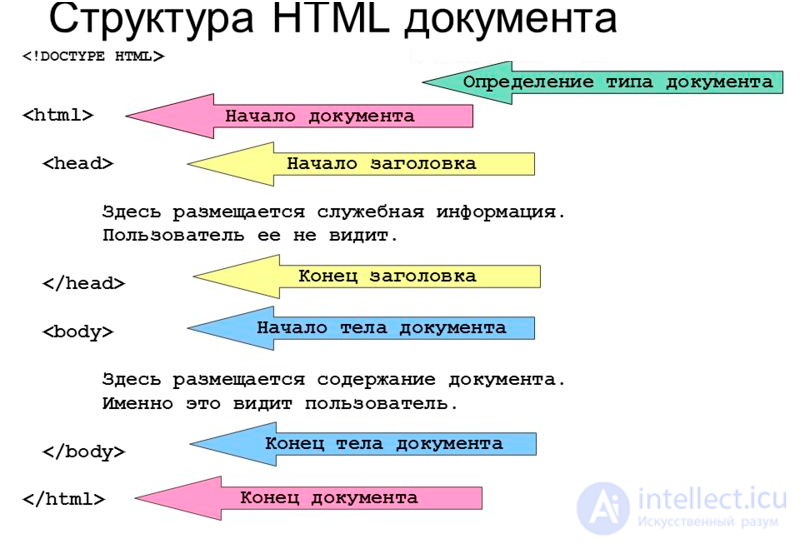
If we illustrate the example above schematically, we get the following:
From the diagram you can see that the document consists of two main blocks – the "head" and the "body". The head is defined using the HEAD element, and the body – using the BODY element.
The head contains "technical" information about the document, though most often it is only used to specify its title (see the TITLE element).
The body of the document is the holy of holies. It is where everything that is displayed on the page lives: text, images, tables. So, the conclusion is: most of your HTML experiments will take place in the space between the tags
and

Comments