
Lecture
A header file is a file that contains declarations (for example, of functions, classes, constants, and macros) and is intended for reuse across multiple source files. It is usually used to separate the interface from the implementation of code. In programming, a header file or include file is a file whose contents are automatically added by the preprocessor to the source text at the place where a certain directive is located ({$I file.inc} in Pascal, #include in C).
In the C and C++ programming languages, header files are the main way to make available to a program the data types, structures, function prototypes, enumerated types, and macros used in another module. By default the extension .h is used; sometimes the extension .hpp is used for C++ header files.
To avoid including the same code more than once, the directives #ifndef, #define, #endif are used.
In general, a header file may contain any constructs of the programming language, but in practice executable code (except for inline functions in C++) is not placed in header files. For example, identifiers that must be declared in more than one file are conveniently described in a header file and then included as needed. Modularity works in a similar way in most assemblers.
By long-standing tradition, the functions of the C and C++ standard libraries are declared in header files.
Other languages (for example, Pascal) use a developed module system. But even in them, header files have a certain value. The reason is that the two files (the main one and the header) are merged into a single translation unit, and therefore a header file can contain preprocessor directives and incomplete syntactic constructs.
In modern programming languages, programs are composed of separately compiled modules. This raises the question: how do you indicate that subroutine or variable X is defined in module Y? There are several solutions to this; C uses the following one.
In one of the compilation units (that is, a c-file), a function is defined, for example:
 int add(int a, int b)
 {
     return a + b;
 }
To make it possible to refer to it from other compilation units, it must be declared using a function prototype, that is:
 int add(int, int);

 int triple(int x)
 {
     return add(x, add(x, x));
 }
However, such a declaration requires the programmer to provide a declaration of the function add in two places: in the file containing its implementation and in the file where it is used. If the function definition changes, the programmer must remember to update all the prototypes used in the program.
A header file is one solution to this problem. The module's header file declares every function, object, and data type that is part of the module's calling interface; for example, in this case the header file could contain only the declaration of the function add. Every source file that refers to the function add must use the #include directive to include the header file:
 /* File triple.c */
 #include "add.h"

 int triple(int x)
 {
     return add(x, add(x, x));
 }
Lists of initialized constants in a header file are picked up by the preprocessor to replace them with the values of those constants in the including file. The functions included from a header file are wrapped in preprocessor include guard directives to avoid duplication in the including file (such a situation can arise with class or file inheritance):
 /* File add.h */
 #ifndef ADD_H
 #define ADD_H

 int add(int, int);

 #endif /* ADD_H */
Besides the #ifndef - #endif construct, the non-standard #pragma once is sometimes used:
 /* File add.h */
 #pragma once
 int add(int, int);
Header files make maintenance easier: when a definition changes, only one declaration has to be updated (the one in the header file). A header file containing the definitions used in the sources can also be included in the source file itself. This allows the compiler to check whether the declaration in the h-file matches the definition in the c-file:
 /* File add.c */
 #include "add.h"

 int add(int a, int b)
 {
     return a + b;
 }
Header files are usually used only to define an interface more clearly, and they usually contain comments explaining how to use the components declared in the file. In the example given, the subroutines used are placed in separate source files, which must be compiled separately (the exception in C and C++ is inline functions, which are often included in the header file because in most cases of use an inline function cannot be expanded correctly without access to its definition at compile time).
Example:
math_utils.h
#ifndef MATH_UTILS_H
#define MATH_UTILS_H
int add(int a, int b);
double multiply(double x, double y);
#endif
math_utils.c
#include "math_utils.h"
int add(int a, int b) {
   return a + b;
}
 double multiply(double x, double y) {
   return x * y;
}
main.c
#include
#include "math_utils.h"
int main() {
   printf("Sum: %d\n", add(3, 4));
   return 0;
}
Java has no traditional header files, but interfaces serve a similar function.
// Interface (analogue of a header file)
public interface MathUtils {
  int add(int a, int b);
}
C# does not use header files, but code can be organized through namespace and using.
In Python, the role of header files is played by modules (.py files), which are imported using import.
math_utils.py
def add(a, b):
  return a + b
main.py
import math_utils
print(math_utils.add(3, 4))
TypeScript uses .d.ts files to declare types.
Example:
math_utils.d.ts
declare function add(a: number, b: number): number;
math_utils.js
function add(a, b) {
  return a + b;
}
An alternative to header files is to obtain information about declared types, functions, and so on directly from the compiled module. This is what Pascal, Java, and other languages do.
The advantage of header files is primarily a simpler compiler: without header files, the compiler and the linker do the same work, checking whether module Y contains a compiled function X.
If a module is written correctly, part of its functionality can be switched off with conditional compilation. For example, here we avoid linking the huge STL library into the program:
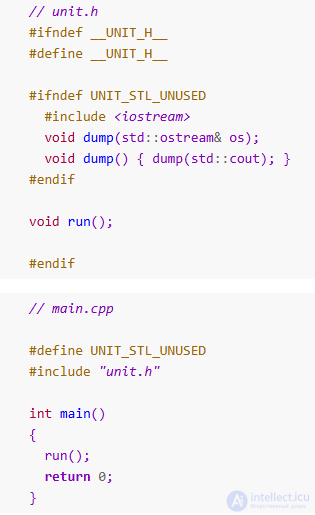
If a module is distributed already compiled (a library), the header file also serves as documentation for using the module.
If a programmer fixes the implementation of a function in the c-file without touching the header, this will not trigger a cascading recompilation of all modules that use that header.
A header file makes it possible to specify what cannot be specified with modules: substitutions with #define, compiler directives, incomplete syntactic constructs...
Interaction between modules written in different languages is simplified. The compiler and linker do not care whether the called module is written in the same language or another one. Moreover, different languages can compile their modules into identical object files, in which case a single linker serves several languages. It is likewise easy to build a library that, at the user's choice, is included in a project as CPP files, is stored precompiled and linked statically, or is linked as a DLL.
Header files are much slower: to compile 10 c-files, each of which includes a long h-file, the compiler has to go through the header 10 times. To deal with this problem, many compilers use precompiled headers.
Header files, together with some C++ language entities (constants, inline functions, templates, static variables), form heavyweight constructs.
The programmer has to change function headers in two places in sync. If they change the c-file and forget to do the same in the h-file, the linker will produce a vague error message without a line number. This is especially noticeable in C++, where the same function can have different sets of arguments and the compiler-level check does not fire. If the programmer accidentally leaves a construct in an h-file unfinished, the error will show up in a completely different c- or h-file.
Projects in the C family of languages tend to have complex build schemes. After all, (at least in standard C++) a library has to be included in the project, either as CPP files or in compiled form. Even if (for example, in Visual C++) there are preprocessor directives for this, the library still has to be built.
Header files play an important role in programming by enabling the separation of code into interface and implementation. They allow you to:
Although not all programming languages have traditional header files (for example, Java and Python), their functionality is implemented through interfaces, modules, and namespaces.

Comments