
Lecture
Working with a text file is similar to working with the console: we use formatted output functions to save data to a file, and formatted input functions to read data from a file. There are many nuances, which we will look at later. The main operations you need to perform are as follows.
There are also a number of tasks where we do not need to access the contents of the file: renaming, moving, copying, and so on. Unfortunately, the C standard does not describe functions for these needs. They certainly exist in each compiler implementation. Reading the contents of a directory (folder) is also an access to a file, because a folder is itself a file containing metadata.
Sometimes you need to perform some auxiliary operations: move to a particular place in the file, remember the current position, determine the length of the file, and so on.
To work with a file you need a FILE object. This object stores the identifier of the file stream and the information needed to control it, including a pointer to its buffer, the file position indicator, and status indicators.
The FILE object is itself a structure, but its fields should not be accessed. A portable program should treat the file as an abstract object that provides access to the file stream.
A FILE object is created and its memory allocated by the fopen or tmpfile function (there are others, but we will only look at these).
The fopen function opens a file. It takes two arguments – a string with the path to the file and a string with the file access mode. The file name can be either absolute or relative. fopen returns a pointer to a FILE object, which can then be used to access the file.
FILE* fopen(const char* filename, const char* mode); |
For example, let's open a file and write Hello World to it
|
1
2
3
4
5
6
7
8
9
10
11
12
13
14
15
|
#include <stdio.h>#include <conio.h>#include <stdlib.h>void main() { //We will use the file variable to access the file FILE *file; //Open a text file with write permissions file = fopen("C:/c/test.txt", "w+t"); //Write to the file fprintf(file, "Hello, World!"); //Close the file fclose(file); getch();} |
The fopen function allocates the memory for the object itself, and it is freed by the fclose function. Closing the file is mandatory; it will not close by itself.
The fopen function can open a file in text or binary mode. Text mode is used by default. The access mode can be one of the following
| Type | Description |
|---|---|
| r | Reading. The file must exist. |
| w | Writing a new file. If a file with that name already exists, its contents will be lost. |
| a | Appending to the end of the file. Positioning operations (fseek, fsetpos, frewind) are ignored. The file is created if it did not exist. |
| r+ | Reading and updating. You can both read and write. The file must exist. |
| w+ | Writing and updating. A new file is created. If a file with that name already exists, its contents will be lost. You can both write and read. |
| a+ | Appending and updating. Positioning operations work only for reading and are ignored for writing. If the file did not exist, a new one will be created. |
If you need to open a file in binary mode, the letter b is added to the end of the string, for example “rb”, “wb”, “ab”, or, for mixed mode, “ab+”, “wb+”, “ab+”. Instead of b you can add the letter t, in which case the file will be opened in text mode. This depends on the implementation. In the newer C standard (2011), the letter x means that fopen must fail if the file already exists. Let's extend our old program: we will reopen the file and read back what we wrote to it.
|
1
2
3
4
5
6
7
8
9
10
11
12
13
14
15
16
17
|
#include <stdio.h>#include <conio.h>#include <stdlib.h>void main() { FILE *file; char buffer[128]; file = fopen("C:/c/test.txt", "w"); fprintf(file, "Hello, World!"); fclose(file); file = fopen("C:/c/test.txt", "r"); fgets(buffer, 127, file); printf("%s", buffer); fclose(file); getch();} |
Instead of fgets we could have used fscanf, but remember that it can only read a string up to the first space.
fscanf(file, "%127s", buffer);
Also, instead of opening and closing the file, you can use the freopen function, which “reopens” the file with new access permissions.
|
1
2
3
4
5
6
7
8
9
10
11
12
13
14
15
16
|
#include <stdio.h>#include <conio.h>#include <stdlib.h>void main() { FILE *file; char buffer[128]; file = fopen("C:/c/test.txt", "w"); fprintf(file, "Hello, World!"); freopen("C:/c/test.txt", "r", file); fgets(buffer, 127, file); printf("%s", buffer); fclose(file); getch();} |
The fprintf and fscanf functions differ from printf and scanf only in that they take as their first argument a pointer to a FILE to which they will write data or from which they will read it. It is worth adding right away that printf and scanf can be replaced by fprintf and fscanf without any problems. In an OS (we are considering the most common and sensible operating systems) there are three standard streams: the standard output stream stdout, the standard input stream stdin, and the standard error output stream stderr. They are opened automatically when the application starts and are connected to the console. Example
|
1
2
3
4
5
6
7
8
9
10
11
12
13
14
15
16
|
#include <stdio.h>#include <conio.h>#include <stdlib.h>void main() { int a, b; fprintf(stdout, "Enter two numbers\n"); fscanf(stdin, "%d", &a); fscanf(stdin, "%d", &b); if (b == 0) { fprintf(stderr, "Error: divide by zero"); } else { fprintf(stdout, "%.3f", (float) a / (float) b); } getch();} |
If the call to fopen fails, it returns NULL. Errors when working with files are quite common, so every time we open a file we must check the result
|
1
2
3
4
5
6
7
8
9
10
11
12
13
14
15
16
17
18
19
20
21
22
23
24
25
26
27
28
|
#include <stdio.h>#include <conio.h>#include <stdlib.h>#define ERROR_OPEN_FILE -3void main() { FILE *file; char buffer[128]; file = fopen("C:/c/test.txt", "w"); if (file == NULL) { printf("Error opening file"); getch(); exit(ERROR_OPEN_FILE); } fprintf(file, "Hello, World!"); freopen("C:/c/test.txt", "r", file); if (file == NULL) { printf("Error opening file"); getch(); exit(ERROR_OPEN_FILE); } fgets(buffer, 127, file); printf("%s", buffer); fclose(file); getch();} |
The problem arises when several files are opened at once: if one of them cannot be opened, the others must be closed as well
...FILE *inputFile, *outputFile; unsigned m, n; unsigned i, j; inputFile = fopen(INPUT_FILE, READ_ONLY); if (inputFile == NULL) { printf("Error opening file %s", INPUT_FILE); getch(); exit(3); } outputFile = fopen(OUTPUT_FILE, WRITE_ONLY); if (outputFile == NULL) { printf("Error opening file %s", OUTPUT_FILE); getch(); if (inputFile != NULL) { fclose(inputFile); } exit(4); }... |
In simple cases you can go head-on, as in the previous piece of code. In more complex cases, techniques that stand in for C++ RAII are used: wrappers, compiler-specific features (cleanup in GCC), and so on.
As mentioned earlier, when we output data it is first placed in a buffer. The buffer is flushed
You can force the buffer to be flushed by calling the fflush(File *) function. Let's look at two examples – with flushing and without.
|
1
2
3
4
5
6
7
8
9
10
11
12
13
14
15
16
17
18
19
20
|
#include <stdio.h>#include <conio.h>#include <stdlib.h>void main() { FILE *file; char c; file = fopen("C:/c/test.txt", "w"); do { c = getch(); fprintf(file, "%c", c); fprintf(stdout, "%c", c); //fflush(file); } while(c != 'q'); fclose(file); getch();} |
Uncomment the fflush call. While the program is running, open the text file and observe the behavior.
You can assign a file's buffer yourself and set its size. This is done with the function
void setbuf (FILE * stream, char * buffer); |
which takes an already open FILE and a pointer to the new buffer. The size of the new buffer must be at least BUFSIZ (for example, on the current workstation BUFSIZ is 512 bytes). If you pass NULL as the buffer, the stream becomes unbuffered. You can also use the function
int setvbuf ( FILE * stream, char * buffer, int mode, size_t size ); |
which accepts a buffer of arbitrary size, size. The mode parameter can take the following values
If successful, the function returns 0.
Example: let's set our own buffer and see how reading from a file works. Suppose the file is short (something like Hello, World!), and we read it character by character
|
1
2
3
4
5
6
7
8
9
10
11
12
13
14
15
16
17
18
19
20
21
|
#include <conio.h>#include <stdio.h>#include <stdlib.h>void main() { FILE *input = NULL; char c; char buffer[BUFSIZ * 2] = {0}; input = fopen("D:/c/text.txt", "rt"); setbuf(input, buffer); while (!feof(input)) { c = fgetc(input); printf("%c\n", c); printf("%s\n", buffer); _getch(); } fclose(input);} |
As you can see, the data is already in the buffer. Reading character by character is now done from the buffer.
The function int feof (FILE * stream); returns true if the end of the file has been reached. It is convenient when you need to go through a whole file from beginning to end. Suppose there is a text file text.txt. Let's read the file character by character and print it to the screen.
|
1
2
3
4
5
6
7
8
9
10
11
12
13
14
15
16
17
18
19
20
21
22
|
#include <conio.h>#include <stdio.h>#include <stdlib.h>void main() { FILE *input = NULL; char c; input = fopen("D:/c/text.txt", "rt"); if (input == NULL) { printf("Error opening file"); _getch(); exit(0); } while (!feof(input)) { c = fgetc(input); fprintf(stdout, "%c", c); } fclose(input); _getch();} |
Everything would be fine, except that feof does not work correctly... This is because the notion of "end of file" is not well defined. When using feof, a common error is that the last data read is printed twice. This happens because the data is written to the input buffer, the last read fails, and the function returns the previously read value.
|
1
2
3
4
5
6
7
8
9
10
11
12
13
14
15
16
17
18
19
20
21
22
|
#include <conio.h>#include <stdio.h>#include <stdlib.h> void main() { FILE *input = NULL; char c; input = fopen("D:/c/text.txt", "rt"); if (input == NULL) { printf("Error opening file"); _getch(); exit(0); } while (!feof(input)) { fscanf(input, "%c", &c); fprintf(stdout, "%c", c); } fclose(input); _getch();} |
This example will (most likely) fail and print the last character of the file twice.
The solution is not to use feof. For example, store the total number of records, or make use of the fact that fscanf and similar functions usually return the number of values successfully read and matched.
|
1
2
3
4
5
6
7
8
9
10
11
12
13
14
15
16
17
18
19
20
21
|
#include <conio.h>#include <stdio.h>#include <stdlib.h>void main() { FILE *input = NULL; char c; input = fopen("D:/c/text.txt", "rt"); if (input == NULL) { printf("Error opening file"); _getch(); exit(0); } while (fscanf(input, "%c", &c) == 1) { fprintf(stdout, "%c", c); } fclose(input); _getch();} |
1. One file contains two numbers, the dimensions of an array. Let's fill a second file with an array of random numbers.
|
1
2
3
4
5
6
7
8
9
10
11
12
13
14
15
16
17
18
19
20
21
22
23
24
25
26
27
28
29
30
31
32
33
34
35
36
37
38
39
40
41
42
43
44
45
46
47
48
49
50
51
52
53
54
55
56
|
#include <stdio.h>#include <conio.h>#include <stdlib.h>#include <time.h>//File names and access modes#define INPUT_FILE "D:/c/input.txt"#define OUTPUT_FILE "D:/c/output.txt"#define READ_ONLY "r"#define WRITE_ONLY "w"//Maximum value for the array size#define MAX_DIMENSION 100//File opening error#define ERROR_OPEN_FILE -3void main() { FILE *inputFile, *outputFile; unsigned m, n; unsigned i, j; inputFile = fopen(INPUT_FILE, READ_ONLY); if (inputFile == NULL) { printf("Error opening file %s", INPUT_FILE); getch(); exit(ERROR_OPEN_FILE); } outputFile = fopen(OUTPUT_FILE, WRITE_ONLY); if (outputFile == NULL) { printf("Error opening file %s", OUTPUT_FILE); getch();//If the input file was opened successfully, it must be closed if (inputFile != NULL) { fclose(inputFile); } exit(ERROR_OPEN_FILE); } fscanf(inputFile, "%ud %ud", &m, &n); if (m > MAX_DIMENSION) { m = MAX_DIMENSION; } if (n > MAX_DIMENSION) { n = MAX_DIMENSION; } srand(time(NULL)); for (i = 0; i < n; i++) { for (j = 0; j < m; j++) { fprintf(outputFile, "%8d ", rand()); } fprintf(outputFile, "\n"); }//Close the files fclose(inputFile); fclose(outputFile);} |
2. The user copies a file, first choosing the mode of operation: the file can either be printed to the console or copied to a new file.
|
1
2
3
4
5
6
7
8
9
10
11
12
13
14
15
16
17
18
19
20
21
22
23
24
25
26
27
28
29
30
31
32
33
34
35
36
37
38
39
40
41
42
43
44
45
46
47
48
|
#include <stdio.h>#include <conio.h>#include <stdlib.h>#define ERROR_FILE_OPEN -3void main() { FILE *origin = NULL; FILE *output = NULL; char filename[1024]; int mode; printf("Enter filename: "); scanf("%1023s", filename); origin = fopen(filename, "r"); if (origin == NULL) { printf("Error opening file %s", filename); getch(); exit(ERROR_FILE_OPEN); } printf("enter mode: [1 - copy, 2 - print] "); scanf("%d", &mode); if (mode == 1) { printf("Enter filename: "); scanf("%1023s", filename); output = fopen(filename, "w"); if (output == NULL) { printf("Error opening file %s", filename); getch(); fclose(origin); exit(ERROR_FILE_OPEN); } } else { output = stdout; } while (!feof(origin)) { fprintf(output, "%c", fgetc(origin)); } fclose(origin); fclose(output); getch();} |
3. The user enters data from the console and it is written to a file until the Esc key is pressed. Run the program and see how it behaves when you type backspace: what is written to the file and what is printed to the console.
|
1
2
3
4
5
6
7
8
9
10
11
12
13
14
15
16
17
18
19
20
21
22
23
24
25
26
27
28
|
#include <stdio.h>#include <conio.h>#include <stdlib.h>#define ERROR_FILE_OPEN -3void main() { FILE *output = NULL; char c; output = fopen("D:/c/test_output.txt", "w+t"); if (output == NULL) { printf("Error opening file"); _getch(); exit(ERROR_FILE_OPEN); } for (;;) { c = _getch(); if (c == 27) { break; } fputc(c, output); fputc(c, stdout); } fclose(output);} |
4. A file contains integers. Find the largest of them. We will use the fact that fscanf returns the number of objects successfully read and matched. Each time it should return 1.
|
1
2
3
4
5
6
7
8
9
10
11
12
13
14
15
16
17
18
19
20
21
22
23
24
25
26
27
28
29
30
31
32
|
#include <stdio.h>#include <stdlib.h>#include <limits.h>#define ERROR_FILE_OPEN -3void main() { FILE *input = NULL; int num, maxn, hasRead; input = fopen("D:/c/input.txt", "r"); if (input == NULL) { printf("Error opening file"); _getch(); exit(ERROR_FILE_OPEN); } maxn = INT_MIN; hasRead = 1; while (hasRead == 1) { hasRead = fscanf(input, "%d", &num); if (hasRead != 1) { continue; } if (num > maxn) { maxn = num; } } printf("max number = %d", maxn); fclose(input); _getch();} |
Another solution is to read numbers until we reach the end of the file.
|
1
2
3
4
5
6
7
8
9
10
11
12
13
14
15
16
17
18
19
20
21
22
23
24
25
26
27
28
29
30
|
#include <conio.h>#include <stdio.h>#include <stdlib.h>#include <limits.h>#define ERROR_FILE_OPEN -3void main() { FILE *input = NULL; int num, maxn, hasRead; input = fopen("D:/c/input.txt", "r"); if (input == NULL) { printf("Error opening file"); _getch(); exit(ERROR_FILE_OPEN); } maxn = INT_MIN; while (!feof(input)) { fscanf(input, "%d", &num); if (num > maxn) { maxn = num; } } printf("max number = %d", maxn); fclose(input); _getch();} |
5. A file contains words: a Russian word, a tab, an English word, on several lines. The user enters an English word, and the program must print the Russian one.
The translation file looks roughly like this
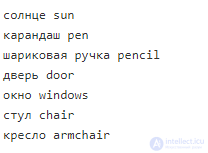
and is saved in the cp866 (OEM 866) encoding. It is important that the last pair of words also ends with a line break.
The algorithm is as follows: read a line from the file, find the tab character in the line, replace the tab with a zero, copy the Russian word from the buffer, copy the English word from the buffer, and compare for equality.
|
1
2
3
4
5
6
7
8
9
10
11
12
13
14
15
16
17
18
19
20
21
22
23
24
25
26
27
28
29
30
31
32
33
34
35
36
37
38
39
40
41
42
43
44
45
46
47
48
49
50
51
52
53
|
#include <conio.h>#include <stdio.h>#include <stdlib.h>#include <string.h>#define ERROR_FILE_OPEN -3void main() { FILE *input = NULL; char buffer[512]; char enWord[128]; char ruWord[128]; char usrWord[128]; unsigned index; int length; int wasFound; input = fopen("D:/c/input.txt", "r"); if (input == NULL) { printf("Error opening file"); _getch(); exit(ERROR_FILE_OPEN); } printf("enter word: "); fgets(usrWord, 127, stdin); wasFound = 0; while (!feof(input)) { fgets(buffer, 511, input); length = strlen(buffer); for (index = 0; index < length; index++) { if (buffer[index] == '\t') { buffer[index] = '\0'; break; } } strcpy(ruWord, buffer); strcpy(enWord, &buffer[index + 1]); if (!strcmp(enWord, usrWord)) { wasFound = 1; break; } } if (wasFound) { printf("%s", ruWord); } else { printf("Word not found"); } fclose(input); _getch();} |
6. Count the number of lines in a file. We will read the file character by character, counting the '\n' characters until we meet the EOF character. EOF is a special value indicating that input has ended and there is no more data to read. The function returns a negative value in case of an error.
NOTE: EOF has type int, so you must use int to read characters. Moreover, the value of EOF is not defined by the standard.
|
1
2
3
4
5
6
7
8
9
10
11
12
13
14
15
16
17
18
19
20
21
22
23
24
25
26
27
28
|
#define _CRT_SECURE_NO_WARNINGS#include <conio.h>#include <stdio.h>#include <stdlib.h>int cntLines(const char *filename) { int lines = 0; int any; //any is of type int, because EOF has type int! FILE *f = fopen(filename, "r"); if (f == NULL) { return -1; } do { any = fgetc(f); //printf("%c", any);//debug if (any == '\n') { lines++; } } while(any != EOF); fclose(f); return lines;}void main() { printf("%d\n", cntLines("C:/c/file.txt")); _getch();} |

Comments