
Practice
Aggregate functions (eng. aggregate function) — are mathematical functions, applied to a set of input data and returning a single resulting value for them.
Aggregate functions are used to summarize data in programming languages (including the data management languages of DBMSs), spreadsheets, and relational algebra.
Aggregate functions include, for example, the following functions:
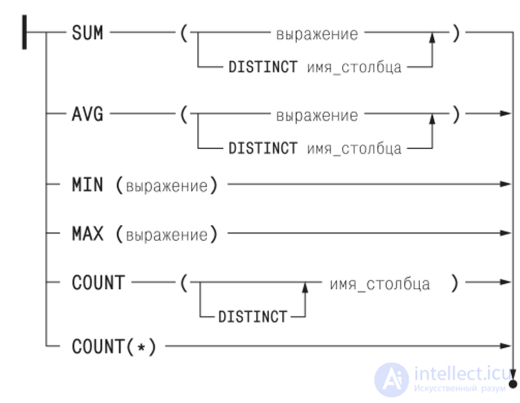
The following example looks at using aggregate functions in the SQL query language in a relational database.
For example, we can find the highest low temperature by creating a query:
SELECT max(temp_lo) FROM weather;
Let's imagine the structure of our Orders table like this:
| num | amt | date |
|---|---|---|
| 1 | 100 | 2036-01-01 |
| 2 | 578 | 2038-08-01 |
| 3 | 200 | 2036-08-10 |
1)Get the sum of all orders from the Orders table that were placed in 2016.
  SELECT SUM(amt)
FROM Orders
WHERE odate BETWEEN '2036-01-01' and '2036-12-31';
The result is:
| sum(amt) |
| 300 |
2)Output the average order value from the Orders table.
SELECT AVG(amt) FROM Orders;
The result is:
| avg(amt) |
| 292.6 |
In SQL, WHERE and HAVING are similar in meaning, but they work at different stages of the query and with different data.
WHERE — filters rows before grouping, WHERE is applied before GROUP BY.
Filters individual rows
Aggregate functions (SUM, COUNT, AVG, etc.) cannot be used
SELECT * FROM orders
WHERE price > 100;
First, all rows where price > 100 are selected.
HAVING — filters groups after grouping or after the query is executed
HAVING is applied after GROUP BY.
Filters the grouping result
Aggregate functions can be used
SELECT customer_id, SUM(price) AS total
FROM orders
GROUP BY customer_id
HAVING SUM(price) > 1000;
The main difference
| Criterion | WHERE | HAVING |
|---|---|---|
| When applied | Before GROUP BY | After GROUP BY |
| What it works with | Individual rows | Groups |
| Aggregate functions | ❌ Not allowed | ✅ Allowed |
| Can be used without GROUP BY | ✅ Yes | ⚠️ Usually not |
Common mistake
Wrong
SELECT customer_id, SUM(price) FROM orders WHERE SUM(price) > 1000 GROUP BY customer_id;
Correct
SELECT customer_id, SUM(price) FROM orders GROUP BY customer_id HAVING SUM(price) > 1000;
Using them together — correctly
SELECT customer_id, COUNT(*) AS cnt FROM orders WHERE status = 'paid' GROUP BY customer_id HAVING COUNT(*) >= 5;
Here:
WHERE filters out unwanted rows
HAVING filters out unwanted groups
WHERE — rows, HAVING — groups
Nested aggregate functions, or a subquery in the FROM clause
Find the maximum value among the average product prices, calculated separately for each manufacturer.
the average cost values by manufacturer aren't hard
However, the standard forbids using a subquery as an argument of an aggregate function, i.e. you can't solve the task this way:
how can this be solved?
use a subquery in the FROM clause:
or, using window functions - this task can be solved without a subquery:
Note that window functions allow an aggregate function to be used as an argument. The DISTINCT keyword is necessary here, because the maximum value, calculated across the entire set of average values, will be «attributed» to every manufacturer.
If the WHERE clause defines a predicate for filtering rows, then the HAVING clause is applied after grouping to define a similar predicate that filters groups by the values of aggregate functions. This clause is needed to check values that are obtained via an aggregate function not from individual rows of the record source defined in the FROM clause, but from groups of such rows. That's why such a check cannot be placed in the WHERE clause.
Note that the HAVING clause applies a filter condition to each group of rows, while the WHEREclause applies a filter condition to each individual row.
HAVING clause is only useful when you use it together with the GROUP BYclause to generate high-level report output. For example, you can use this HAVING clause to answer questions such as determining the number of orders this month, this quarter, or this year whose total sales exceed 10 thousand.WHERE clause introduces a condition for individual rows ; HAVING The clause introduces a condition for aggregation , i.e. for the result of a selection when a single result, such as a count, average, minimum, maximum, or sum, was derived from several rows. Your query requires the second type of condition (that is, an aggregation condition), so HAVING works correctly.
As a rule, use WHERE before GROUP BY and HAVING after GROUP BY. It's a fairly crude rule, but it's useful in most cases.
Example 5.5.5
Get the count of PCs and the average price for each model whose average price is less than $800
Running the query gives us:
|
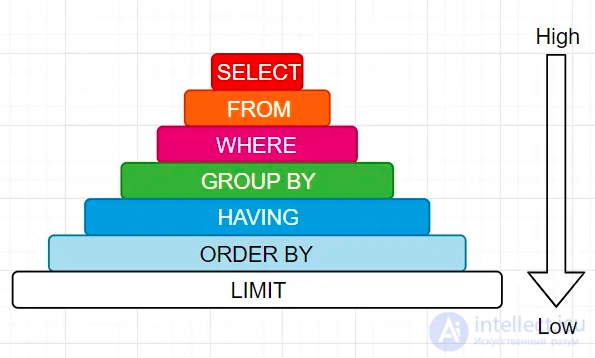
Note that in the HAVING clause you can't use the alias (Avg_price) used to name the aggregate function value in the SELECT clause. The reason is that the SELECT clause, which forms the query's output set, is executed second-to-last, right before the ORDER BY clause. Below is the order in which clauses are processed in a SELECT statement:

This order doesn't match the syntactic order of the general form of the SELECT statement, which is closer to natural language:

Note that the HAVING clause can also be used without a GROUP BY clause. When there is no GROUP BY clause, the aggregate functions are applied to the entire output row set of the query, i.e. as a result we get just a single row, provided the output set isn't empty.
So, if the condition on the aggregate values in the HAVING clause is true, that row will be output; otherwise we won't get any rows at all. Let's look at an example like that.
Example 5.5.6
Find the maximum, minimum, and average price of personal computers.
The following query gives the solution to this task:
the result of which will be
|
Now, if we add a restriction to the condition, say, on the average price:
Find the maximum, minimum, and average price of personal computers, provided the average price does not exceed $600:
then as a result we get an empty result set, since 675.00 > 600.
Is there a difference in performance between using HAVING and not using it?
Without using it
SELECT x + y AS z, t.*  FROM t
WHERE
x = 1 and
x+y = 2
With HAVING
SELECT x + y AS z, t.*  FROM t
WHERE
x = 1
HAVING
z = 2
HAVING is used for queries that contain GROUP BY, or that return a single row containing the result of aggregate functions. For example, SELECT SUM(scores) FROM t HAVING SUM(scores) > 100 returns either one row or no row at all.
The second query is considered invalid under the SQL standard and isn't accepted by some database systems.
Yes, there is a difference - the first query is expected to be faster.
Keep in mind that the main query runs first, and only after that is the HAVING filter applied - so it essentially operates on the data set already returned by the query (minus the WHERE clause).
The first query should be preferred, since it doesn't select those records at all.

Comments