
Lecture
The aggregate function SUM in MySQL will work incorrectly when used together with JOIN, when the result of joining tables produces duplicated data. This will lead to an incorrect sum being calculated.
Here are a few cases where the SUM aggregate function can work incorrectly when used with JOIN:
Row duplication: If, as a result of a JOIN, two or more rows from one table are joined with a single row from another table, then SUM will take all of these duplicated rows into account, which can lead to an inflated sum.
Incorrect join: If the JOIN is performed on the wrong columns or conditions, the result can be incorrect. For example, if the join is done on a column with incorrect values or a non-unique column, SUM will sum the values incorrectly.
Using multiple JOINs: When using several JOINs, especially in complex queries with different types of JOIN (for example, INNER JOIN, LEFT JOIN, RIGHT JOIN), data duplication and an incorrect result can occur.
For the SUM aggregate function to work correctly with JOIN, you need to define the join conditions correctly and make sure the join result doesn't contain duplicate rows. You can use grouping (GROUP BY) and other appropriate functions and statements to ensure the data is summed correctly.
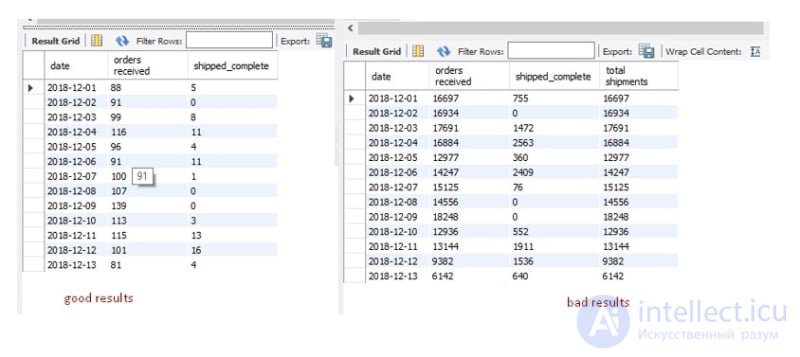
Example of results with an incorrect combined use of JOIN and SUM
To fix the problems with an incorrect sum calculation when using JOIN in a query, you can apply several approaches:
Example:
 SELECT table1.id, SUM(table2.value) AS total_value
  FROM table1
  JOIN table2 ON table1.id = table2.table1_id
  GROUP BY table1.id;
Example:
SELECT table1.id,
   (SELECT SUM(value) FROM table2 WHERE table2.table1_id = table1.id) AS total_value
FROM table1;
Example:
CREATE VIEW view1 AS
   SELECT table1.id, SUM(table2.value) AS total_value
   FROM table1 JOIN table2 ON table1.id = table2.table1_id
   GROUP BY table1.id;

SELECT * FROM view1;
It's important to adapt these approaches to the specific requirements of your query and your data structure. It's also recommended to run tests and check the results to make sure the sum is calculated correctly when using JOIN.

Comments