
Lecture
Aggregation - is an abstraction that turns a relationship between objects into a certain aggregated object.
Aggregate function performs a calculation over several values and returns one value, that is, these are functions that compute a result over a set of values in a group, or over all records in the DB
For example, you can use the AVG()aggregate function, which takes several numbers and returns the average of those numbers.
The syntax of an aggregate function is shown below:
function_name(DISTINCT | ALL expression) Code language: SQL (Structured Query Language) ( sql )
In this syntax:
AVG(). See the list of aggregate functions in the next section.DISTINCT if you want to calculate based on distinct values, or ALLif you want to calculate all values, including duplicates. The default is ALL.Aggregate functions are often used with the GROUP BY clause to calculate an aggregated value for each group, for example, the average value for the group or the sum of values in each group.
Grouping records is a construct - the GROUP BY clause in a selection command lets you split the layer's DB records into groups. Grouping of records can be performed by the values of one or more record fields, or based on the values of columns in the result table of the selection.
Construct format: GROUP BY <data fields>|<column numbers>. When specifying data field names, grouping is performed by the table's data fields; if column numbers are specified instead, grouping is performed by the numbers of the columns in the output table (column numbering starts at 1).
In a selection command, the GROUP BY construct is placed right after the WHERE construct, before HAVING and ORDER.
Grouping of records is always used together with aggregate functions. In that case, the aggregate functions are applied separately to each group of records. For example, when grouping the records of the Buildings layer by the Street field, all the layer's DB records will be split into several groups, with records that share the same street in each group. And, when the COUNT function is applied in such a query, it will output the number of records in each group.
Grouping can be performed simultaneously by several fields (columns). The grouping fields (columns) are listed separated by commas, after the words GROUP BY. Grouping is performed first by the first field, then the already-grouped records are split into subgroups by the second field, and so on.
When grouping is used in a query, the output columns of the selection may include aggregate functions, and the record fields by which grouping is performed, or expressions that include these fields.
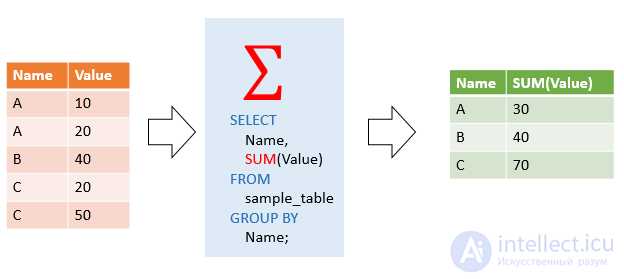
The following image shows that the SUM()aggregate function is used together with the GROUP BYclause:
MySQL supports the following aggregate functions:
| Aggregate function | Description |
|---|---|
| AVG() | Returns the average value, ignoring NULL. |
| BIT_AND() | Return bitwise AND. |
| BIT_OR ) | Return bitwise OR. |
| BIT_XOR () | Return bitwise XOR. |
| COUNT() | Returns the number of rows in a group, including rows with NULL values. |
| GROUP_CONCAT() | Return a concatenated string. |
| JSON_ARRAYAGG() | Return the result set as a single JSON array. |
| JSON_OBJECTAGG() | Return the result set as a single JSON object. |
| MAX() | Returns the highest value (maximum) from a set of values other than NULL. |
| MIN() | Returns the lowest value (minimum) from a set of values other than NULL. |
| STDEV() | Return the standard deviation of the population. |
| STDDEV_POP() | Return the standard deviation of the population. |
| STDDEV_SAMP() | Return the standard deviation of the sample. |
| SUM() | Returns the sum of all non-null values in the set. |
| VAR_POP() | Return the standard variance of the population. |
| VARP_SAM() | Return the sample variance. |
| VARIANCE() | Return the standard variance of the population. |
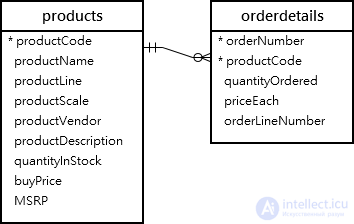
We will use the productsand orderdetailstables from the sample database to demonstrate:
AVG()ExamplesAVG()Function calculates the average value from a set of values. It ignores NULLs in the calculation.
AVG(expression)Code language: SQL (Structured Query Language) ( sql )
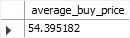
For example, you can use the AVGfunction to calculate the average purchase price of all products in the productstable using the following query:
SELECT AVG(buyPrice) average_buy_price FROM products;Code language: SQL (Structured Query Language) ( sql )
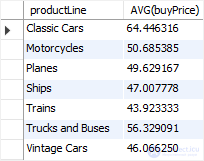
In the next example, the AVG()function is used to calculate the average purchase price for each product line:
SELECT productLine, AVG(buyPrice) FROM products GROUP BY productLine ORDER BY productLine; Code language: SQL (Structured Query Language) ( sql )
COUNT()ExamplesCOUNT()Function returns the number of values in a set.
For example, you can use the COUNT()function to get the number of products in the productstable, as shown in the following query:
SELECT COUNT(*) AS total FROM products;Code language: PHP ( php )

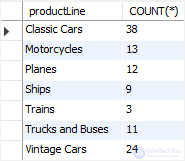
The following statement uses the COUNT()function with the GROUP BYclause to get the number of products for each product line:
SELECT productLine, COUNT(*) FROM products GROUP BY productLine ORDER BY productLine; Code language: SQL (Structured Query Language) ( sql )
SUM()ExamplesSUM()Function returns the sum of the values in a set. SUM()Function ignores NULL. If no matching row is found, the SUM()function returns NULL.
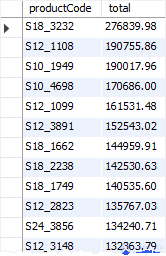
To get the total order value of each product, you can use the SUM()function together with the GROUP BYclause as follows:
SELECT productCode, SUM(priceEach * quantityOrdered) total FROM orderDetails GROUP BY productCode ORDER BY total DESC;Code language: SQL (Structured Query Language) ( sql )
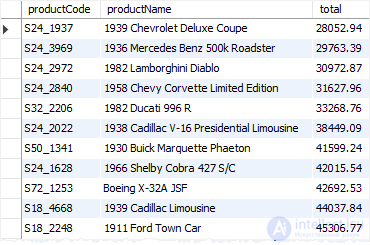
To see the result in more detail, you can join the orderdetailstable to the productstable, as shown in the following query:
SELECT productCode, productName, SUM(priceEach * quantityOrdered) total FROM orderDetails INNER JOIN products USING (productCode) GROUP BY productCode ORDER BY total;Code language: SQL (Structured Query Language) ( sql )
MAX()Function ExamplesMAX()The function returns the maximum value in a set.
MAX(expression)Code language: SQL (Structured Query Language) ( sql )
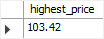
For example, you can use this MAX()function to get the highest purchase price from the productstable, as shown in the following query:
SELECT MAX(buyPrice) highest_price FROM products;Code language: SQL (Structured Query Language) ( sql )
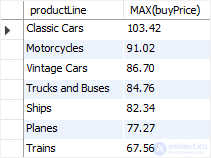
The following statement uses the MAX()function with the GROUP BYclause to get the maximum price for each product line:
SELECT productLine, MAX(buyPrice) FROM products GROUP BY productLine ORDER BY MAX(buyPrice) DESC;Code language: SQL (Structured Query Language) ( sql )
MIN()Function ExamplesMIN()The function returns the minimum value in a set of values.
MIN(expression)Code language: SQL (Structured Query Language) ( sql )
For example, the following query uses the MIN()function to find the lowest price from the productstable:
SELECT MIN(buyPrice) lowest_price FROM products;Code language: SQL (Structured Query Language) ( sql )

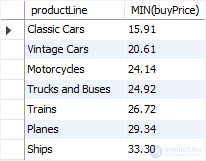
In the following example, the MIN()function with the GROUP BYclause is used to get the lowest price for each product line:
SELECT productLine, MIN(buyPrice) FROM products GROUP BY productLine ORDER BY MIN(buyPrice);Code language: SQL (Structured Query Language) ( sql )
GROUP_CONCAT()Function ExampleGROUP_CONCAT()Joins a set of strings and returns the concatenated string. See the following employeesand customerstables:
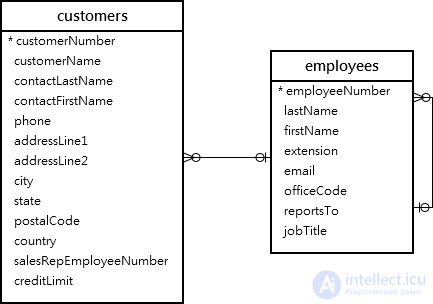
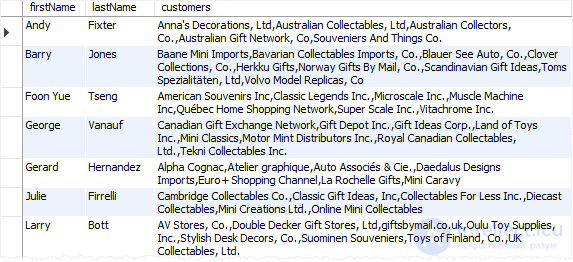
The following statement uses the GROUP_CONCAT()function to return the sales staff and the list of customers each sales staff member is responsible for:
SELECT firstName, lastName, GROUP_CONCAT( DISTINCT customername ORDER BY customerName) customers FROM employees INNER JOIN customers ON customers.salesRepEmployeeNumber = employeeNumber GROUP BY employeeNumber ORDER BY firstName , lastname;Code language: SQL (Structured Query Language) ( sql )
On this page, we discussed how to use the MySQL COUNT() function with GROUP BY.
Example:
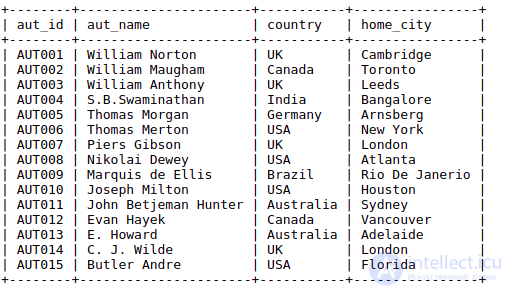
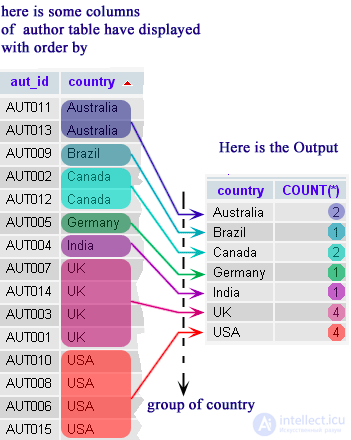
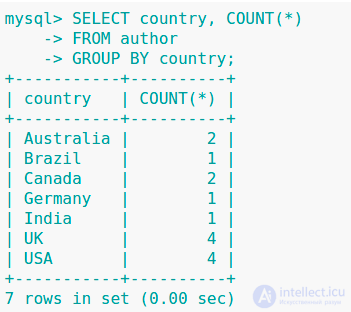
The following MySQL statement will show the number of authors for each country. The GROUP BY clause groups all the records for each country, and then the COUNT() function together with GROUP BY counts the number of authors for each country.
Sample table:
Code:
SELECT country,COUNT(*)
FROM author
GROUP BY country;
Sample output:
Illustrated explanation

Comments