
Lecture
In this chapter, we'll touch on a few performance topics and look at the tooling available to MongoDB developers. We won't dive too deeply into these subjects, but we'll cover the most important aspects of each.
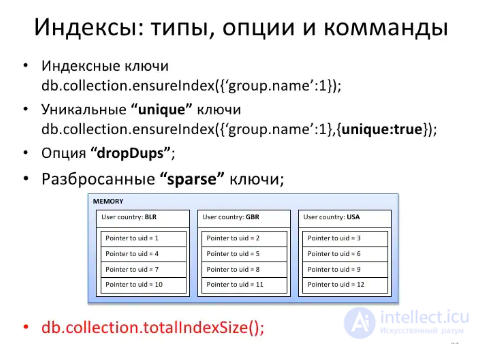
Right at the start, we saw the system.indexes collection, which holds information about every index in our database. Indexes in MongoDB work similarly to indexes in relational databases: they speed up querying and sorting data. Indexes are created with ensureIndex:
db.unicorns.ensureIndex({name: 1});
And dropped with dropIndex:
db.unicorns.dropIndex({name: 1});
A unique index can be created by setting unique to true in the second parameter:
db.unicorns.ensureIndex({name: 1}, {unique: true});
You can create indexes on embedded fields (again, using dot notation) or on arrays. You can also create compound indexes:
db.unicorns.ensureIndex({name: 1, vampires: -1});
The order of your index (1 for ascending and --1 for descending) doesn't matter for a simple index, but it can matter when sorting or limiting results with compound indexes.
You can find additional information on the indexes documentation page.
To see whether indexes are being used in your queries, call the cursor's explain method:
db.unicorns.find().explain()
The result shows us that a BasicCursor was used (meaning no index), that scanning went through 12 objects, how long it took, whether an index was applied and if so which one, along with other useful details.
If we change the query so it uses an index, we'll see that a BtreeCursor was used, along with the index used for the lookup:
db.unicorns.find({name: 'Pilot'}).explain()
We already mentioned that writes in MongoDB happen without acknowledgment. This can boost performance, but it also carries the risk of losing data because of some accidental error. There's also a side effect: when an update or insert violates a unique index constraint, no error occurs. To find out whether an error happened, you need to call db.getLastError() after the last write. Many drivers work around this and let you write safely - there's often a special parameter for it.
Unfortunately, the shell can't do this, so it won't be easy to observe in the shell.
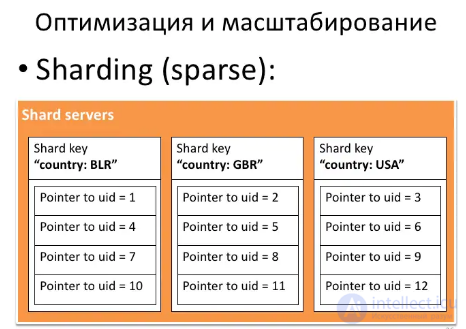
MongoDB supports auto-sharding. Sharding is an approach to scalability where separate pieces of data are stored on different servers. A primitive example is storing the data of users whose name starts with A-M on one server and everyone else on another. MongoDB's sharding capabilities go far beyond this simple example. Covering sharding is beyond the scope of this book, but you should know it exists, and you should make use of it once your workload outgrows a single server.
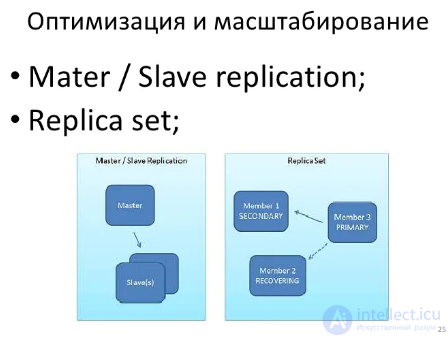
Replication in MongoDB works similarly to replication in relational databases. Writes are sent to one server - the master (master), which then syncs its state to the other servers - the slaves (slave). You can allow or disallow reads from the slave servers, depending on whether your system can tolerate reading inconsistent data. If the master server goes down, one of the slaves can take over the master role. MongoDB replication is also beyond the scope of this book.
Although replication improves read performance by distributing it, its main purpose is to increase reliability. A typical approach is to combine replication with sharding. For example, each shard can consist of a master and a slave server. (Technically, you'll also need an arbiter to resolve the conflict when two slave servers try to declare themselves master. But an arbiter consumes very few resources and can be used for several shards at once.)
You can get database statistics by calling db.stats(). Most of the information concerns the size of your database. You can also get collection statistics, for example for unicorns, by calling db.unicorns.stats(). Most of the information you get, again, concerns the size of the collection.
When mongod starts up, the console shows, among other things, a line with a link to the admin web interface. You can access it by going to http://localhost:28017/ in your browser. To get the most out of it, you can add rest=true to the configuration file and restart the mongod process. The web interface provides a lot of interesting information about the server's current state.
The MongoDB profiler can be enabled with the following call:
db.setProfilingLevel(2);
With the profiler enabled, you can run the command:
db.unicorns.find({weight: {$gt: 600}});
And query the profiler:
db.system.profile.find()
The result shows us what ran and when, how many documents were scanned, and how much data was returned.
You can disable the profiler by calling setProfileLevel again, just passing 0 as the argument. You can also pass 1 to profile queries that take longer than 100 milliseconds. You can also pass a time in milliseconds as the second parameter:
//profile everything that takes more than 1 second
db.setProfilingLevel(1, 1000);
MongoDB's bin folder contains the mongodump utility. Running mongodump connects to localhost and backs up all databases into the dump subfolder.
You can type mongodump --help to see additional options. Common options are --db DBNAME, to back up only the specified database, and --collection COLLECTIONAME, to back up only the specified collection. After that you can use mongorestore, located in the same bin folder, to restore a database from a previously made backup. Here too you can specify --db and --collection to restore only the specified database and collection.
For example, to back up the learn database into the backup folder, we need to run (of course, not in the MongoDB shell itself, but just in the operating system's console):
mongodump --db learn --out backup
To restore only the unicorns collection, we need to do the following:
mongorestore --collection unicorns backup/learn/unicorns.bson
It's also worth mentioning that there are two utilities, mongoexport and mongoimport, intended for exporting and importing data as JSON and CSV. For example, you can get the result as JSON like this:
mongoexport --db learn -collection unicorns
And CSV:
mongoexport --db learn -collection unicorns --csv -fields name,weight,vampires
Keep in mind that mongoexport and mongoimport can't fully represent your data. Only mongodump and mongorestore should be used for real backups.
In this chapter, we looked at various commands, tools, and performance nuances of MongoDB. We didn't cover every topic, but we did cover the most common ones. Indexing in MongoDB is similar to indexing in relational databases, and the same goes for most of the tooling. However, MongoDB makes all of it much easier to use.
You now have enough information to start using MongoDB in real projects. MongoDB has many more aspects that weren't covered in this book, but your immediate task is to use what you've learned and start exploring the driver you'll be using. The MongoDB website has a lot of useful information. The official MongoDB group can answer many of your questions.
NoSQL is born not only out of necessity, but also out of interest in finding new approaches. This means we're on the leading edge, and success may elude only those who give up.

Comments