
Lecture
The progress of NoSQL technologies that are replacing long-established relational databases. Yesterday the web relied on a handful of well-known RDBMSs, yet today around five NoSQL solutions have already emerged and proven themselves.
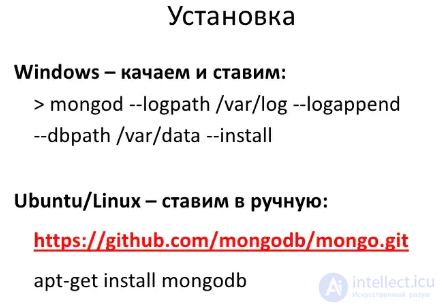
We've arrived at the first thing you need to know about MongoDB: its drivers. MongoDB has a large number of official drivers for various languages. You can think of them as drivers for databases you're already used to. On top of them, the developer community has built a range of higher-level drivers for specific languages and frameworks. For example, NoRM is a library for C# that implements LINQ, and MongoMapper is for Ruby, with ActiveRecord support. Whether to program directly against MongoDB's low-level drivers, or to use higher-level libraries instead, is up to you. I've dwelt on this because many newcomers get confused by the existence of both official drivers and community-built ones - the former are aimed at basic communication with Mongo, while the latter focus more on integrating with specific languages and frameworks.
As you read, try to reproduce the examples shown, and also explore any questions that come up along the way. Getting MongoDB up and running is easy - it'll only take us a few minutes to set everything up.
Add a single line to mongodb.config: dbpath=PATH_WHERE_YOU_WANT_TO_STORE_THE_DATABASE_FILES.
For example, on Windows you could write dbpath=c:\mongodb\data and on Linux - dbpath=/etc/mongodb/data.
For Windows users, for example, if you unpacked the downloaded file into c:\mongodb\ and created the folder c:\mongodb\data\, then in c:\mongodb\bin\mongodb.config you should specify db?path=c:\mongodb\data\. Now you can run mongod from the command line using the command c:\mongodb\bin\mongod --config c:\mongodb\bin\mongodb.config.
For convenience, you can add the bin folder to the PATH environment variable. For MacOSX and Linux users, the instructions are practically the same. All you need to do is just change the paths.
I hope MongoDB is now installed and running for you. If there are errors, read the messages in the console carefully - the server prints detailed and clear diagnostic messages.
Now, to connect to the running server, you can start mongo (without the d at the end). Try entering db.version() to make sure everything is fine. If everything's OK, you'll see your server's version number.
When you start working with MongoDB in the mongo shell, the first thing you need to do is set the database you need as the current one, so you can then use it. To do this, use the use command, followed by the name of the database. It doesn't matter whether that database already exists or not. If it doesn't exist yet, MongoDB will automatically create it once you add data to it.
So, let's launch the mongo.exe shell and enter the following command there:
|
1
|
> use test |
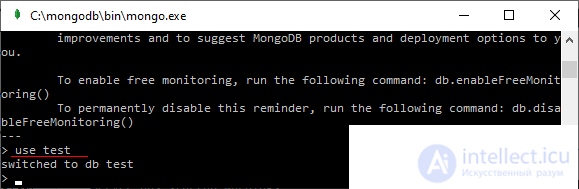
Now the test database will be set as the current one.
If you're ever not sure whether a database with that name already exists, you can use the show dbs command to print the names of all existing databases to the console:
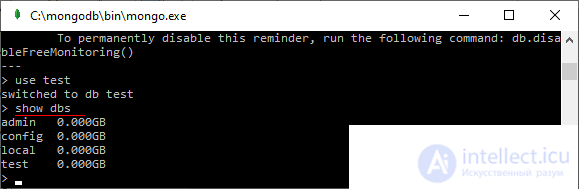
You can give a database any name, but there are some restrictions. For example, the name must not contain the characters /, \, ., ", *, <, >, :, |, ?, $. In addition, database names are limited to 64 bytes.
There are also reserved names that you can't use: local, admin, config. These names represent databases that already exist by default on the server and are intended for internal purposes.
And as you can see, the test database isn't in this list, since I haven't added any data to it yet.
If we want to find out which database is currently in use, we can use the db command:
|
1
2
|
> dbtest |
Besides databases, we can also view the list of all collections in the current database using the show collections command.
Using the db.stats() command, you can get statistics for the current database. For example, we currently have the test database set as the current one:
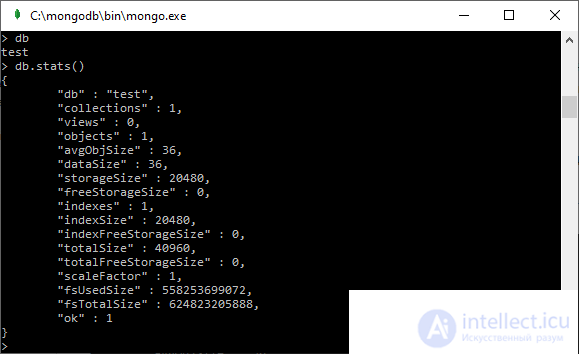
In a similar way, we can find out all the statistics for a specific collection. For example, let's get the statistics for the users collection: db.users.stats()

Comments