
Lecture 11 min.
Have you seen the subreddit https://www.reddit.com/r/Colorization/ on Reddit? People use Photoshop to add colors to old black-and-white photographs. This is a good problem to automate because perfect training data is easy to get: any color image can be desaturated and used as an example.
This project is an attempt to use modern deep learning techniques to automatically colorize black-and-white photographs.
Over the last few years, convolutional neural networks (CNNs) have revolutionized the field of computer vision. Every year in the ImageNet Challenge (ILSVRC), the error rate drops sharply thanks to the widespread adoption of CNN models among participants. As of this year, the classification error in ILSVRC is considered better than that of humans. Amazing visualizations have shown that pretrained classification models can be repurposed for other tasks.
http://googleresearch.blogspot.com/2015/06/inceptionism-going-deeper-into-neural.html
http://arxiv.org/abs/1508.06576
Here are some of my best colorizations after about three days of training. The input to the model is the grayscale image on the left. The output is the middle image. The image on the right is the true color, which the model never sees. (These images are from the validation set.)
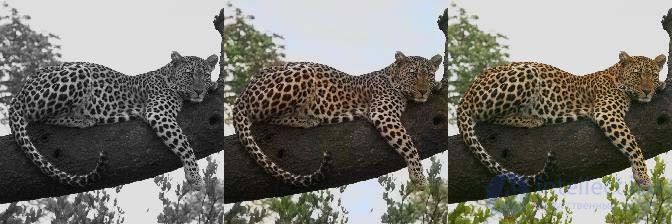
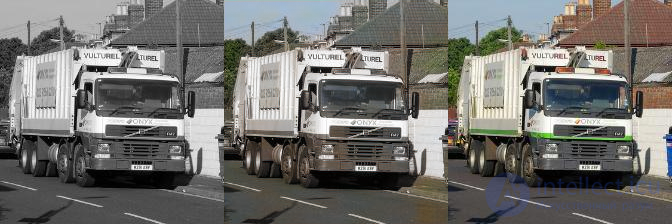
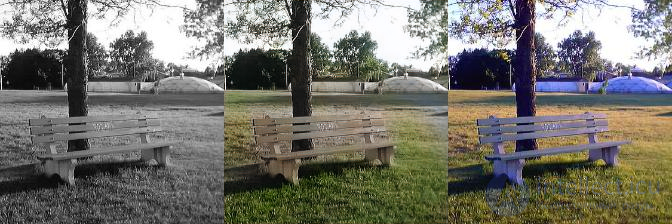
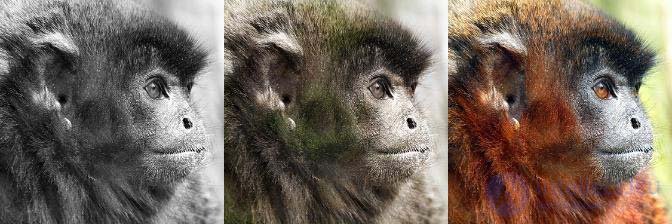
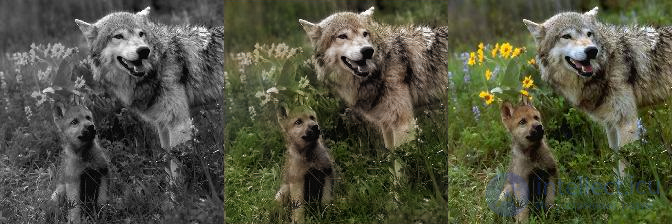
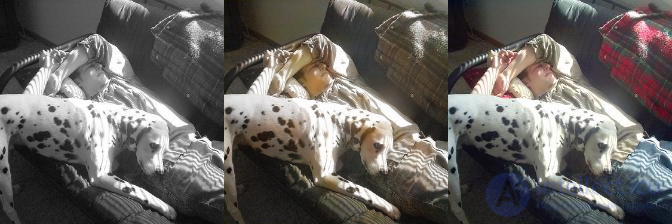
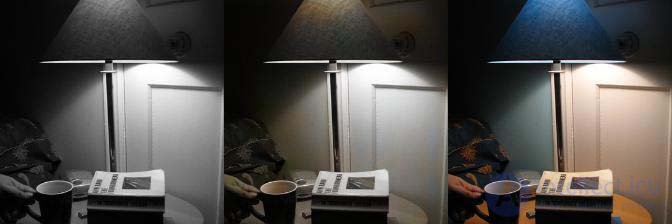
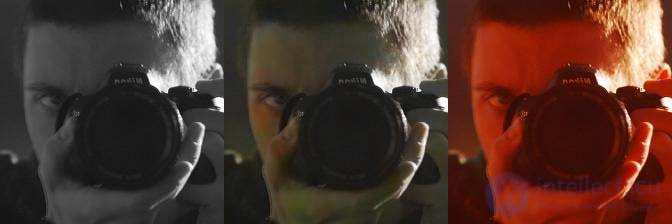
There are also bad cases, which mostly look black-and-white or tinted sepia.
Here are some random validation images, if you want a better idea of the model's competence. The image files are named after the training iteration they come from, so a higher number means better color.
From this point on, I assume you are somewhat familiar with how CNNs work. For an excellent introduction, see Karpathy's CS231n. http://cs231n.github.io/convolutional-networks/
In CNN classification models (for example, for ILSVRC), you can extract more information than just the final classification. Zeiler and Fergus showed how to visualize what the intermediate layers of a CNN can represent, and it turned out that objects such as car wheels and people already start to be recognized at the third layer. The intermediate layers in classification models can provide useful information about color.
The first task was to choose a pretrained model to use.
So I wanted to use a pretrained image classification model (from the Caffe Model Zoo) to extract features for colorization. I chose the VGG-16 model because it has a simple architecture yet is still competitive (second place in ILSVRC 2014). This paper introduces the idea of "hypercolumns" in CNNs: http://arxiv.org/abs/1411.5752. The hypercolumn for a pixel in the input image is the vector of all activations above that pixel. I implemented it by forwarding the image through the VGG network, then extracting several layers (specifically, the tensors before each of the first 4 max-pooling operations), upscaling them to the original image size, and concatenating them all together.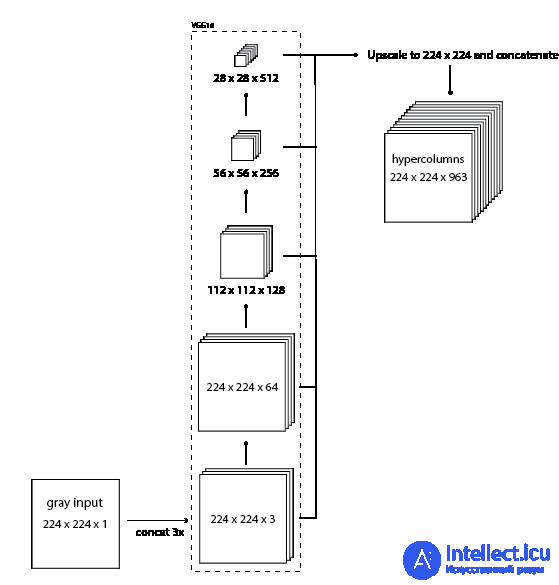
The resulting hypercolumn tensor contains a wealth of information about what is in the image. Using this information, I will be able to colorize the image.
Instead of reconstructing the whole RGB color image, I trained the models to produce two color channels, which I combine with the grayscale input channel to create a YUV image. The Y channel is the intensity. This guarantees that the intensity of the output is always the same as that of the input. (This extra complexity is not necessary, since the model could learn to reconstruct the image entirely, but learning only two channels helps with debugging.)
Initially I used the Hue-Saturation-Value (HSV) color space. (It was the only color space with a grayscale channel that I knew of.) The problem with HSV is that the hue channel wraps around. (0, x, y) maps to the same RGB pixel as (1, x, y). This makes the loss function more complicated than Euclidean distance. I am also not sure whether this circular property of hue could spoil the gradient, so I decided to avoid it. Also, the formula for converting YUV to and from RGB is just a matrix multiplication, whereas HSV is more complicated.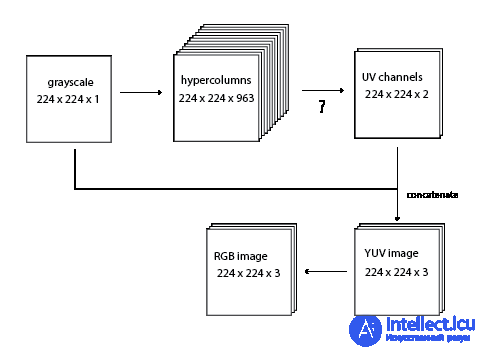
What should be used for the question-mark operation? The simplest way is to use a 1x1 convolution from 963 channels to 2 channels. That is, multiply each hypercolumn by a (963, 2) matrix, add a 2-dimensional bias vector, and pass the result through a sigmoid. Unfortunately, this model is not complex enough to represent the colors in ImageNet. It collapses to desaturated images.
I tried various hidden layers and larger convolutions, but before I get to those, I want to talk about the loss and some other choices.
The most obvious loss function is the Euclidean distance between the network's output RGB image and the true-color RGB image. To some extent this works, but I found that the models converged faster when I used a more sophisticated loss function.
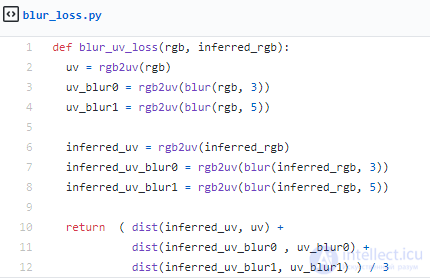
Blurring both the network output and the true-color image and then computing the Euclidean distance seems to give the gradient a decent boost. (I ended up averaging the normal RGB distance and two blurred distances, with Gaussian kernels of 3 and 5 pixels.)
Also, I compute the distance only in UV space. Here is the exact code.
I use ReLU as the activation function everywhere, except for the final output to the UV channels, where I use a sigmoid to squash the values to between 0 and 1. I use batch normalization (BN) instead of bias terms after each convolution. I experimented with using ELU instead of, and in addition to, BN, but without much success. I did not have much success with leaky ReLUs either. I experimented with using dropout in different places, but it did not seem to help much. A learning rate of 0.1 was used with standard SGD. No weight decay.
The models were trained on the ILSVRC 2012 classification training set, the same training set used for the pretrained VGG16. It is 147 GB and over 1.2 million images!
I experimented with many different architectures for converting hypercolumns to UV channels. Here I will compare two hidden layers with depths of 128 and 64, with 3x3 stride-1 convolutions between them.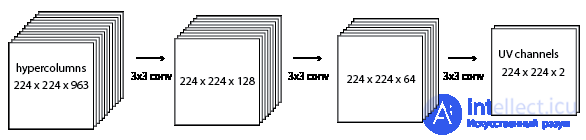
This model may be complex enough to learn the colors in ImageNet. But I never spent enough time training it fully, because I found a better setup. I think the problem with this model will be immediately obvious to anyone who has worked with CNNs before. It was not to me.
Unlike classification models, there is no max pooling here. I need the output at the full 224 x 224 resolution. The hypercolumns and the subsequent layer of depth 128 take up a lot of memory! I was able to run a model like this with only 1 image per batch on my 2 GB NVIDIA GTX 750ti.
I came up with a new model that I call the "residual encoder", because it is almost an autoencoder, but from black-and-white to color, with residual connections. The model passes the grayscale image through VGG16 and then, using the highest layer, outputs some color information. It then upscales the color guess and adds information from the next highest layer, and so on, working down to the bottom of VGG16 until there is a 224 x 224 x 3 tensor. I was inspired by the classification-winning entry from Microsoft Research at ILSVRC 2015, in which they add residual connections that skip every two layers. I used residual connections to add information as it moves down through VGG16.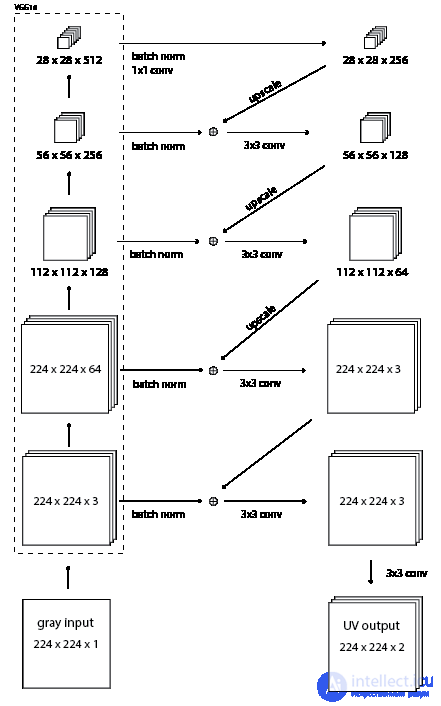
This model uses much less memory. I managed to run it with 6 images per batch. Here is a comparison of training this new residual encoder model and the original hypercolumn model.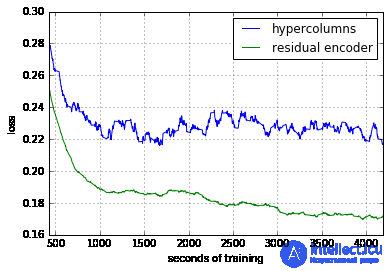
Let's compare some manual colorizations from the Reddit colorization subreddit with images colorized automatically by the model. Of course, you would expect manual colorization to always be better. The question is how bad the automatic colorization is.
Left
original black-and-white
Middle
automatic colorization using the residual encoder model (after 156,000 iterations, 6 images per batch)
Right
manual colorization from Reddit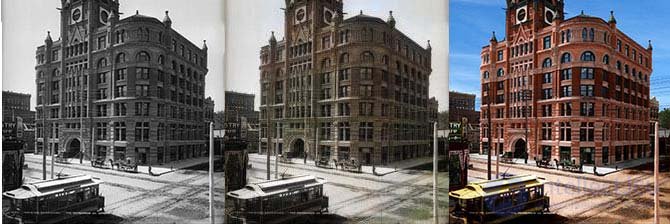
The model did poorly here. There are light shades of blue in the sky, but otherwise we get only a sepia tint. Further training would probably colorize the rest of the sky, but it would probably never give a distinct hue to the building or the train car. 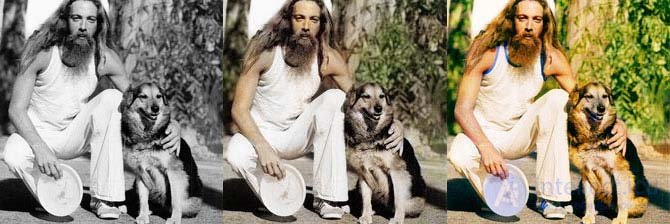
A decent colorization! It got the right skin tone, did not color his white clothes, and added a little green to the background. It did not add the right tone to his hands and lacked the rich saturation that makes the hand-colored version popular. 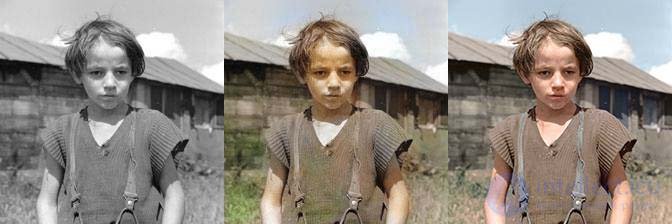
The sky is only slightly blue, and his chest is not colored. It also colored his shirt green, possibly because the fur has a vegetation-like texture and is at the bottom of the image. Otherwise, not bad. 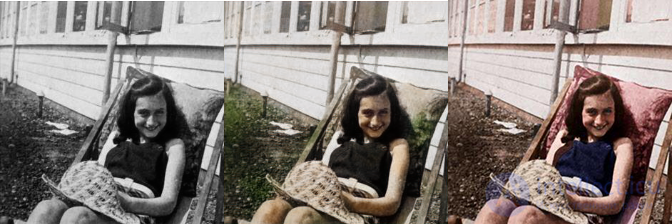
This is Anne Frank in 1939. The model cannot colorize pillows, because pillows can be any color. Even if the training set were full of pillows (which I don't think it is), they would all be different colors, and the model would probably end up averaging them to a sepia tint. A human can pick a random color, and even if it is wrong, it will look better than no color at all. 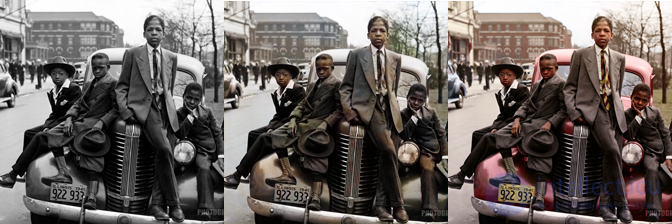
Another bad colorization. Information about the car's color is lost. The person who colorized this photo simply guessed that it was red, but it could just as well have been green or blue. The model seems to produce an average of the colors of the cars it has seen, and this is the result. (Reddit post)
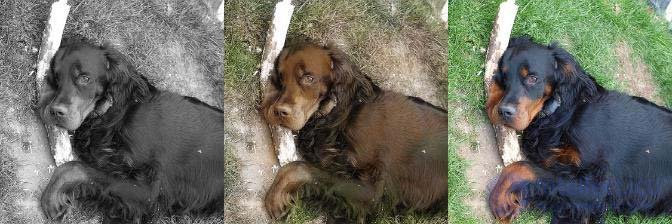
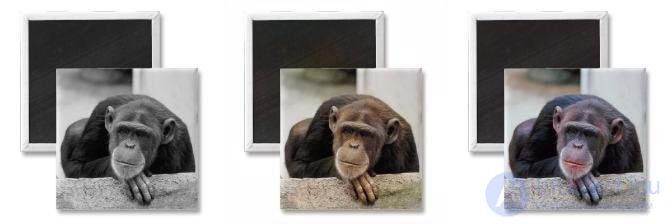
Likes to color black animals brown?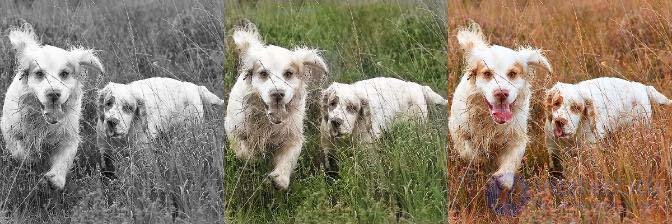
Likes to color grass green.
Here is the trained TensorFlow model to play with:
colorize-20160110.tgz.torrent 492M https://tinyclouds.org/colorize/colorize-20160110.tgz.torrent
This model contains the VGG16 model by Karen Simonyan and Andrew Zisserman (which I converted to TensorFlow). It is available for non-commercial use only.
It sort of works, but there is still a lot to improve:
convolutional neural networks (CNN)

Comments