
Lecture
| CSS 1 | CSS 2 | CSS 2.1 | CSS 3 |
|---|---|---|---|
Defines which side an element is aligned to, with the other elements wrapping around it on the other sides. When the value of the float property is none, the element is displayed on the page normally, although one line of the wrapping text is allowed to be on the same line as the element itself.
float: left | right | none | inherit
Example
<!DOCTYPE html>
<html>
 <head>
  <meta charset="utf-8">
  <title>float</title>
  <style>
   .layer1 {
    float: left; /* Wrapping on the right side */
    background: #fd0; /* Background color */
    border: 1px solid black; /* Border parameters */
    padding: 10px; /* Padding around the text */
    margin-right: 20px; /* Right margin */
    width: 40%; /* Block width */
   }
  </style>
 </head>
 <body>
  <div class="layer1">
   Lorem ipsum dolor sit amet, consectetuer adipiscing elit, sed diem nonummy nibh
   euismod tincidunt ut lacreet dolore magna aliguam erat volutpat.
  </div>
  <div>
   Duis autem dolor in hendrerit in vulputate velit esse molestie consequat, vel
   illum dolore eu feugiat nulla facilisis at vero eros et accumsan et iusto odio
   dignissim qui blandit praesent luptatum zzril delenit au gue duis dolore te
   feugat nulla facilisi.
  </div>
 </body>
</html>
The result of this example is shown in fig. 1.
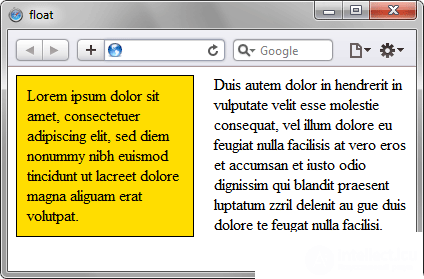
Fig. 1. Applying the float property
[window.]document.getElementById("elementID").style.styleFloat
[window.]document.getElementById("elementID").style.cssFloat
Internet Explorer 6 has a bug that doubles the value of the left or right margin for floated elements nested inside parent elements. The margin that is doubled is the one adjacent to the side of the parent. The problem is usually solved by adding display: inline for the floated element. This browser also adds a 3px offset (the so-called "three-pixel bug") in the direction specified by the float value.
Internet Explorer up to and including version 7.0 does not support the inherit value.

Comments