
Lecture 4 min.
React Native is an open-source cross-platform framework for developing native mobile and desktop applications in JavaScript and TypeScript, created by Facebook, Inc. React Native supports platforms such as Android, Android TV, iOS, macOS, tvOS, Web, Windows and UWP, allowing developers to use the capabilities of the React library outside the browser to build native applications with full access to the platforms' system APIs.
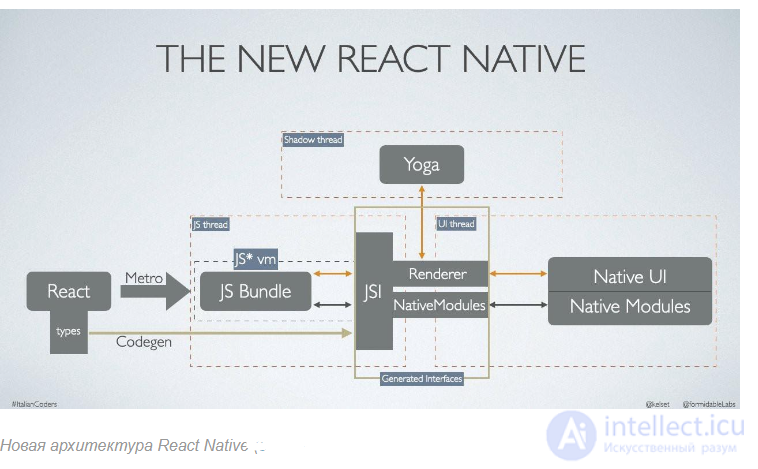
The core principles of React Native are almost identical to those of React, except that React Native manages not the browser DOM but platform user interface components. The JavaScript code written by the developer runs in a background thread and interacts with platform APIs through an asynchronous messaging system called the Bridge. In 2021, the Bridge is expected to be replaced by a more performant synchronous messaging model that supports the zero-copy paradigm.
Although the styling system of React Native (the way visual properties of interface elements are configured) has a syntax similar to CSS, the framework does not use HTML or CSS technologies as such.[14] Instead, for each of the operating systems the framework supports, software adapters are implemented that apply the style specified by the developer to the platform interface element.
React Native also lets developers reuse existing code written in other programming languages, for example Java or Kotlin for Android and Objective-C or Swift for iOS. React Native also supports integration into existing applications; for example, part of a mobile application's interface can be implemented in React Native and part with purely platform-native tools.
A Hello, World program in React Native looks like this:
import { AppRegistry, Text, View, Button } from 'react-native';
import React from 'react';
const HelloWorldApp = () => {
  const [count, setCount] = React.useState(0);
  const incrementCount = () => {
    setCount((prevCount) => prevCount + 1);
  };
  return (
    <View>
      <Text>Hello world!</Text>
      <Text>{count}</Text>
      <Button onPress={incrementCount} title="Increase Count" />
    </View>
  );
};
export default HelloWorldApp;
AppRegistry.registerComponent('HelloWorld', () => HelloWorldApp);
React Native is a framework for developing mobile applications that lets you use the JavaScript programming language and the React library to build native mobile applications for iOS and Android. Here are the main concepts and elements of React Native:
Components: React Native is built on the concept of components. Components are reusable blocks of the user interface that combine logic and visual elements.
Example of a component:
State: State is an object that holds data managed by a component. When a component's state changes, React Native re-renders the component to display the new state.
Navigation: React Navigation is a library for managing navigation in React Native applications. It lets you create stack, tab and other types of navigation.
Device APIs: React Native provides many APIs for interacting with the device, such as the camera, geolocation, sensors and more.
Style management: Styles in React Native are defined using JavaScript objects rather than CSS. Styles can be inline or defined in separate files.
These basics will help you start developing mobile applications with React Native. Consult the official React Native documentation to deepen your knowledge and skills.

Comments