
Lecture 6 min.
Cross-platform (multi-platform) is the ability of software to work with several hardware platforms or operating systems. It is achieved through the use of high-level programming languages and development and runtime environments that support conditional compilation, linking and execution of code for different platforms. A typical example is software designed to run on the Linux and Windows operating systems at the same time.
Cross-platform compatibility, also known as multi-platform compatibility, is a property of software that allows it to run on several platforms or operating systems without significant changes. It is an important characteristic for application development, as it provides broader user reach and saves development resources. Here are several key aspects of cross-platform compatibility:
Programming language: Using programming languages that support cross-platform development. Some popular cross-platform languages include Java, JavaScript (using frameworks such as React Native or Flutter), C# (using Xamarin) and Python.
Frameworks and libraries: Using cross-platform frameworks and libraries that provide abstractions over platform-specific characteristics. For example, Xamarin, Flutter, React Native, Electron and Qt.
User interface: Developing user interfaces that adapt to the standards of each platform. Some frameworks allow shared code for business logic and have the ability to create native user interfaces.
Testing: Comprehensive testing on various platforms to ensure compatibility and stable operation of the application.
Examples of cross-platform applications include Microsoft Office, Slack, Skype, and many mobile applications built with the React Native and Flutter frameworks. Cross-platform compatibility is a key element in improving development efficiency and provides broader access to applications for users of different platforms.
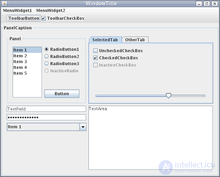
Swing looks the same on all operating systems.
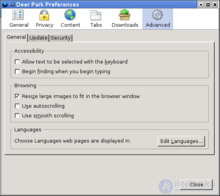
Mozilla Firefox, which uses XUL, styles its windows to match the OS (in this case, Linux).
Most modern high-level programming languages can be called cross-platform. For example, C, C++, Free Pascal, FreeBASIC and PureBasic are cross-platform languages at the compilation level, meaning compilers exist for these languages for various platforms. This makes it possible, given proper code quality, not to rewrite the program's core engine; only the special system-dependent parts change.
Standardized runtime libraries are no less important for cross-platform compatibility. In particular, the C language library (POSIX) has become a standard. Large cross-platform libraries include Qt, GTK+, FLTK, STL, Boost, OpenGL, SDL, OpenAL and OpenCL.
There are cross-compilers: compilers that generate executable code for a platform different from the one on which the compiler itself runs.
PHP, Perl, Python, Tcl and Ruby are cross-platform interpreted languages; their interpreters exist for many platforms.
The ActionScript Virtual Machine, Java Virtual Machine and .NET runtime environments are also cross-platform, but their input is not source text but intermediate code. Therefore, programs written in ActionScript, Java and C# can be run under different operating systems without prior recompilation.
On different operating systems and environments, regardless of how running on them is technically achieved, standard interface elements have different sizes. Therefore, simple fixed positioning of interface elements is impossible: in another operating system (environment) they may overlap one another, "blur" or "get drunk". There are several approaches:
In any case, at least minimal testing is required in other operating systems and environments, since layout errors are possible.
Even despite the generally broad standardization of hardware and software, a programmer often has to set up branches for different operating systems and environments, enabling one or another through conditional compilation.
For example, the Mozilla Firefox browser has different sets of icons for different operating systems.
A large number of application programs are also cross-platform. This quality is especially pronounced in programs originally developed for Unix-like operating systems. An important condition for porting them to other platforms is the platform's compatibility with POSIX recommendations, as well as the existence of a GCC compiler for the platform being ported to.
Modern operating systems are also often cross-platform. For example, open-source operating systems (in particular NetBSD, Linux, FreeBSD and AROS) can run on several different hardware platforms. The most common are x86, m68k, PowerPC, Alpha, AMD64 and SPARC. ("Elbrus OS" is nothing other than a deeply modified system for the "Elbrus" platform. But "Elbrus OS" is also available for the "Elbrus-SPARC" platform, which is an implementation of the SPARC platform by MCST, and for the x86 platform.) The first release of Microsoft Windows NT 4, released in 1996, supported four platforms (x86, Alpha, MIPS and PowerPC); in later versions of Windows NT only x86 support remained. Modern Microsoft Windows can run on both the Intel x86 and the Intel Itanium platforms. (More precisely, for Itanium there are only Windows 2000/XP, Windows 2003 and Windows 2008 versions, after which Itanium support was wound down.) The NetBSD operating system is considered the most multi-platform ; it has been ported to most currently existing platforms.
A number of IDEs, including Free Pascal, Lazarus and Qt Creator, work on different operating systems: Linux, Windows and others .
If a program is not intended to be run on a particular platform, but an emulator exists for that platform of the program's base platform, then the program can be run in the emulator's environment.
Running a program in an emulator usually results in reduced performance compared with similar programs for which the platform is native, since a significant part of the system's resources is spent on performing the emulator's functions.

Comments