
Lecture 15 min.
SMS (Short Message Service) is a mobile service for sending short messages between mobile subscribers or online services. Originally, SMS was developed as an additional feature for GSM (Global System for Mobile Communications) networks. The first SMS message was sent in the United Kingdom in December 1992 and was a Christmas greeting. The first commercial network supporting short message transmission was put into operation in Sweden in 1993. In 2020, sending SMS through ordinary mobile phones and via satellites in low Earth orbit was planned.
Previously this service was in low demand, and in 1995 there was, on average, less than half a message per month per subscriber. This was primarily due to the limited number of phones that supported SMS. By 2000, demand for the service had grown, reaching about 40 messages per month per subscriber. In the 2020s, demand for SMS fell, except for bulk SMS campaigns. Because of this high demand, the SMS service was included as a mandatory feature in subsequent mobile communication standards, such as UMTS (Universal Mobile Telecommunications System), LTE (Long Term Evolution) and others.
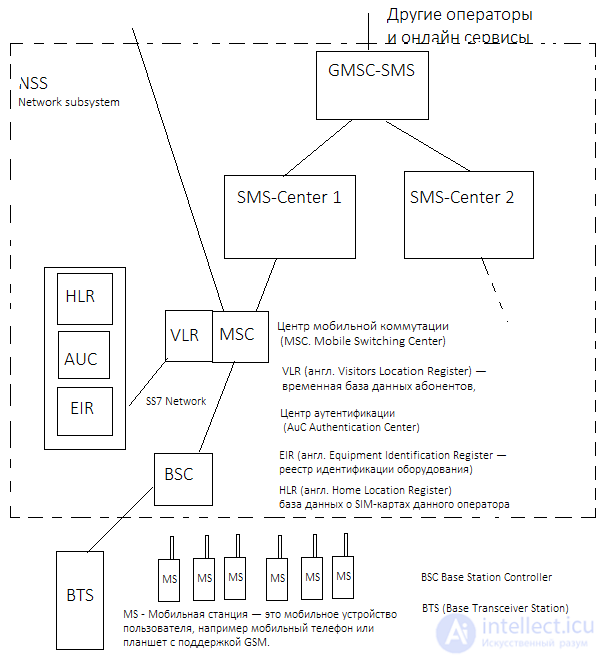
The SMS (Short Message Service) service in the GSM (Global System for Mobile Communications) standard and in other networks works on the basis of certain principles. To provide this service, the operator's network contains the following key elements:
SMS Center (SMSC): This is the central element responsible for managing the SMS service. It is part of the NSS (Network Switching System) and performs several important functions:
GMSC-SMS (Gateway Mobile Switching Center for SMS): This element acts as a gateway between the operator's network and the networks of other operators. It is used to route SMS messages to recipients located outside the current operator's network.
Note that in some cases one of the SMS centers can perform the functions of both the SMS center and the GMSC-SMS, providing all the functionality needed to process and transmit SMS messages. This depends on the specific architecture and settings of the operator's network.
These network elements work together to ensure reliable and efficient delivery of short text messages between subscribers in a cellular network.
The principle of the SMS (Short Message Service) service includes the following steps:
Composing the message: The subscriber types a text message on their mobile device using the keyboard. Each key on the keypad corresponds to several characters, and subscribers press the appropriate keys to enter text.
Length limit: For Latin characters the maximum message length is 160 characters, and for Cyrillic it is 70 characters. This is due to the different amount of data required to transmit characters of different alphabets.
Specifying the recipient: The user also enters the phone number of the recipient for whom the message is intended.
Transmitting the message over the network: The message is transmitted over the operator's network, usually via signaling channels; voice channels are not used. The message is sent through the BSS (Base Station System) to the MSC (Mobile Switching Centre).
Routing to the SMS center: The MSC routes the message to the SMS center, which performs the following actions:
Handing over to other operators: If the recipient subscriber is outside the service area of the current MSC or belongs to another operator's network, the message is passed to the GMSC-SMS, which acts as a gateway to other operators' networks.
Unavailable recipient: If the recipient subscriber is temporarily unavailable, the message is stored in the SMS center. After a certain time, an attempt is made to deliver the message again. If the recipient remains unavailable, the waiting time is increased and the process repeats. Depending on the operator's settings, the message may be deleted after a certain number of unsuccessful attempts.
Delivery confirmation: In some cases, a delivery confirmation for the message may be sent to the sender.
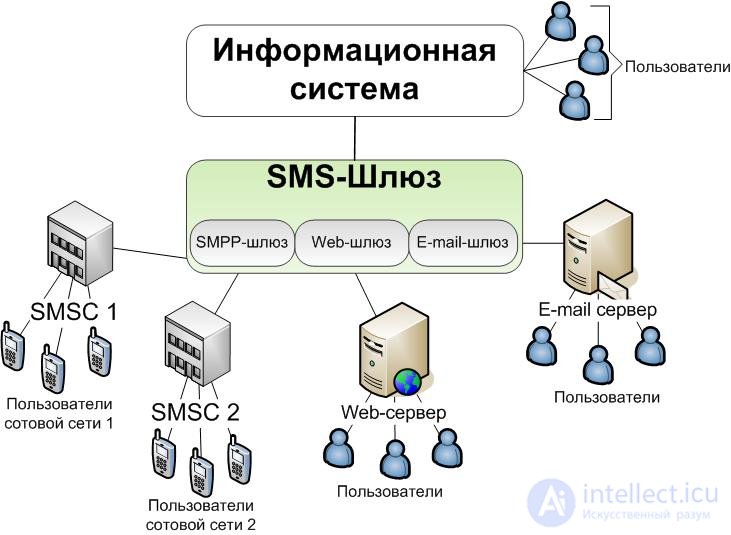
This process ensures the transmission of text messages between subscribers in a mobile network, and it is the basis of how the SMS service works.
The SMS (Short Message Service) service has many applications and uses, making it not only popular but also profitable for mobile operators. Some of the most significant and interesting uses of SMS include:
Cell Broadcasting: This service allows operators to send messages to all subscribers located in a particular area. It can be used to warn about emergencies, natural disasters and other important events.
Remote control of equipment: SMS can be used to remotely control various devices, such as security systems, car immobilizer systems, home automation systems and much more. By sending SMS commands, these devices can be monitored and controlled.
Information services: Many information services, such as bank notifications, news, weather forecasts, schedules, medical notifications and much more, rely on SMS to deliver information to subscribers.
Marketing and advertising: SMS campaigns are widely used in marketing and advertising. Operators and companies can send advertising messages, special offers and discounts to their subscribers.
Verification and authorization: SMS codes are used to confirm identity and authorize logins to internet services, banking systems and other online transactions.
Personal communication: Despite the many commercial applications, SMS remains a popular means of personal communication between subscribers.
These diverse uses of SMS make it an important element of modern mobile communication and exhaust its potential as a tool for communication, information and commercial activity.
Sending SMS messages in bulk messaging systems can be a difficult task, especially when large volumes of messages have to be processed. The SMPP (Short Message Peer-to-Peer) protocol is one of the standard ways for SMS centers and client systems to interact in order to send SMS. However, working with SMPP can be labor-intensive, and building your own infrastructure for sending SMS messages requires significant effort and resources.
SMPP is an application-layer protocol based on the exchange of PDUs and carried over TCP/IP or X.25 sessions to transmit SMS and USSD messages. SMPP is usually used with a persistent connection, which helps save time. SMPP uses a client-server communication model.
The SMPP protocol is a peer-to-peer messaging protocol. This means that every node/hub server is an equal peer. In the simplest case, the SMS exchange scheme looks like this:
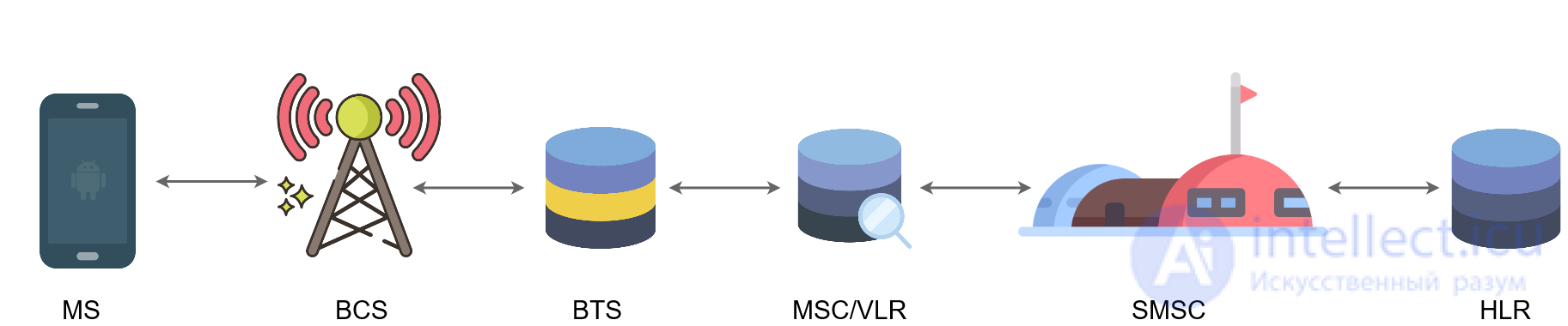
However, if a national operator has no route to some remote region, it asks an intermediary, an SMS hub, for help. Sometimes, to send a single SMS, a chain has to be built across several countries or even continents.
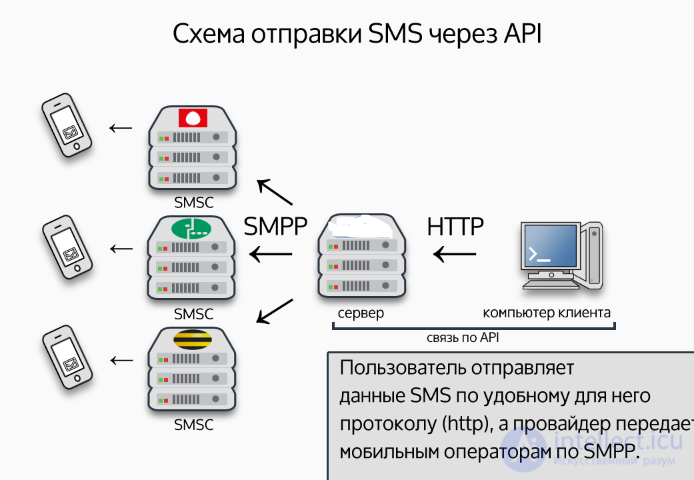
This is why SMS providers (or SMS gateways) have become popular options for sending SMS in bulk campaigns. They provide ready-made infrastructure and an API that lets clients send SMS messages with minimal effort. They usually support various ways of interacting, including HTTP, HTTPS, SMTP and other protocols.
Here is how it usually works:
The client sends a request to send an SMS message to the SMS provider's server using an API or other means of communication.
The SMS provider receives the request and converts it into a suitable format, for example a PDU (Protocol Data Unit), which the SMS center understands.
The SMS provider then passes the message to the SMS center for sending to the specified subscriber phone numbers.
The SMS center processes the message and tries to deliver it to the recipients. If the subscribers are temporarily unavailable, the message can be stored and resent later.
After the message is sent, the client can receive from the SMS provider a confirmation of successful delivery or information about the delivery status.
Using SMS providers simplifies the process of sending SMS messages, freeing clients from having to set up and maintain complex infrastructure for working with SMPP. This makes it possible to quickly build and scale bulk messaging solutions and to save time and resources.
An API (Application Programming Interface) provides clients with a simple and convenient way to send SMS messages without having to worry about the complexities of the SMPP protocol or configuring SMS center equipment.
Using the API, clients can create requests that contain the subscriber's number, the message text, the signature and other necessary data. The SMS provider's API then takes this data, processes it and passes it to the SMS provider's server for further processing and delivery of the messages.
An SMS provider's API offers these advantages:
Ease of use: Clients do not need to understand the technical details of the SMPP protocol in depth. They can use a convenient API interface to send messages.
Development speed: Using an API makes it possible to quickly integrate SMS sending into applications and systems without lengthy development of your own infrastructure.
Support for different platforms: An SMS provider's API can be used on different platforms, including websites, mobile applications, servers and others.
Reports and monitoring: SMS providers usually offer delivery reports and monitoring, which allow clients to track the status of sent messages.
Support for many features: The API lets clients use various functions, such as scheduled sending, bulk messaging and others.
Using an SMS provider's API simplifies and automates the process of sending SMS messages, which makes it the preferred choice for businesses and developers who want to integrate SMS campaigns into their applications and services.
| SMPP | API |
| requires specialized knowledge | adapts to the customer's capabilities |
| used for a direct connection to the SMSC | used for connecting to the SMS provider's equipment |
| requires large investments in software development | reduces the cost of software development |
| the benefits are noticeable only with a large volume of SMS traffic | the benefit decreases as the volume of SMS traffic grows |
An SMS gateway is an online service that allows you to create, send and also receive SMS messages without using a mobile phone, with the help of various automated control systems.
The most common uses of SMS gateways:
Bank account transaction notifications: SMS notifications are important for banks and financial institutions to inform account holders about financial operations, such as withdrawals or deposits, bill payments and other transactions. This helps improve security and gives customers up-to-date information about the state of their accounts.
Confirming registration on a website or in a system: When registering on a website or in an online system, SMS messages can be used to verify the user's identity. A confirmation code sent by SMS provides security and protection against unauthorized access.
Informing about order status: Companies that sell online often use SMS to inform customers about the status and fulfillment of an order. This is important for increasing customer satisfaction and trust in the brand.
Informing about new promotions and services of companies: SMS campaigns are widely used for marketing and for informing customers about new products, promotions, discounts and services of companies. SMS marketing is effective because text messages can be delivered quickly and read by customers almost instantly.
In addition to the purposes listed above, SMS campaigns are also used in medical organizations to remind patients of doctor's appointments, in educational institutions for notifications about schedules and important events, and in government agencies for emergency notifications and warnings.
SMS gateways give companies and organizations a powerful tool for communicating with customers and the customer base, which is why they are widely used in many fields of activity.
A gateway, in this context, is a system that allows you to send and receive SMS. In fact, using another gateway's API to send messages and creating your own API to receive SMS turns what you have written into a gateway.
If you are interested in how large gateways that process millions of SMS a day work, you should look toward the SMPP protocol or, if you want to dig even deeper, SS7.
SMPP (Short Message Peer-to-Peer protocol) is a protocol that describes the interaction of an end client with an SMS server (SMSC). It is used to transmit SMS and USSD messages.
So if the goal is to send a certain number of SMS, you need to find a good provider and a suitable type of connection. An HTTP API, which is the most convenient to work with from PHP, is now offered by nearly every provider.
You can rent a short number from any of the operators or from aggregators (what will be cheaper is not even a number but a separate prefix; in that case you receive messages over HTTP from the aggregator, and you can send either through the aggregator or through external gateways).
If you consider your own server, for example to overcome the limit of five hundred SMS per day, one option is to buy several SIM cards with vanity numbers from different providers and assemble everything yourself, for example on GSM modems. For receiving messages, besides a modem, you can also rent an industrial service (many providers offer one, called SIM hosting).
Designing SMS campaigns and internet gateways is an important process, and the choice between a ready-made internet gateway and deploying your own equipment depends on a number of factors, including budget, technical resources, scaling needs and technical expertise. Here are some key points and recommendations:
Budget and resources:
Quality of communication channels:
Scalability:
Technical support and maintenance:
Legal requirements:
Reports and monitoring:
So, the decision about designing SMS campaigns and internet gateways depends on your specific needs, budget and resources. It is important to carry out a thorough analysis and choose the most suitable path for your project.

Comments