
Lecture 9 min.
A dialog box in a graphical user interface is a special interface element, a window intended to display information and/or obtain a response from the user. It got its name because it provides two-way computer-user interaction (a "dialog"): telling the user something and waiting for a response.
Dialog boxes are divided into modal and modeless, depending on whether they block the user's ability to interact with the application (or the system as a whole) until they receive a response.
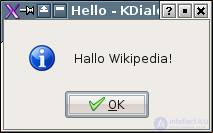
The simplest type of dialog box is the message box (also called an alert box), which displays a message and requires the user to confirm that the message has been read. This usually means clicking the OK button. A message box is intended to inform the user that an action has completed, to display an error message, and for similar cases that do not require the user to make any choice.
Although the message box is a frequently used design pattern, usability experts criticize it as an ineffective solution to the problem it addresses (protection against erroneous user actions), especially since better alternatives exist.
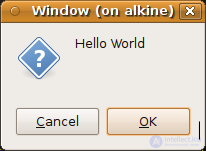
Dialog boxes in many programs have OK and Cancel buttons. By clicking the first, the user expresses agreement with what the dialog box currently shows and thereby closes it, putting the changes made in it into effect; the second closes the window without applying them. There are variants with a single OK button, in informational windows that do not imply any changes, and with OK, Apply and Close buttons, in windows where, in the program author's view, the user can evaluate the results of changes without closing the window and, if the result is unsatisfactory, continue making changes.
It is also considered good practice to provide a help system in dialog boxes. This is usually implemented either as a Help button that opens a documentation page describing how to work in that dialog box, or (in Windows) as a button with a question mark in the window's title bar; clicking it switches the mouse into a one-time context help mode: clicking an element of the dialog box in this mode displays a description of that element.
Modeless dialog boxes are used when the information displayed in the window is not essential for the further operation of the system. The window can therefore stay open while the user continues to work with the system. A kind of modeless window is a toolbar or "palette" window, if it is detached or can be detached from the application's main window, because the controls on it can be used in parallel with the application's work. However, such windows are rarely called "dialog boxes".
In general, good software design rules suggest using this type of dialog box, since it does not force the user into a particular (possibly non-obvious to them) sequence of actions. An example is a dialog box for changing some properties of the current document, such as the background or text color. The user can type text without paying attention to its color, but at any moment can change the color using the dialog box. (This example is not necessarily the best solution. The same functionality can be provided by a toolbar located in the main window.)
A modal window in a graphical user interface is a window that blocks the user's work with the parent application until the user closes that window. Dialog boxes are mostly implemented as modal. Modal windows are also often used to draw the user's attention to an important event or a critical situation .
As a rule, modal windows are used when it is necessary to:
A modal window completely blocks the entire workflow until it is closed. The user may not realize that the window requires their attention, while at the same time not understanding why the program's main window does not respond to their actions.
Since creating modal windows is an integral capability of any GUI development environment, these windows continue to be used in practice. Proponents of this technique also believe that a large number of dialog boxes between which one can freely switch may confuse the user, and that it is therefore better to reduce the input options to a minimum at any given moment.
Ergonomics specialists, on the contrary, believe that in the vast majority of situations, restricting the user's freedom of action and enforcing a strict sequence of those actions significantly reduces convenience and frustrates users . Using modal windows forces the user to concentrate on one aspect of the task, whereas in practice they may work with large amounts of information placed in various windows of the application and constantly switch between them. In such cases, the use of modal windows reduces work efficiency.
Creating a window that was modal with respect to the desktop could break the accessibility of the whole system. For example, such a feature was provided in Microsoft Windows 3.x, 95 and 98, but it was removed from NT and later versions, and a window's system modality no longer blocked access to the system .
In all Microsoft Windows versions, an open modal window completely blocks interaction with the parent window, including preventing it from being resized, moved elsewhere on the screen or minimized. In some cases, because of software flaws, modal windows may end up behind the parent window when switching tasks, which makes any interaction with the program impossible.
When many applications are open, it becomes difficult to identify the parent window, especially if the modal window's title does not contain enough information for this (for example, when several identical applications are open). In that case one has to try interacting with all the windows until the blocked one is found.
To overcome some of these drawbacks, OS X developed a special concept of modal windows . Unlike ordinary modal windows, OS X modal windows are part of the parent window. In OS X, modal windows slide out from under the title bar of the parent window and are attached to it, which avoids confusion in identifying the parent window. The modal window does not prevent the parent window from being moved or resized.
A modal window is one that blocks the user's work with the parent application until the user closes it. Dialog boxes are mostly implemented as modal.
For example, application settings dialogs are modal, because it is easier to implement a mode in which all the changes made to the settings are applied or canceled at once, and from the moment the user decides to change the application's settings and opens the settings dialog until the moment they either put the new settings into effect or reject them, the application waits for the user's decision.
Displaying windows in modal mode is also practiced in other cases, when the application needs additional information to continue the work it has started, or simply the user's confirmation of consent to perform a requested sequence of actions if it is potentially dangerous.
Usability specialists consider modal confirmation prompts to be poor design decisions, because they can lead the user into so-called "mode errors". Dangerous actions should be undoable wherever possible, whereas modal confirmation prompts, which startle the user with their unexpected appearance, are after a while skipped automatically (since the user gets used to them) and therefore do not protect against dangerous actions .
To mitigate the drawbacks of modal dialog boxes (blocking access to the application, or even to the whole system), the concept of window-level (or document-level) modality was proposed. This type of dialog box was introduced, for example, in Mac OS X, where it is called a "document modal sheet".
When a dialog box of this type appears, work with the application's other windows is not blocked. Because the dialog window does not overlap the parent window but is attached to it, it remains possible to resize and move the parent window itself. Naturally, the contents of the parent window remain inaccessible until the modal dialog box is closed.

Comments