
Lecture
The efficiency of executing SQL queries and their related data analysis operations plays a key role in managing large volumes of information, which is especially important for modern companies and organizations. As data volumes grow, the requirements for query speed become increasingly significant. However, many specialists face the problem of slow query execution, which negatively affects the system's response time and leads to delays in analytics and decision-making. The causes of this problem can vary: lack of optimal indexes, non-optimal queries and JOIN operations, inefficient use of server resources and poor database settings, insufficient memory, and other hardware-level limitations. In addition, a large amount of outdated data and network issues can further aggravate the situation. Thus, understanding the causes affecting SQL query performance and the methods for optimizing them becomes a necessary step for improving the overall efficiency of working with databases.
Basic terms
cost — the cost of executing this node and all its child nodes. The first number shows the cost before obtaining the first result row, and the second — the cost of all rows in full. Execution cost is measured in certain conventional units. They are needed mainly for comparing plans with each other — this can be useful when there are several ways of writing the same query and you need to choose the most efficient one.
EXPLAIN - the expected query plan, without execution
SQL optimization — is the process of improving the performance of database queries in order to reduce execution time and resource usage (such as CPU and memory).
There are several reasons why SQL query execution and related data analysis tasks may slow down. Here are the main ones:
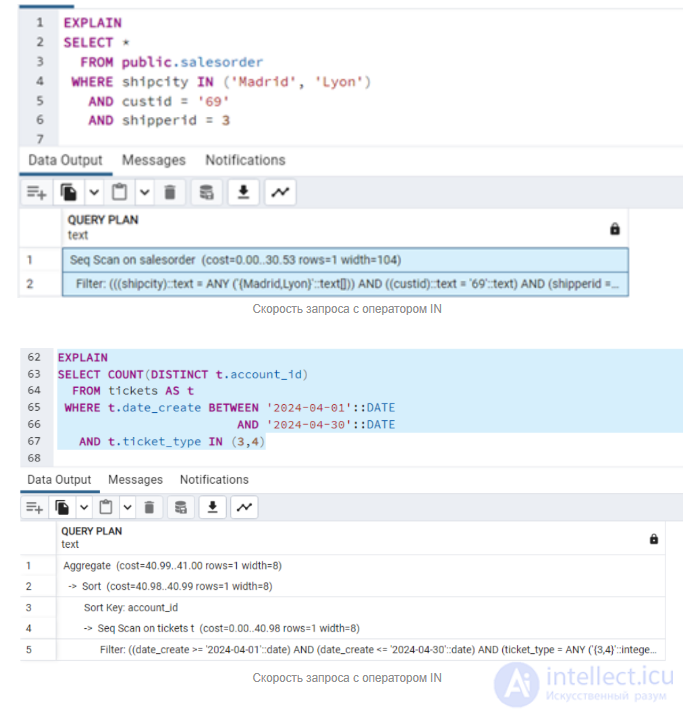
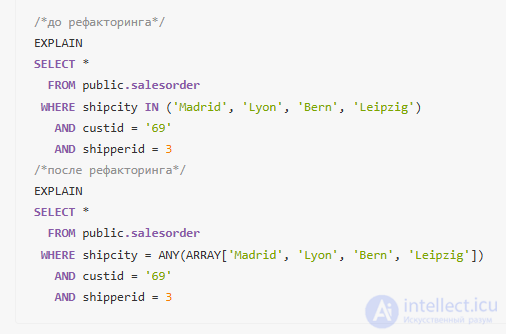
In SQL, the IN operator is used to check whether a value is contained in a list of values. This is a more convenient way of writing than using several OR conditions. It has been found that with a large number of values, query speed drops significantly when IN is used. This happens because the value of the column of each row is compared sequentially with each of the possible options, thereby loading the processor.
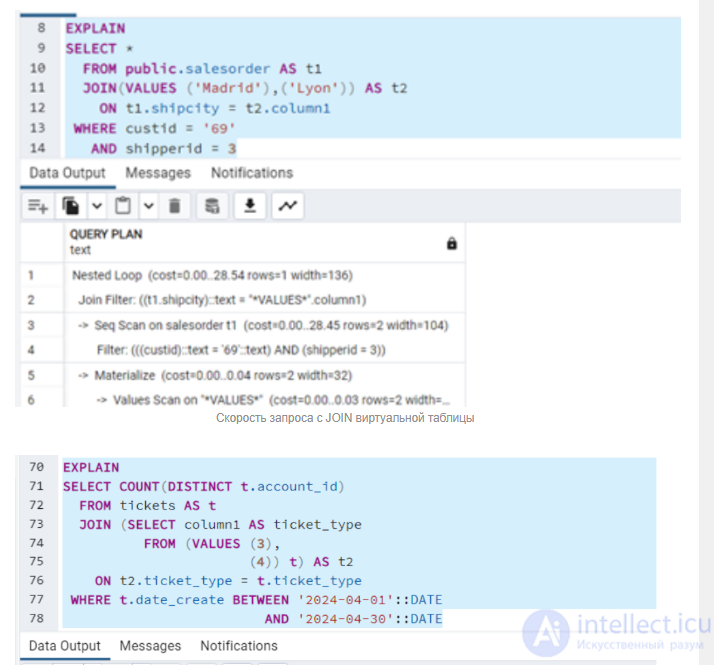
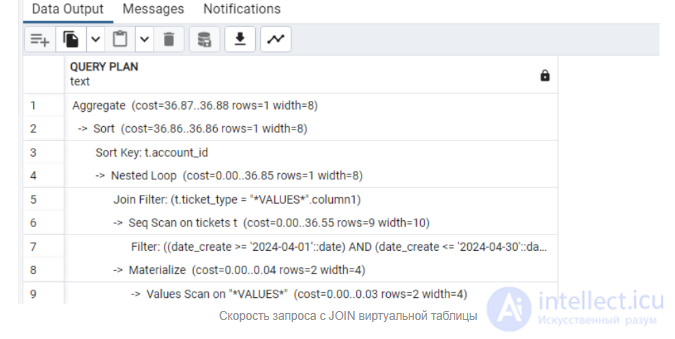
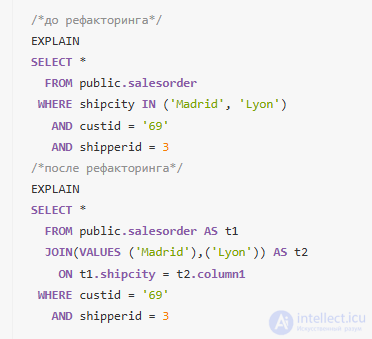
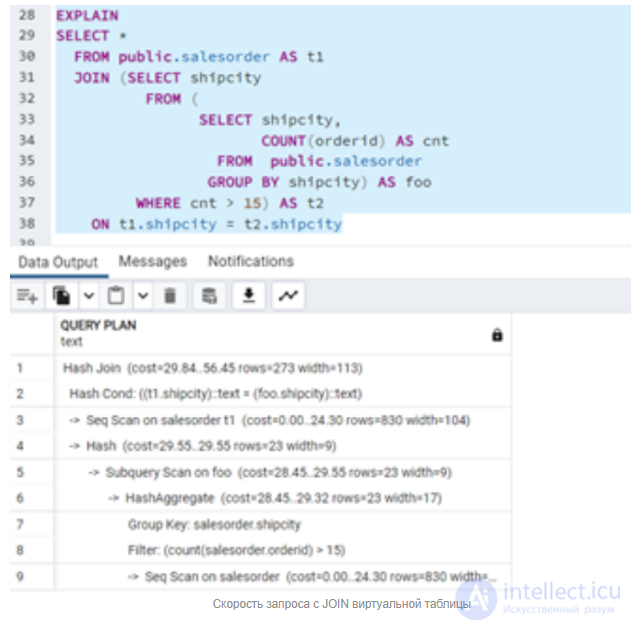
To avoid a full table scan, you can use a JOIN with a virtual table. The VALUES command represents a list of values as a table.
In SQL, the VALUES operator is used to create a virtual table that can be used in queries. This can be useful when you want to perform a selection, insertion, or other operations with a dataset that is not stored in a physical table.
This operator checks whether there is at least one element in the iterable object that is true. It stops execution as soon as it finds the first true element, which can be faster than checking the entire object with IN. This item applies to PostgreSQL only.
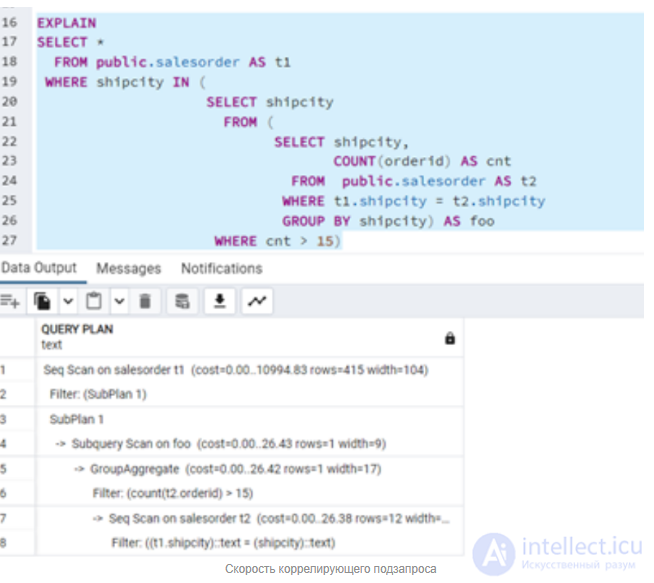
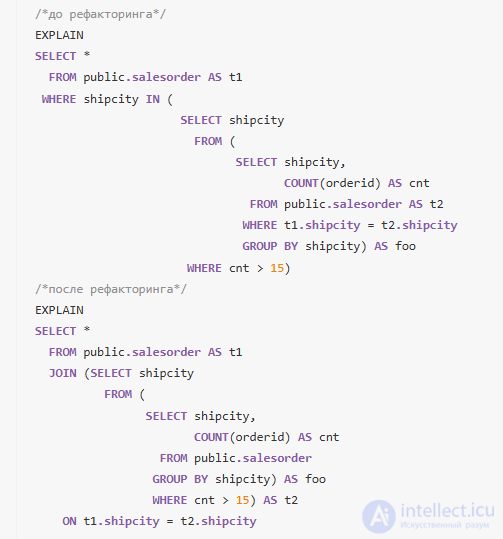
A correlated subquery — is a subquery that references columns of the outer query. Unlike non-correlated subqueries, which can be executed independently of the outer query, correlated subqueries require context from the outer query in order to execute.
The main problem of the query — is repeated reading of data. This is an anti-pattern.
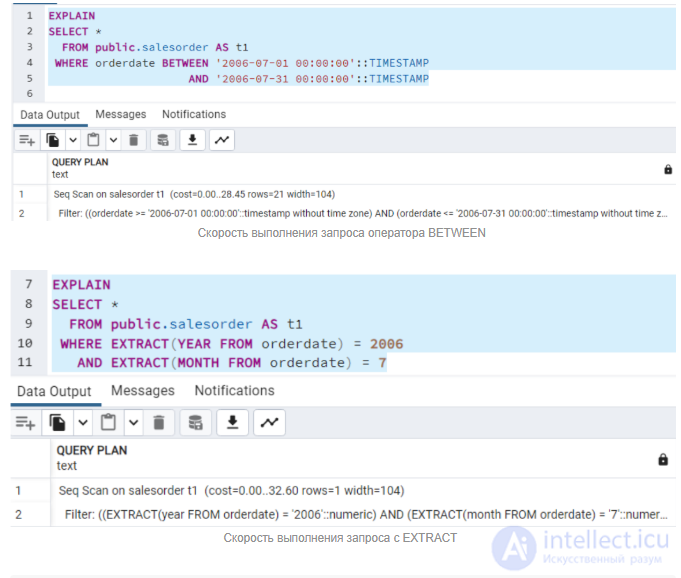
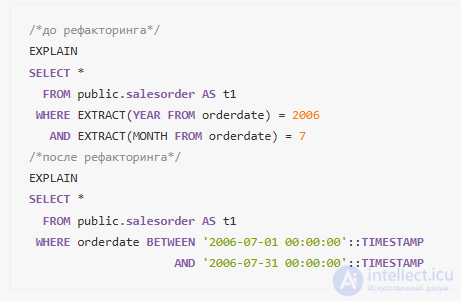
The BETWEEN operator performs a comparison of values and, as a rule, executes faster than functions, since it can use indexes, which allows the query execution to be optimized. Whereas EXTRACT and DATE_PART require processing the data to extract the needed information before the comparison, which can be less efficient.
The BETWEEN operator in SQL is used to select values within a specified range. It allows filtering of selection results by defining an interval between two values. The operator can be used with numeric, string, and temporal data.
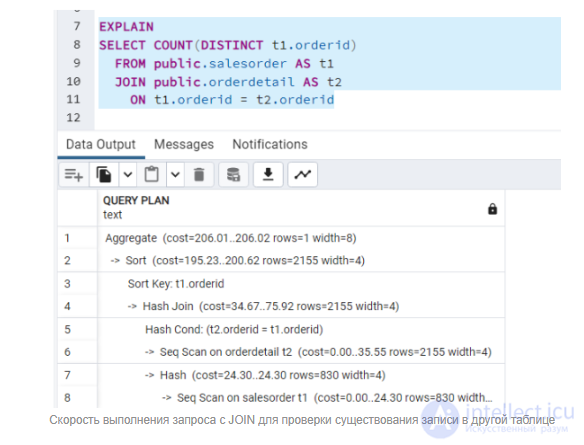
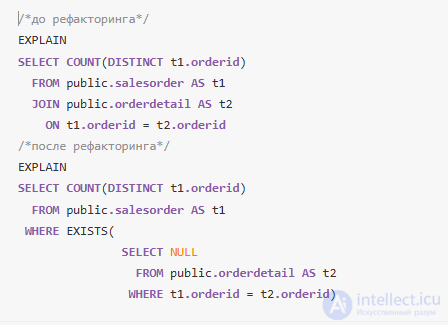
The EXISTS operator in SQL is used to check for the existence of records in a subquery. If the query returns at least one row, EXISTS returns TRUE, otherwise — FALSE
The EXISTS operator will be more efficient than JOIN, because the server does not read unnecessary rows from the table when it only needs to make sure that a record exists in some table.
Extracting only the necessary columns improves performance
Limiting the number of rows can speed up data output.
Do not use the SUBSTRING function in conditions. Using LIKE allows indexes to be used
Creating intermediate results during aggregation. Using a CTE can help optimize calculations
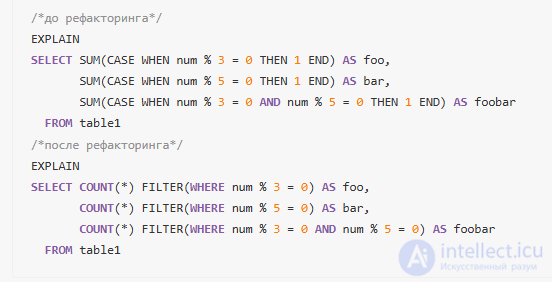
To count the number of rows that meet certain conditions without adding a WHERE operator, you can use the SUM aggregate function together with CASE. This will be more optimized than using the UNION ALL set operator, but less readable. For a more readable query – use the FILTER operator.
In SQL, the FILTER operator is used in combination with aggregate functions to limit the set of data to which these functions are applied. This allows you to perform aggregation only on certain rows that satisfy the given conditions

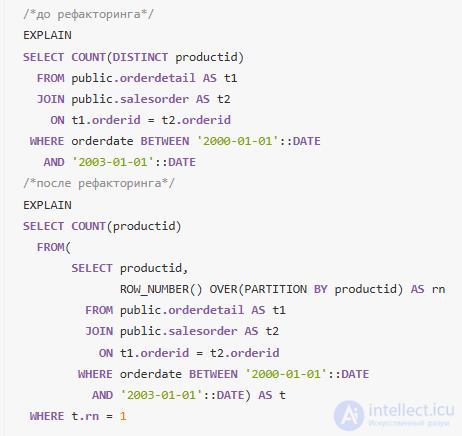
If you need to get unique values and optimal execution time is important, consider using ROW_NUMB ER() with grouping, especially if you can take advantage of indexes.
DISTINCT – This operation is used to select unique values from a column or set of columns. With large volumes of data the operation can be slow, since it needs to scan all rows to identify unique values.
ROW_NUMBER() – This function assigns a unique number to each row in the result set, based on a given sort order. As a rule, it is faster than DISTINCT if you simply want to get unique rows without needing to check each element for uniqueness, especially if you already have an indexed column.
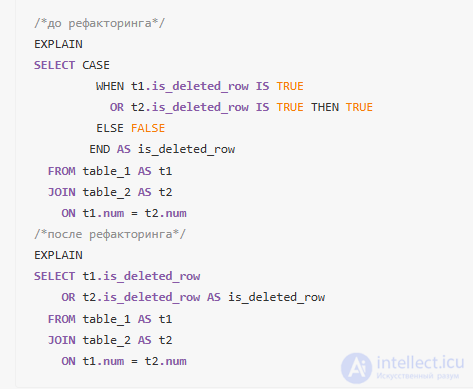
The CASE construct is more complex and cumbersome. For simple logical conditions it is preferable to use OR or other logical operations, since this improves both readability and potential query performance.
In conclusion, optimizing SQL queries in PostgreSQL and MySQL is an important process that helps improve database performance and reduce query execution time. By applying what is described in the article on query refactoring, you can achieve a significant improvement in application response and confidence in system scalability under growing loads.
Optimizing SQL queries and related analytical operations – is a complex process that requires taking into account many factors, from the database structure to the configuration of the server hardware. A deliberate approach to indexing, improving query architecture, tuning database and cache parameters, as well as regular maintenance and cleanup of outdated data, can significantly reduce query execution time and increase the performance of the entire system. The proper allocation of resources, such as RAM and processor time, also contributes to more efficient work with data. Implementing these methods makes it possible to achieve high speed and accuracy of analytics, speeding up the decision-making process and increasing business competitiveness.

Comments