
Lecture
We do not live in a perfect world. All systems have bugs that lead to failures. The developers' task is to minimize the number of these errors and their negative impact on the system and its users.
Patterns are not a panacea. They solve problems within a particular context. Once a problem is solved, they may leave the system in a new context with new problems.
Fault, error, and failure are three different terms.
The causal chain looks like this: fault → error → failure.
Errors and faults are important for a fault-tolerant system because they can be noticed before a failure occurs.
There are several kinds of failures.
Failures can also be divided into consistent and inconsistent ones. The former manifest themselves identically to all parts of the system. The latter may manifest differently to different observers. For example, they may present correct results to the parts that watch for errors, and incorrect ones to the other parts.
Coverage is the conditional probability that the system will recover from an error automatically within a given period of time. Reliable and available systems aim for coverage of no less than 0.95.
Reliability is the probability that the system will work without failures for a given period of time. Reliability is described by:
Availability is the proportion of time during which the system is able to perform its function. Uptime is the time when the system is available, downtime is when it is not.
A fault-tolerant system is designed to cope efficiently with the normal workload and to handle overloads gracefully.
The key question when developing fault-tolerant applications is "What can go wrong?".
Fault tolerance is the ability of a system to function normally even in the presence of failures. It is also the ability to limit the damage from an error that has occurred in the system. Quality is how well the system can work without failures.
The pursuit of fault tolerance can lead to technological and architectural overhead. Excessively increasing complexity in order to detect and fix errors will very likely lead to even more errors. Apply KISS.
Important assumptions, checks, and presumptions:
It is useful to apply N-version programming when developing a system. This is an approach in which several teams design the system independently. The advantage is that the teams will most likely use different algorithms, structures, and approaches. This increases the number of alternatives from which to choose the one containing the fewest faults.
Testing and verification are key properties of a fault-tolerant system. They show whether fault prevention and error correction are successful. Fault Insertion Testing is the only way to determine coverage.
The fault-tolerant design methodology:
The life cycle of a failure consists of 4 phases:
Stateless systems generally contain fewer errors than stateful systems. If a system has operations that take a long time, it is usually considered stateful. When a stateful system loses its internal state, it loses the ability to continue functioning.
Developing a fault-tolerant system is expensive. Be prepared to invest more resources than you would in developing an ordinary system.
Architectural patterns describe how to design a system with fault tolerance in mind.
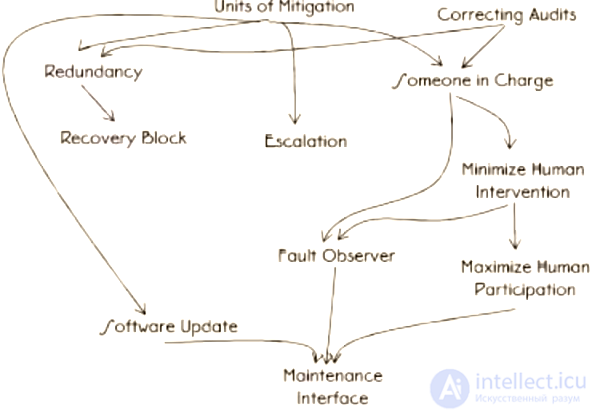
Map of the relationships between architectural patterns
During development you want to reduce the risk of a complete system shutdown. How can you keep the system operational when a failure occurs?
A monolith is not suitable: if an error occurs, the monolith stops working entirely. The interfaces between units of mitigation must be clear and well defined. The boundary between parts of the system must be sharp and must divide the system into understandable parts. Such a division is a way to prevent an error from propagating from one part of the system to others.
Units of mitigation...
Errors in data can and will occur.
Data must be perceived inseparably from its context. (1984 may be a valid year, but it cannot be a valid number of years for a user's age.) Errors in data lead to the following:
Audits make it possible to detect incorrect data.
For every data structure, consider what could go wrong with it. When an error appears in the data, good practice is to:
Try to detect and fix data errors as early as possible; check related data and log every case.
How can the time between error detection and the return to normal operation after recovery be reduced?
For as long as the system has not restored normal operation after an error, it is unavailable. Reducing this period increases availability. One way to speed up recovery is to do only what is strictly necessary to handle the error. Everything else should be postponed until after recovery.
Redundancy comes in several types:
Redundant elements do not necessarily have identical functionality; all that is needed is that the redundant element can perform some part of the work of the element it duplicates. Diversity is a good tool in the fight against the propagation of errors in a system.
Redundancy is not free.
There are several ways to provide spatial redundancy:
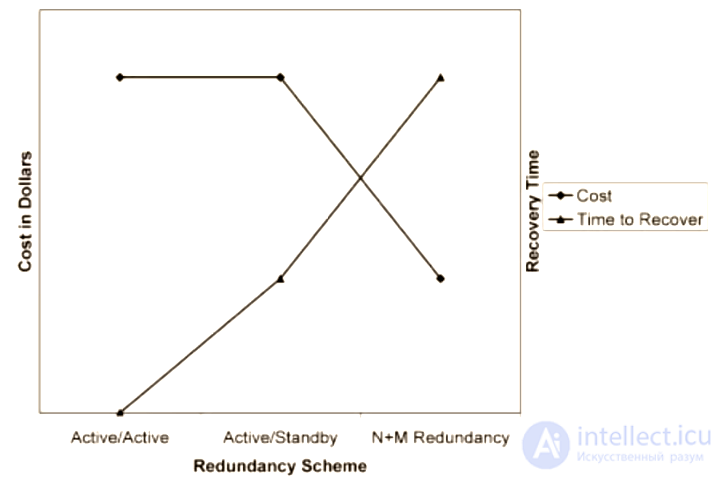
Cost and recovery time by type of redundancy
Programs contain hidden errors. How can you make sure that the result of the work is error-free?
A program with recovery blocks consists of parts with a primary block and secondary blocks. If the result of the primary block does not pass an acceptance test, the secondary blocks perform the useful work until the result passes the test. If the test still fails, the error is registered in the Error Handler.
A common scheme for building secondary blocks is to make each subsequent one simpler than the previous one. Be prepared for information to be lost along the way, since each subsequent block performs fewer actions than the previous ones.
Avoid creating too many secondary blocks. Use Limit retries to keep the system from getting stuck in a loop.
People are a frequent cause of many errors. How can you keep people from performing wrong actions that lead to errors?
Besides hardware and software errors, there are procedural errors, which result from the actions of personnel. Design the system so as to reduce the number of possible procedural errors. People quickly get bored and stop paying attention to routine and monotonous tasks.
The system should give clear and unambiguous instructions on what to do if a failure occurs. At the same time, personnel should not be necessary for resolving the error.
Should the system ignore people altogether?
For many types of systems (for example, avionics), the operator's ability to override or modify error handling is vital. Such systems can enter a "safe mode" and stop performing automatic actions, waiting for human intervention.
Determine who the system is being designed for. Create ways for qualified users to take part in error handling if required.
Should application signals and maintenance signals be mixed?
No, they should be kept separate. Maintenance signals must be processed even when the system is overloaded. In addition, mixing signals can lead to security holes.
Anything can go wrong, even during error handling. The system may stop performing not only its main function but also stop handling errors.
When the system knows what it should be doing at a given moment, it is more robust. The part of the system that can determine that something is not working, or is working incorrectly, is called the Fault observer.
For each individual action related to error handling, there should be one clearly defined entity.
What should the system do if its attempts to handle an error did not achieve the desired result?
Apply handling methods from the next levels. Raise the error "up" the hierarchy of the system. The signal to "escalate" should be given by the Someone in charge.
The system does not crash after an error but handles errors automatically. How can we find out which errors occurred and when?
The Fault observer notifies personnel about errors that have occurred through the Maintenance Interface. The Fault observer does not have to be an internal part of the system; it can be an external service.
Report all errors to the Observer. It will make sure that all interested parties learn about the errors that occurred.
The system should not stop working even in order to update itself.
Build the ability to make changes, patches, and updates into the architecture from the first release. Do not expect that even after that, updating will be an easy task in the future.
Errors and faults must be detected. There are two common mechanisms for detecting errors. The first is to check what a function returns, and whether it contains error codes. The second is to use the language's built-in exceptions and try-catch constructs. Once errors are detected, they must be isolated so that they do not propagate through the system.
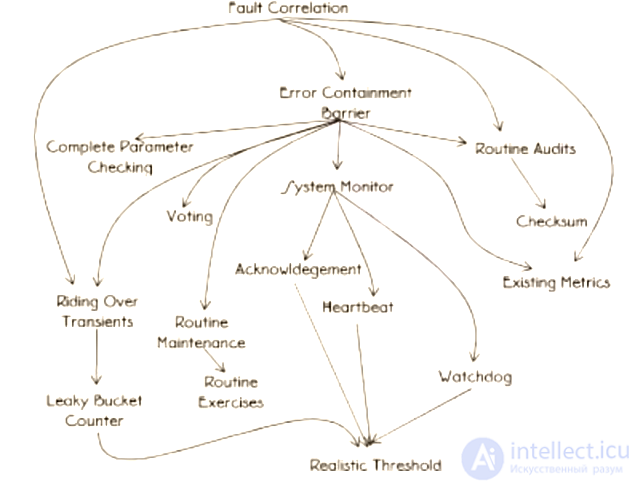
Map of the relationships between error detection patterns
Which failure is manifesting?
Identify the unique signs of the error in order to understand the category of the failure. Once the error is identified, an Error containment barrier must be built around it to prevent propagation.
What should the system do first when it detects an error?
The consequences of an error cannot always be predicted in advance. Nor can all potential errors be predicted. Errors move from component to component of the system if nothing restricts them. In programs, the barrier against propagation is a Unit of mitigation.
How can the time from the occurrence of a failure to the detection of the error be reduced?
Create checks for data, function arguments, and computation results. Any check increases the reliability of the system and reduces the time between the occurrence of a failure and the detection of the error. At the same time, checks reduce performance.
(This, by the way, is reminiscent of design by contract.)
How can one part of the system tell that another part is alive and functioning?
If, when a failure occurs, a part of the system can notify the other parts of its state, recovery can begin faster. You can rely on Acknowledgement messages — messages that system components send to one another in response to certain events. Another way is to create a part of the system that watches the state of the components itself.
When a monitored component stops functioning, the Fault Observer should be informed. When implementing System monitoring, you need to define the delay after which the failure message will be sent to the Fault Observer.
How can System Monitoring be sure that a particular monitored task is still running?
Sometimes the component being monitored has no idea that it is being watched. In such cases, System monitoring must request a status report, a Heartbeat. Make sure the Heartbeat has no undesirable side effects.
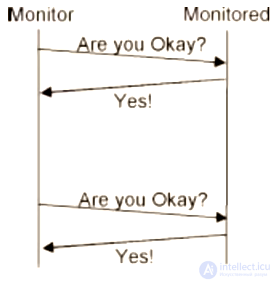
Diagram of how Heartbeat works
When two components communicate, what is the simplest way for one of them to determine that the other is alive and functioning?
One way is to add confirming information to the response that will be sent to the other component. The downside is that if a component receives no requests, it sends no responses, and therefore no confirming information either.
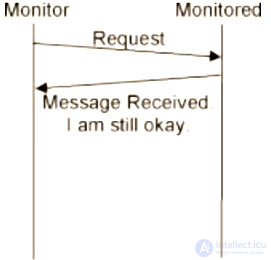
Diagram of how Acknowledgement works
How can you determine that a component is alive and functioning if an Acknowledgement cannot be added?
One way is to observe actions that occur regularly. Another way is to put a timestamp on the start of an operation and check that the operation finished within a satisfactory period of time.
How much time should pass before System Monitoring sends a failure message?
Here we are interested in two intervals: detection latency and messaging latency. The former is how long System Monitoring must wait for a response from a component. The latter is the time between requests that determine the component's status. Inadequately chosen values will reduce performance.
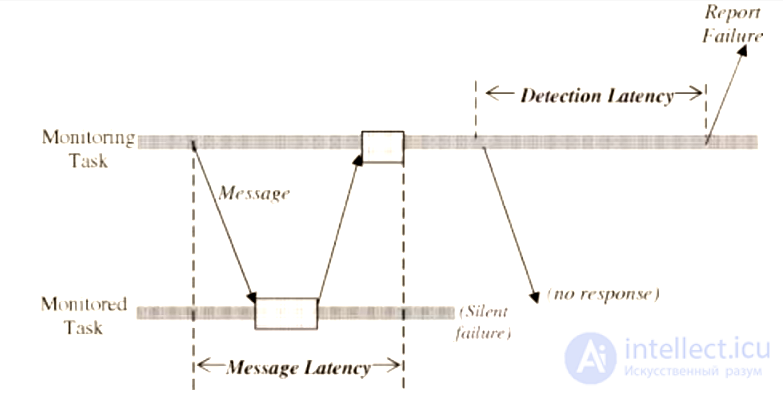
Diagram of latency determination
Set the messaging latency based on the worst possible communication time plus the time to process the Heartbeat. Set the detection latency based on how critical the component is.
How can a system measure the intensity of overload without increasing the overload?
Use the built-in mechanisms for indicating system overload ¯\_(ツ)_/¯
Several different results were obtained. Which one should be used?
Develop a voting strategy for choosing the answer. Assign weights to each of the answers. One can assume that the active element is the one whose result is more likely to be trusted. If the answers are too large to verify in full, a Checksum can be used.
Be careful with results that may differ but still be correct. For such answers, you should check not "correctness" but validity.
How can errors that can be prevented be kept from happening?
Perform routine, preventive maintenance of the system. Correcting audits keep the data clean and free of errors. When repeated periodically, they become Routine audits.
How can you make sure that redundant elements will start working when an error occurs?
From time to time, run the system in a mode in which the redundant elements are supposed to start working. This helps identify elements with latent failures.
Erroneous data can sit in memory for a very long time before leading to a failure.
From time to time, check the stored data for latent errors. Checks should be carried out at times when the system is not under load.
How can you determine that a received value is incorrect?
Add a Checksum for a value or a group of values, and use it as confirmation that the data is correct.
How can a system determine whether an error is permanent or temporary?
Inside each Risk-reduction block, use a counter that increases when an error occurs. Periodically the counter decreases, but never falls below its initial value. If the counter reaches a certain limit, the error is permanent and occurs frequently.
Recovery mostly consists of two parts: undoing the undesirable effects of the error, and recreating an error-free environment so that the system can continue to function.
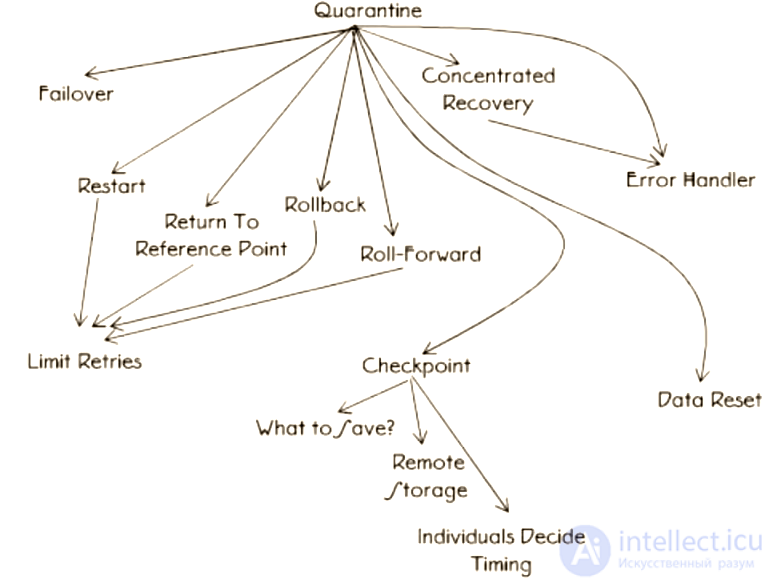
Map of error recovery patterns
How can a system keep an error from spreading?
Create a barrier that protects the system from the error's negative impact on useful work and from the error spreading to other parts of the system.
How can a system reduce the time it is unavailable while recovering from an error?
Concentrate all available and necessary resources on the recovery task in order to reduce recovery time.
Error handling increases the complexity and cost of developing and maintaining a program.
Error handling is not the work the system was created for. It is generally accepted that the time spent on error handling is time during which the system is unavailable.
Separate the error-handling code into dedicated blocks. This makes it easier to maintain and to add new handlers.
How can work be resumed when recovering from the error is impossible?
Restart the application ¯\_(ツ)_/¯
Cold restart — in which all systems start functioning "from scratch", as if the system had just been turned on. Warm restart — may skip some steps.
Exactly where should work resume after recovering from an error?
Go back to a point before the error appeared, at which work can be synchronized between components. Limit the number of attempts through Limit retries.
Exactly where should work resume after recovering from an error?
If the system is event-driven, it responds to external stimuli as it works. In this case, you can recover at a point after the error, where the next stimulus is expected to arrive. Treat all operations before the error as not performed.
Where should work resume if there are no suitable Rollback and Roll-forward points for the error that occurred?
Reference points are not the same as rollback points. Rollback points are dynamic. Reference points are static and are always available as recovery points. It is known for certain that recovery from them is safe.
Failures are deterministic. The same error can lead to the same result. An attempt to recover from an error can lead to looping.
Apply strategies for counting the messages and signals that lead to identical results. Limit the number of attempts to process the same signal.
The active element contains an error. How can the system continue to function properly?
Ideally, a redundant element should instantly replace the active one in which the error appeared. This should be handled by Someone in charge. The strategy cannot be used if the redundant elements already share the common workload.
Unfinished work can be lost during recovery.
Save the system state from time to time. Provide the ability to recover from the saved state without having to repeat all the actions that led to that state.
What should a Checkpoint contain?
Save information that is important to all processes, as well as information that needs to be kept for a long time.
Where should Checkpoints be stored in order to reduce the time needed to recover from the saved state?
Store them in centrally accessible storage.
What should be done if the data contains an error that cannot be reproduced or corrected?
Reset the data to its initial values. The initial value is one that was valid in the past.
These patterns describe how to reduce the negative effects of errors without changing the application or the system state.
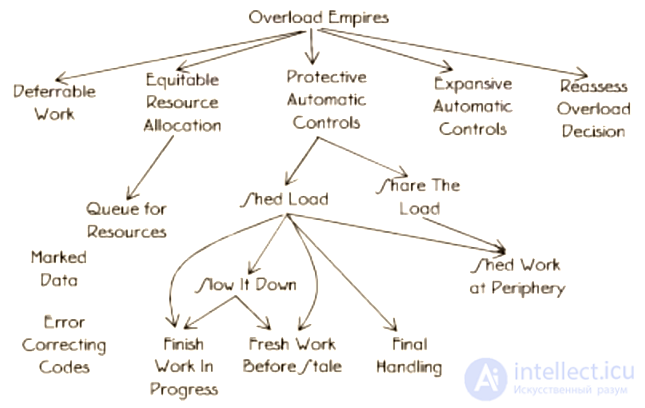
Map of error mitigation patterns
What work can the system put off until later?
Make routine tasks deferrable.
What should be done if the chosen overload-reduction strategy does not work?
Create a feedback channel that makes it possible to revisit the decisions regarding Fault correlation.
What should be done with requests for resources that cannot be handled right now?
Store the requests in a queue. Define its finite length.
How can you avoid overload from handling all the requests that cannot be handled immediately, together with the increased response time?
Define some resources as ones that will be allocated only in case of overload. Create additional ways for the system to perform its main work, which will either use reserve resources or consume fewer resources.
What can the system do so as not to get buried forever in answering an ever-increasing number of requests?
Define limits on the requests to be processed in advance, to protect the system's ability to perform its main work.
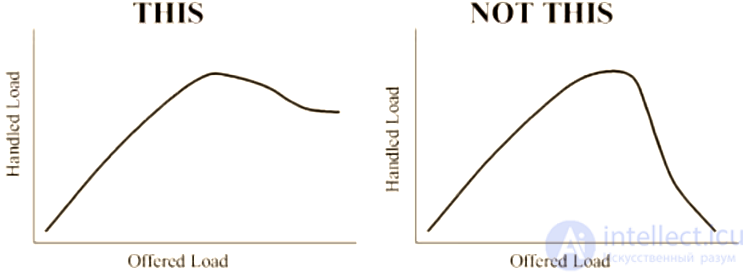
Graph of the desired level of processed requests under overload
What should be done when the number of requests is so large that the system cannot even potentially process them efficiently?
Use Escalation to apply predefined limits on resource consumption. Each next step is harsher and more economical than the previous ones. The goal is to slow everything down enough that the system is able to cope with at least some load.
What should be done to prevent an error from spreading when the system finds erroneous data?
Mark the erroneous data so that it cannot be used anywhere in the system. Define rules for all components that say what to do with such data.
After an error has been handled, its recurrence must be prevented.
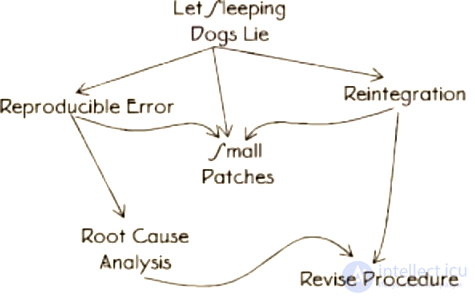
Map of "plugging the gaps" patterns
The real error needs to be corrected, rather than wasting time.
Reproduce the error in a controlled environment to make sure that the failure was really caused by this error.
Which pattern of Software update is least likely to introduce new errors?
Use small updates of parts. Update and replace only what is necessary.
What exactly should be fixed? How exactly should it be fixed?
Keep asking yourself "Why did this happen?" until you dig down to the real cause of the failure.
The appendix to the book contains a step-by-step algorithm for developing a fault-tolerant system.
Clearly defined specifications help to identify and determine which situations count as failures.
Identify the patterns that will help reduce the risk of the failures identified in step 1.
Redundancy is a basic property of a fault-tolerant system. Compare the technical data of the system being designed with the requirements for availability, reliability and coverage. Introduce the necessary redundant elements into the system.
Consider which patterns can be and will be used in the specific implementation.
Define the risk-reduction strategies that the system being designed will follow.
Think through and design who will interact with the system and how: who the main users are, how maintenance, updates and so on will be carried out.
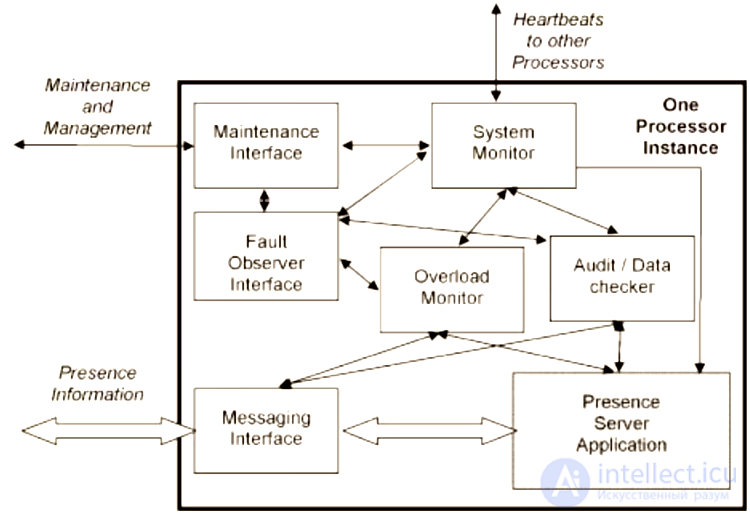
Structure of a fault-tolerant system

Comments