
Lecture
Game streaming is a form of online broadcasting in which the streamer plays through a game in real time while communicating with viewers. Streaming platforms (for example, Twitch, YouTube or Kick) let viewers watch the gameplay, comment on what is happening and interact with the streamer.
The streamer's main task is not only to play but to create an interesting show, maintaining constant interaction with the audience.
The main goals of running a stream:
Demonstrating gameplay.
Entertaining the audience.
Communicating with viewers.
Building a community around the channel.
Promoting the game or the channel.
The main goals and objectives of a stream can be divided into several areas. First of all, there is demonstrating gameplay: viewers come to see the game in action, get to know its mechanics or simply enjoy the playthrough. The second goal is entertaining the audience, since a stream has to be interesting and dynamic so that viewers enjoy watching. The third objective is communicating with viewers: it is live dialogue, answers to questions and interaction through the chat that create an atmosphere of presence and engagement. The fourth goal is building a community around the channel, where viewers feel part of a group of like-minded people and the streamer becomes the center of that communication. And finally, a stream serves to promote the game or the channel itself: it helps attract new viewers, expand the audience and strengthen recognition. Together, these objectives form the foundation of a successful broadcast that not only entertains but also builds long-term relationships with viewers.
The streamer's tasks:
Before starting a stream, you need to go through several preparation steps so that the broadcast goes smoothly and looks professional. First, check the technical side: sound and image quality, internet stability, and the correctness of the streaming software settings. Then it is important to prepare the content — think through the stream plan, key moments, and possible challenges or interactive elements, so that there are no pauses or boring stretches. It is just as important to prepare the workspace: remove distracting objects, and set up the lighting and camera so that the picture looks pleasant to viewers. It is also useful to test the chat and notifications in advance, so you are ready to interact with the audience. Finally, there is psychological preparation: the streamer should charge up with energy, get into a positive mood and be ready to share emotions, because this is what creates the atmosphere and keeps viewers watching.
The streamer should check:
The following programs are usually used for broadcasting:
They make it possible to:
A standard stream scene includes:
| Element | Purpose |
|---|---|
| Game window | main content |
| Webcam | the streamer's emotions |
| Chat | interaction with viewers |
| Overlays | stream design |
| Alerts | notifications about donations and subscriptions |
Before the stream, it is advisable to decide on:
Example:
Stream plan
1. Greeting
2. Brief recap of the previous episode
3. Playing through the mission
4. Answering chat questions
5. Finale and announcement of the next stream
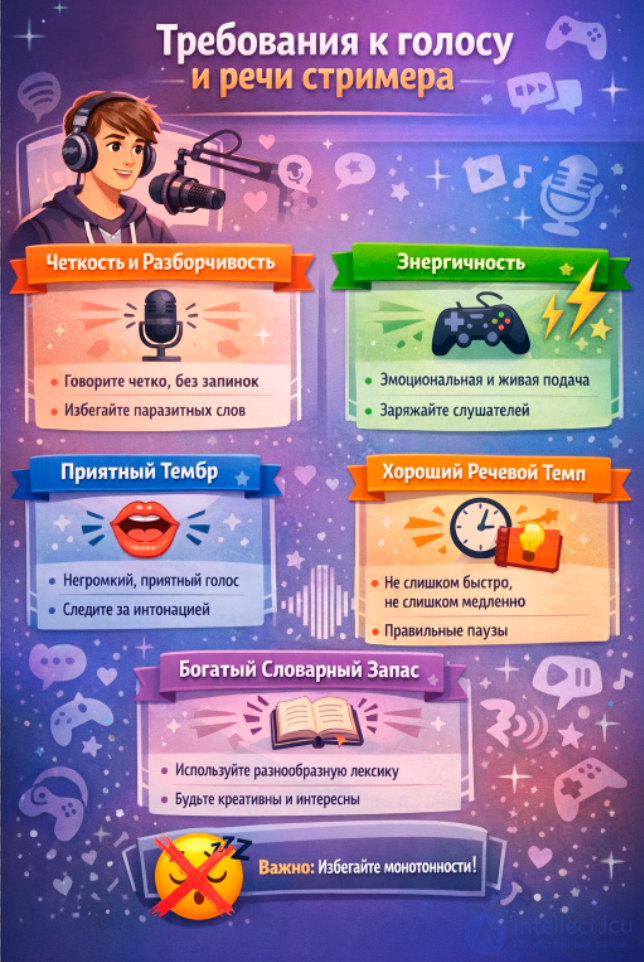
A good stream usually consists of several stages that help hold viewers' attention and create a coherent structure. First comes the introduction: the streamer greets the audience, sets up the equipment, and sets the tone and atmosphere of the broadcast. Then the main part begins — this may be playing through the game, discussing a topic or completing challenges, where it is important to combine commentary, emotion and interaction with the chat. In the middle of the stream it is useful to take short breaks to talk with the audience, sum up interim results or launch polls, so that viewers feel involved. Toward the end comes the final block: summing up, thanking the viewers and announcing the next stream, in order to build anticipation and retain the audience for the future. Such a sequence makes the broadcast logical, dynamic and pleasant for viewers, and the stream itself is perceived as a full-fledged event rather than a random flow.
At the start of the stream, the streamer:
Example:
"Hi everyone! Today we're continuing our playthrough and we'll try to beat the boss on the third level."
The goal of this stage is to engage the viewers.
While playing the game, the streamer should:
Comment on their own actions.
Show emotional reactions.
Share interesting facts.
Read messages from the chat.
Examples of comments:
The chat is the most important element of a stream.
Methods of interaction:
Example:
"Write in the chat — should we go left or right?"
This increases audience engagement.
Professional streamers use:
For example:
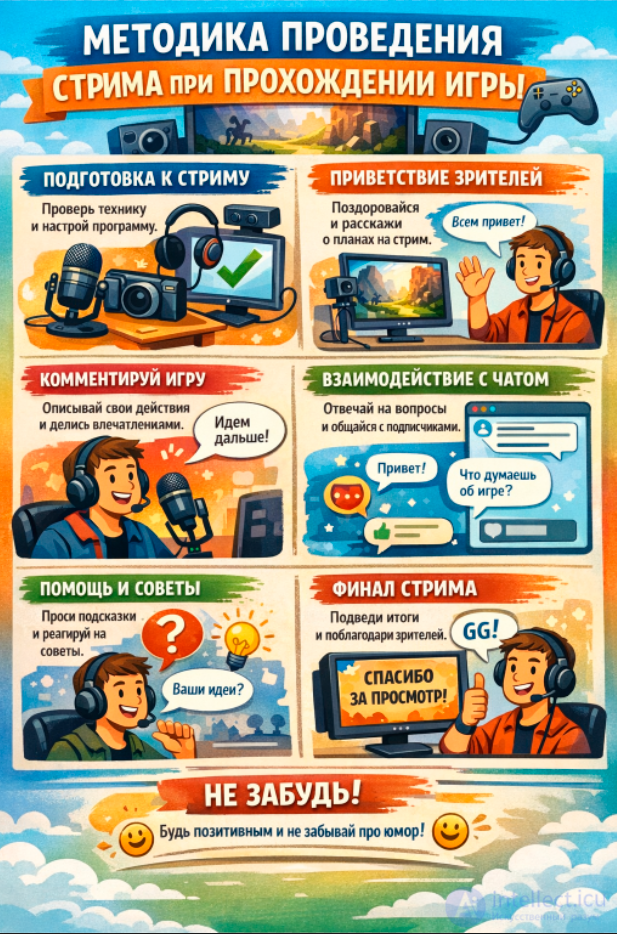
Even if the chat is silent, the streamer must keep talking. Professional streamers use a range of rhetorical, psychological and directorial techniques that keep a broadcast interesting even over a long stream. Below are the main professional techniques of the streamer's monologue. The technique of delivering a monologue during an online game stream is a set of methods that allow the streamer to keep talking interestingly all the time, even when viewers write little in the chat. Such a monologue should hold viewers' attention, explain what is happening and create an atmosphere of conversation.
Below are the main elements of the streamer's monologue technique.
The following techniques are used:
Now I'm opening the map…
We need to get to this location…
Looks like there's going to be a boss ahead.
This strategy isn't working, let's try a different approach.
The streamer can tell:
A professional streamer almost never stays silent for more than 3–5 seconds.
Even if nothing is happening, they talk about:
Example
"Okay, now we'll try to go through the right side… because on the left we keep getting killed…"
This creates a sense of presence.
Two things are commented on at the same time:
Example:
"I'm taking this sword right now… because it has a higher critical chance."
This style is used even in esports broadcasts.
Emotions are deliberately amplified a little.
In reality, a player might say:
"Not bad."
A streamer will say:
"That was just a perfect shot!"
This makes the stream more entertaining.
Before an action, the streamer builds tension.
Example:
"This is going to be a very dangerous moment… if I make a mistake — we lose."
Viewers start watching more closely.
The streamer regularly speaks directly to the viewer.
Examples:
"Did you see that?"
"It's about to get interesting"
"Watch closely"
This breaks down the distance between the streamer and the audience.
Since viewers join at any moment, the streamer periodically explains the situation.
For example:
"If you've just joined — we're trying to beat this level without taking damage."
This is important for retaining new viewers.
The streamer personifies objects in the game.
For example:
"This boss hates me"
"This chest is clearly hiding something"
This makes the narration resemble a story.
Professional streamers do not show irritation; they turn failures into humor.
Example:
"Great… perfect plan… almost worked."
This makes the stream more pleasant.
The streamer sometimes holds a conversation with themselves.
Example:
— "Go left?"
— "No, that's a bad idea."
This helps to:
Even ordinary gameplay turns into a small story:
For example:
"Today our goal is to beat this boss without armor."
Many streamers explain the game's mechanics.
For example:
"This item increases attack speed by 20%."
This retains viewers who are learning the game.
The streamer recalls previous events.
Example:
"Last time this level destroyed us."
This creates a continuation of the story.
The streamer uses repeated phrases or actions.
For example:
This forms a personal style.
Sometimes the streamer takes a short pause to strengthen the reaction.
For example:
1 second of silence → then
"WHAT WAS THAT?!"
This intensifies the emotion.
Professionals vary their speech speed:
This makes the stream dynamic.
The main secret of streamers
A stream is not just a game.
It is an improvisational show:
The most basic technique is to narrate your actions and the events in the game.
Example:
"Now let's try to come in from the flank…"
"This boss is almost dead…"
"Oh, there's a secret door here!"
Why this is needed:
The streamer voices their decisions and strategy.
Example:
"If I take this item, I won't have enough mana…"
"Probably better to kill the archers first"
This is especially useful for:
Viewers are interested in genuine emotions.
Typical reactions:
Example:
Emotions make a stream come alive.
During a calm moment in the game, the streamer can tell:
Example:
"When I first played this game, I got stuck on this level for three days…"
Even if the chat is silent, it is important to ask questions.
For example:
"Do you think this path is the right one?"
"Who has already finished this game?"
"Which weapon is better to take?"
This stimulates the chat.
A good streamer usually alternates:
Game commentary
Reflections
Emotions
Chat interaction
Stories
This produces a cycle:
game → commentary → emotion → thought → question → back to the game
A useful principle:
Speak as if thousands of people are listening to you.
Even if there are few viewers.
For example:
"If you've just joined — we're on the third level right now…"
"Let me remind you of the mission objective…"
On streams, it is important not to allow long silence.
If there is nothing to say:
You can build a monologue as a story:
For example:
"Today we're going to try to beat the final boss…"
This creates dramaturgy.
Experienced streamers prepare in advance:
If the game is calm, they can be used.
Thus the streamer's monologue is built on 5 elements:
The streamer's monologue rests on five key elements that make the broadcast lively and engaging. First, there is game commentary: it is important for viewers to hear what is happening on the screen, which events are unfolding and how the streamer perceives them. Second, thoughts and strategy — explaining your actions and reasoning about tactics and plans helps viewers better understand the process and draws them into the course of the game. The third element is emotions: joy, surprise, tension or even slight irritation make the stream feel real and create an atmosphere in which viewers are interested to be. The fourth element is questions to viewers, because it is they that turn the broadcast into a dialogue rather than a monologue; viewers feel that their opinion matters and are more willing to stay in the chat. And finally, stories: personal memories, funny incidents or interesting facts add individuality and make the stream unique. Together, these elements form genuine communication, hold the audience's attention and create the very atmosphere for which viewers come back again and again.
When it comes to game streams, dialogues and polylogues have their own features that differ greatly from ordinary communication. Let's go through them point by point.
Personalization: The streamer can address a viewer directly by name or nickname, which creates a "live" conversation effect.
Responsiveness: Replies must be quick — a delay of even a few seconds is already noticeable.
Game context: The dialogue is often tied to what is happening in the game: explaining actions, giving advice, analyzing a situation together.
Emotional coloring: The streamer expresses emotions more vividly to hold the attention of a single viewer.
Multithreading: Viewers write at the same time, often with different questions and comments. The streamer has to choose what to respond to.
Prioritization: It is important to keep track of hot topics, memes or questions about the game so as not to ignore an active audience.
Brevity and clarity: Answers must be short and clear, otherwise the attention of the other participants is lost.
Interactivity: Chatbot games, polls or contests are used to involve as many viewers as possible.
Moderation: Sometimes a moderator or the streamer personally has to manage the flow of messages to avoid chaos.
Synchronizing speech and in-game actions: Comments must match what is happening on the screen.
Energy and dynamics: Even in an ordinary dialogue it is important to maintain an upbeat tone.
Repetition: Sometimes the same questions come up many times; you need to be able to answer easily and with humor.
Using viewer feedback: Viewers can influence the course of the game, the strategy or the choice of hero.
To retain viewers, the following are used:
If we beat the boss now, there will be a secret ending.
For example:
Retaining an audience on a stream requires constant engagement of viewers and creating a feeling that they are part of what is happening. One of the most effective tools is intrigue: the streamer can hint at future events, leave things unsaid or promise surprises so that viewers want to stay and watch the broadcast to the end. Challenges also work very well — completing difficult tasks, trials or unusual goals arouses interest and a desire to watch the result. Interactivity is especially important: polls allow viewers to influence the course of the stream, tasks from viewers make them active participants, and the ability to choose decisions in the game creates a sense of playing through it together. All this builds momentum, holds attention and turns the stream into live communication rather than just a broadcast.
A proper ending of a stream includes:
Summing up.
Thanking the viewers.
Announcing the next stream.
Example:
"Thanks to everyone who was on the stream today! Next time we'll continue playing through the game and try to beat the final boss."
A proper ending of a stream plays no less a role than its beginning or main part. It is important to sum up so that viewers feel a sense of completion and understand that their time was not wasted: you can briefly recall the key moments, the most interesting events or the achievements of the broadcast. You should definitely thank viewers for their attention, participation in the chat and support — this strengthens the connection and motivates the audience to come back again. When wrapping up the stream, it is useful to announce the next broadcast: name the date, the time or at least the topic, so that viewers know in advance what to expect and can plan to take part. This approach creates a feeling of care for viewers and builds a habit of returning to the channel regularly.
Long silences.
Ignoring the chat.
Sound that is too quiet or poor.
Lack of emotion.
Poor stream preparation.
Typical streamer mistakes are often related not so much to technical problems as to a lack of attention to details and to viewers. One of the most common is long silence: viewers come for live communication and atmosphere, and silence quickly turns the broadcast into a boring spectacle. Ignoring the chat is an equally serious mistake — interaction with the audience creates a sense of involvement and keeps viewers, so a lack of response is perceived as indifference. Sound quality also plays a key role: sound that is too quiet or poor interferes with perception of the content and can scare off even the most interested viewers. The streamer's emotional involvement is an important factor: a lack of emotion makes the broadcast monotonous and deprives it of individuality. Finally, poor stream preparation — whether technical glitches, the lack of a plan or unpreparedness for the topics discussed — gives an impression of unprofessionalism and lowers trust in the author. All these mistakes can be avoided if you pay attention to details, prepare in advance and remember that a stream is, above all, communication and atmosphere.
A game playthrough stream is a combination of:
A successful streamer must be able to:
The main principle of streaming:
A streamer is at once a player, a host and a performer.
What is the goal of my stream: entertainment, education, communication or promotion?
Can I hold viewers' attention for 10–15 minutes without outside events?
How varied are my monologues: do they have an introduction, a development and a conclusion?
Do I use questions to the audience to draw them into dialogue?
Can I switch between describing the gameplay and personal comments?
Do I keep a balance between humor, informativeness and emotional reaction?
Do I have universal phrases to fill pauses (for example, while a level is loading)?
How natural does my dialogue with the chat sound: does it turn into a dry reading of messages?
Can I control the pace of my speech so as not to tire viewers?
Can I adapt my communication style to different types of games (fast-paced shooters vs story-driven RPGs)?
Description practice: record 5 minutes of gameplay and try to narrate what is happening as if the viewer cannot see the screen.
Emotional coloring: take one game moment and say it three times — neutrally, with humor and with a dramatic emphasis.
Structured storytelling: choose a game episode and break it into three parts: introduction, climax, conclusion.
Improvising with the chat: make a list of 10 universal questions for viewers (for example, "Which tactic would you choose?").
Reacting to a comment: ask a friend to write random remarks, and you must answer quickly and naturally while keeping the game context.
Role switching: try holding a dialogue with an imaginary "partner" in the game to develop the skill of live interaction.
Pause timer: during practice, take a pause every 3 minutes and fill it with a short comment or question.
Recording analysis: rewatch your stream and note the moments where your speech sounded monotonous or where the chat was left without attention.
Genre change: practice streaming different games (action, strategy, visual novel) and compare your communication style.
1. What is a key element of a successful stream?
2. What is the best way to start a stream to hold the audience's attention?
3. What helps a monologue be interesting?
4. How should dialogue be used properly during a stream?
5. What is best to do during long pauses in the game?
6. Which technique helps hold viewers' attention?
7. What is important when delivering a monologue?
8. What is the best way to react to viewers' comments?
9. What helps make a dialogue lively?
10. Which technique helps when explaining the gameplay?
11. What is best to do when there are technical problems?
12. Which speaking style is best for a stream?
13. What helps make a monologue clear?
14. What is the best way to end a stream?
15. What is important in a dialogue with the audience?
16. Which technique helps keep interest in the game?
17. What is best to use to engage viewers?
18. Which technique helps during a long playthrough?
19. What is important in a monologue about game strategy?
20. What is the best way to sustain a dialogue with the audience?

Comments